Built That Extension vs Chrome Goldmine (2026)
Feature-by-feature look at Built That Extension vs Chrome Goldmine: data quality, pricing, and which expired-extension database wins.
Article content
TL;DR — Both Built That Extension and Chrome Goldmine sell databases of expired Chrome extensions. Built That Extension gives you a raw CSV — names, user counts, ratings. Chrome Goldmine goes 12 layers deeper: revenue estimates, rebuild difficulty, competitor analysis, failure reasons, and step-by-step action plans. Both are one-time purchases. Chrome Goldmine costs $29. Built That Extension is cheaper — but so is a blank spreadsheet. If you're serious about finding your next $100K idea, Chrome Goldmine is the only choice worth your time.
Google's Manifest V2 → V3 migration killed tens of thousands of Chrome extensions — not because the ideas were bad, but because developers moved on. That left a graveyard of validated, user-proven concepts ripe for rebuilding. Two products spotted this opportunity and turned it into a database product: Built That Extension and Chrome Goldmine.
If you've been searching for a *Built That Extension review*, wondering whether it's worth buying, or looking for a Built That Extension alternative — you've landed in exactly the right place. We've also stacked Chrome Goldmine up against the much larger ExtensionDB index of 246K listings if you want the breadth-vs-depth angle. In this article, I'll break down both tools with full transparency: what's in the data, what's missing, what each costs, and who each is actually built for.
Fair warning: I built Chrome Goldmine. So I have skin in this game. But I also have access to both products — so I'll make the comparison as concrete and factual as possible and let the numbers speak for themselves.
Why "Expired Chrome Extension Databases" Are a Real Thing
Let's establish why this market exists at all — because it's a genuinely unusual product category.
In 2023–2024, Google enforced the migration from Manifest V2 to Manifest V3 — a major architectural overhaul of how Chrome extensions work. Any extension that didn't update its codebase got pulled from the Chrome Web Store automatically. No appeal, no grace period, just: removed.
The result? Thousands of extensions with real, loyal user bases — some with 50,000, 100,000, even 500,000+ active users — simply vanished. Not because the idea failed. Not because users didn't want them. Because the developer got busy, lost interest, or didn't know how to migrate to MV3.
It's like a real estate market where perfectly good houses were bulldozed by a zoning regulation — and nobody bothered to build anything new on the lots.
For indie hackers and solo developers, this created a rare arbitrage opportunity: a catalog of demand-validated ideas with zero active competition, sitting in plain sight. The Chrome Web Store doesn't export this data cleanly, which is exactly why both Built That Extension and Chrome Goldmine exist — they scraped it, cleaned it, and sold it as a structured dataset. The question is: which one scraped it better?
What Is Built That Extension?
Built That Extension (buildthatextension.com) is a simple, no-frills database of expired Chrome extensions sold as a single CSV download. Created by Hiren Thakkar, it launched as a lightweight product targeting developers who want to quickly scan a list of dead extensions for rebuild opportunities.
Here's exactly what you get when you buy Built That Extension:
- A CSV file containing 9,500+ expired Chrome extensions
- Each entry had a minimum of 500 users before removal
- Columns: extension name, Chrome Store URL, description, user count, average rating, total ratings, abandonment timeline
- Instant download, lifetime access
That's it. Open the CSV in Excel or Google Sheets, sort by user count, and start scrolling for ideas.
There's nothing wrong with that approach — if you're comfortable doing your own market research from scratch, a raw CSV is a legitimate starting point. But it's worth being clear-eyed about what you're buying: a list of names and numbers, not a decision-making framework.
Built That Extension: Pros & Cons
- Pros: Simple, clean CSV format. Low price point. Good for quick manual scanning. Covers the key basics (user count, rating). Instant delivery.
- Cons: No revenue estimates. No rebuild difficulty. No failure reason analysis. No competitor analysis. No implementation guides or action plans. CSV-only — no interactive filtering. No data refresh policy stated. No refund policy stated publicly.
Market signal: As of May 2026, Built That Extension has generated approximately $409 in total revenue since launch and has been listed for sale on TrustMRR for $700 — suggesting minimal ongoing commercial traction. This isn't a knock on the data quality; it's a reflection of the product's positioning as a bare-bones entry-level tool.
What Is Chrome Goldmine?
Chrome Goldmine (chromegoldmine.com) is the most complete database of expired Chrome extensions available. Built by Raf Vantongerloo, it covers 9,656 expired extensions — every entry filtered to a minimum of 500 users — but goes dramatically further on each one with a 12-point research dataset designed to turn raw data into actionable startup decisions.
Where Built That Extension hands you a list, Chrome Goldmine hands you a research report for every single extension in the database.
Here's what's included for each of the 9,656 extensions:
- Revenue estimate — projected annual earning potential if rebuilt
- Rebuild difficulty score — how technically complex the rebuild is (low / medium / hard)
- Failure reason analysis — was it MV3? Developer burnout? Paid alternative emerged?
- Competitor analysis — who else is operating in that niche today
- Step-by-step action plan — a concrete path from idea to launched product
- User count, ratings, reviews, and Chrome Store URL (same baseline as Built That Extension)
Beyond the per-extension data, a Chrome Goldmine purchase includes:
- 10+ implementation & rebuild manuals covering common extension types
- Monetization playbooks for subscription, freemium, and one-time purchase models
- 8-Week Action Plan from research to launch
- Market research report on the broader expired extensions opportunity
- Interactive Notion database with filters, sorts, and views — not just a flat CSV
- CSV download for those who prefer spreadsheets
- Quarterly data refreshes at no extra cost
- 30-day refund policy
Chrome Goldmine: Pros & Cons
- Pros: Revenue estimates for every extension. Rebuild difficulty scores. Competitor analysis. 10+ implementation guides. Interactive Notion database + CSV. Quarterly data refresh. 30-day money-back guarantee. Largest dataset: 9,656 extensions.
- Cons: Higher price than Built That Extension. Notion required to use the interactive database. More data means more time to explore it fully.
Built That Extension vs. Chrome Goldmine: Feature-by-Feature Comparison
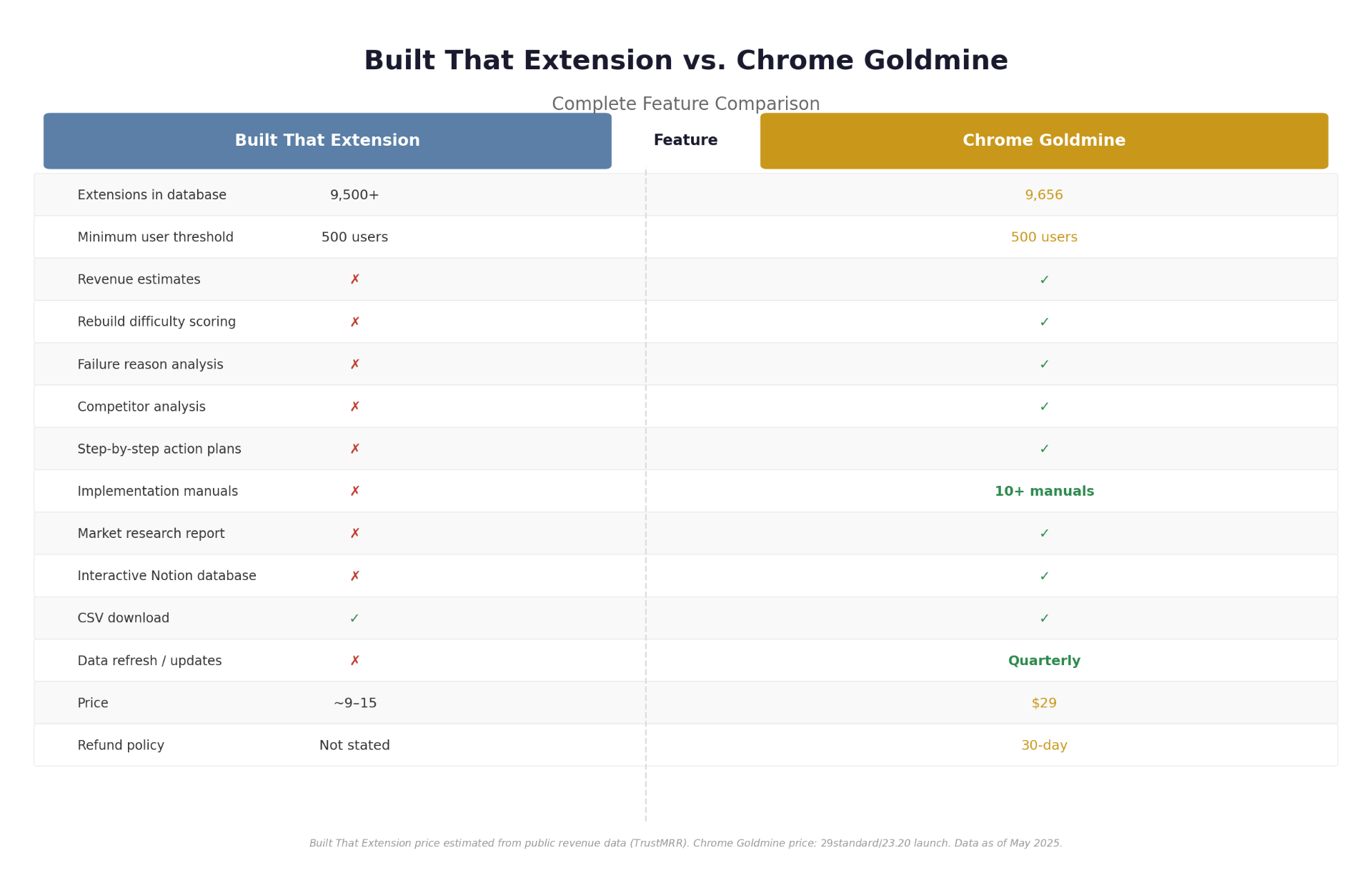
| Feature | Built That Extension | Chrome Goldmine |
|---|---|---|
| Extensions in database | 9,500+ | 9,656 |
| Minimum user threshold | 500 users | 500 users |
| Revenue estimates |  | |
| Rebuild difficulty scoring | | |
| Failure reason per extension | | |
| Competitor analysis | | |
| Step-by-step action plans | | |
| Implementation manuals | (10+) | |
| Market research report | | |
| Interactive Notion database | | |
| CSV download | | |
| Data refresh / updates | Not stated | Quarterly |
| Refund policy | Not stated | 30 days |
| Price (one-time) | $10 | $29 |
Dataset Quality & Data Freshness
Both tools draw from the same source: the Chrome Web Store, scraped after the MV2 deprecation wave. The baseline data — extension names, user counts, ratings, and URLs — is functionally equivalent. Neither has significantly more unique extensions than the other (9,500 vs. 9,656 is a rounding difference, not a quality gap). The real difference is in what each product *adds on top of* the raw Store data.
Built That Extension: Data Freshness
Built That Extension does not publish a data refresh schedule. Given that it has been listed for sale as a product (suggesting the original developer may have moved on), it's unclear whether the dataset receives ongoing maintenance. The Chrome Web Store continues to evolve, and new extensions expire regularly — meaning a static, never-updated CSV becomes less complete over time.
Chrome Goldmine: Data Freshness
Chrome Goldmine includes quarterly data refreshes as part of the one-time purchase price. This means the database is updated regularly with newly expired extensions as MV3 compliance continues to filter the Chrome ecosystem — keeping the dataset current without any recurring charge.
Why this matters: The MV3 migration is not a one-time event. Google continues to enforce MV3 compliance throughout 2026, meaning new extensions expire regularly. A database that isn't refreshed will miss these newly validated opportunities as they appear.
Price & Value: Which Gives You More Per Dollar?
This is where the comparison becomes mathematical.
Built That Extension is cheaper — $10 based on available data. For that price, you get a CSV with 7 data points per extension. Chrome Goldmine costs $29. For that, you get 12 data points per extension, plus 10+ guides, an action plan, a market report, a Notion interface, and quarterly updates.
If you value your time at even $30/hour, Chrome Goldmine pays for itself the moment it saves you one hour of manual research — which it will on the first extension you look up. Built That Extension saves you nothing beyond the initial list-generation step; every other piece of analysis you still have to do yourself.
Put simply: the price gap between the two products is $19. The feature gap is roughly 10 features. That's the best deal in indie hacker tooling you'll find this year.
Who Should Use Each Tool?
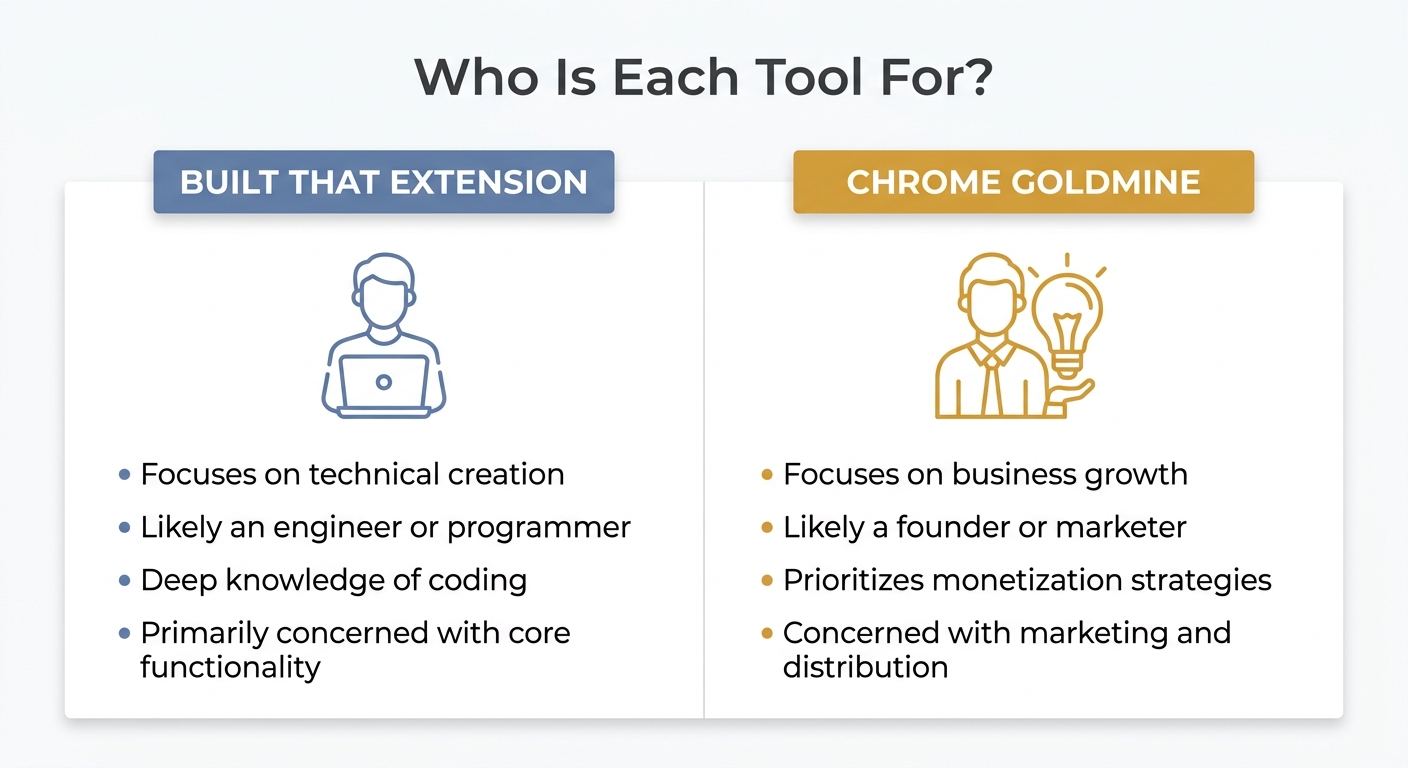
Buy Built That Extension if…
- You're a developer comfortable doing all market research yourself
- You just want a raw list to manually browse through
- You have a very tight budget (under $15)
- You already have proprietary methods for evaluating extension opportunities
- You're purely exploring and not yet committed to building anything
Buy Chrome Goldmine if…
- You're an indie hacker, solo founder, or "vibe coder" actively looking for your next project
- You want to know *which* expired extensions are worth rebuilding — not just a list of all of them
- Revenue potential matters to you (not just user counts)
- You want to avoid walking into a crowded niche without knowing it
- You want step-by-step guidance from idea to launched product
- You want the confidence of a 30-day refund policy
- You value a living, updated database over a static CSV
The 5 Features That Make Chrome Goldmine Different
The comparison table above covers breadth — but it's worth understanding *why* each differentiating feature actually matters to a developer or founder making a real build decision.
1. Revenue Estimates
Knowing that an extension had 50,000 users is interesting. Knowing that if you rebuild it you could realistically generate $8,400/year at a 2% freemium conversion with a $7/month plan is actionable. Revenue estimates turn user counts into business projections — which is the difference between a hobby list and a vetted investment thesis.
2. Rebuild Difficulty Scores
A productivity extension that filters emails and a code injection tool that modifies page DOM might both have 10,000 users. But one is a weekend project; the other is a 3-month build. Rebuild difficulty scores let you filter the entire database to show you only the ideas you can actually ship — which is far more useful than sorting by user count and guessing. Pair a Low-difficulty pick with a production-ready Chrome extension starter kit like TurboStarter and you can realistically be live in a weekend.
3. Failure Reason Analysis
This one is underrated. Not all expired extensions are equal opportunities. Some failed because of MV3 — pure technical negligence, zero product risk. Others expired because a paid competitor emerged and crushed the free alternative. Others failed because the developer's underlying API got shut down. Understanding why each extension expired tells you whether the opportunity is wide open or a graveyard for a reason — and whether you'd be better off shipping the rebuild with an AI app builder like Lovable.dev or a coding agent like Cursor.
4. The Notion Interface
Filtering 9,656 rows in Excel is a chore. The interactive Notion database in Chrome Goldmine lets you filter by revenue range, difficulty, category, and failure reason simultaneously — turning the research process from "scrolling a spreadsheet" into "running a query against a structured dataset." This alone saves hours of exploration time.
5. Quarterly Data Refreshes
Google's MV3 enforcement isn't done. Extensions continue to expire throughout 2026 as Google tightens compliance. Chrome Goldmine's quarterly refreshes mean the database grows over time without you paying again — a meaningful advantage over a static product that will only get more stale.
The Verdict
Let's be direct. Built That Extension is a fine entry-level product for someone who just wants to browse a list. It's the Craigslist version of expired extension research: functional, no-frills, and cheap. If you're casually curious or have zero budget, it'll do the job of showing you what's out there.
But if you're actually trying to find your next income-generating project — if you want to know which ideas have revenue potential, which are technically approachable, and how to build them — Built That Extension gives you a list of ingredients with no recipe. Chrome Goldmine gives you the full cookbook. (If you lean heavily on AI coding agents instead of manual builds, our breakdown of ProvenTools' AI-ready build prompts vs Chrome Goldmine's rebuild playbooks covers that angle in depth. For ongoing analytics once you're live, see our Chrome Stats vs Chrome Goldmine comparison on post-launch monitoring.)
The $15–$20 price difference is less than an hour of your time. The difference in what you actually get is the difference between raw data and a decision-making system.
Our Recommendation — Chrome Goldmine wins by a wide margin. 9,656 extensions. Revenue estimates. Difficulty scores. Competitor analysis. 10+ guides. Quarterly updates. 30-day refund. One-time $29. If you're an indie hacker looking for your next build, this is the only expired Chrome extension database you need.
Related reading: anchor your decisions to real Chrome extension revenue benchmarks, and use our Manifest V3 revival playbook to turn a shortlisted expired extension into a live product.