From Dead Toolbar Icon to Micro SaaS: How to Revive an Expired Chrome Extension in 7 Days
A day-by-day playbook to rebuild an abandoned Chrome extension into a Manifest V3 micro-SaaS — selection, build, launch, monetize.
Article content
Can you really revive an expired Chrome extension in 7 days, and what does that process look like? The answer is a definitive yes, especially with the right strategy and tools. The deprecation of Manifest V2 created a unique opportunity, leaving a void for many once-popular extensions. By picking the right expired extension and leveraging modern development tools — including AI — a 7-day timeline for an MVP (Minimum Viable Product) is not just realistic, but a highly effective path to building a micro-SaaS.
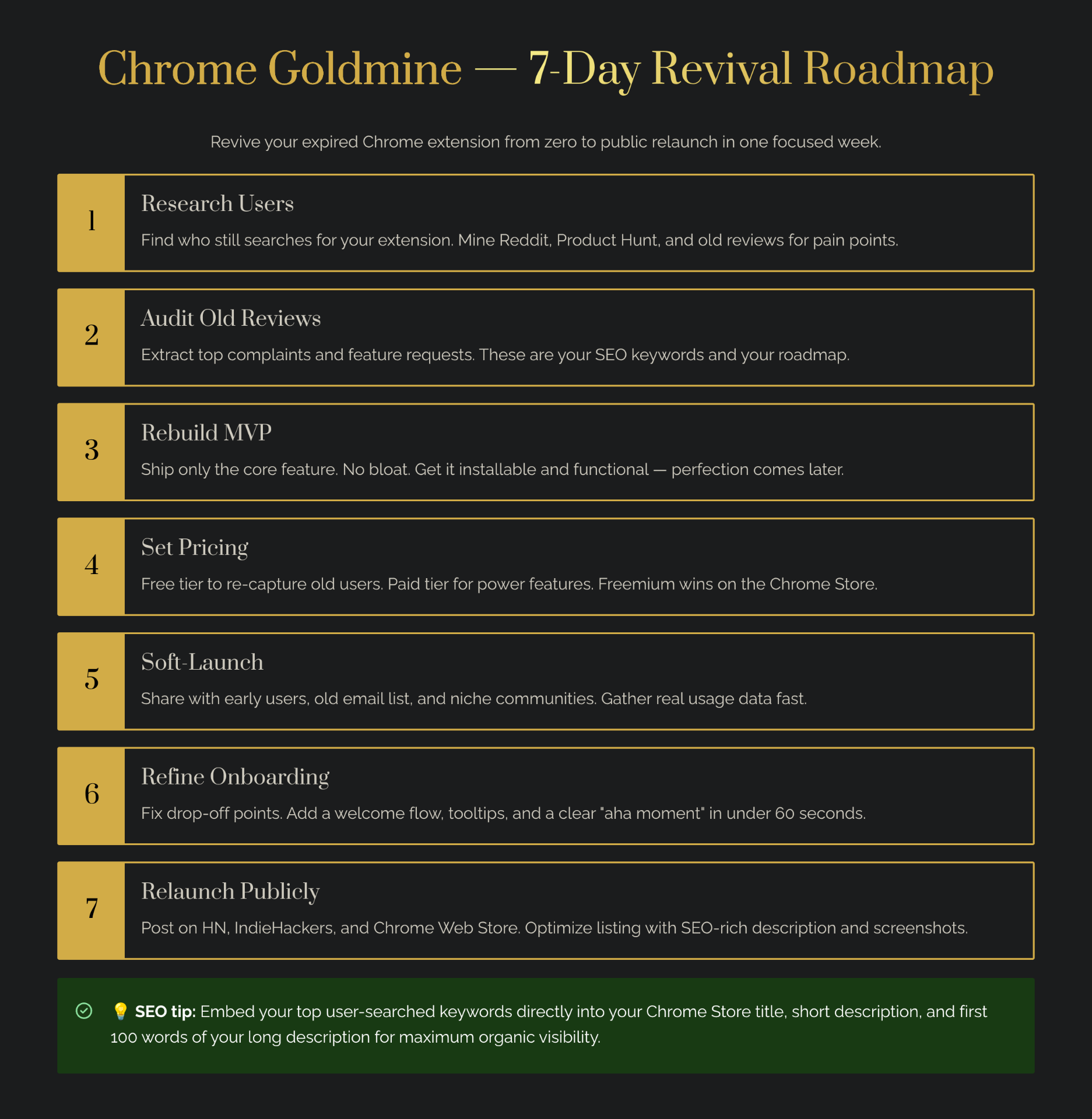
This guide provides a step-by-step, 7-day execution playbook for transforming a defunct Chrome extension into a thriving micro-SaaS. We'll cover everything from selecting the right candidate to technical migration, monetization, and launch. If you're looking for ideas, start with the Chrome Goldmine database to find extensions with proven past demand. Want to automate the discovery process? Our AI agent guide shows you how to build a bot that surfaces profitable opportunities automatically.
Why Expired Chrome Extensions Are Micro SaaS Gold
The shift from Manifest V2 to V3 by Google Chrome — which saw new V2 extensions blocked in January 2022 and existing ones phased out by June 2024 — created a significant disruption in the Chrome Web Store ecosystem. This transition, while aimed at enhancing security, privacy, and performance, inadvertently led to the disappearance of tens of thousands of extensions, particularly those relying on the `webRequest` API (Chrome Developer Blog).
This created a unique opportunity: extensions with real user counts vanished, but the underlying demand often still exists. Users search for replacements, complain about missing functionality, or actively seek alternatives. This unmet demand, coupled with a pre-validated problem, makes expired Chrome extensions prime candidates for a micro-SaaS revival.
According to Chrome-Stats, as of February 2026, approximately 78.94% of tracked Chrome extensions have migrated to V3, leaving a substantial number of non-migrated extensions that were likely removed or disabled. This creates fertile ground for indie makers to step in. Chrome Goldmine can be invaluable here, offering a pre-filtered list of expired extensions with historical user data and categories, allowing you to pinpoint opportunities with proven demand. For a full market deep-dive, see our expired extensions market analysis.
Day 0 – Choosing the Right Expired Extension
The success of your 7-day revival project hinges on selecting the right candidate. Not all expired extensions are created equal. Here's how to identify a high-potential target. For a systematic approach to evaluating candidates, use our reverse engineering framework to analyze what made the original extension successful. For a systematic way to track and score candidates, set up a Deal Flow CRM in Notion.
Selection Criteria
- Signs of Strong Past Demand: Look for extensions that had high historical user counts (e.g., 10,000+ users) and positive reviews/ratings (e.g., 4.0+ stars). This indicates a genuine need that was being met.
- Died Due to Tech/Policy, Not Lack of Interest: Prioritize extensions that likely disappeared due to the Manifest V2 deprecation. Check if their last update coincided with the V2 phase-out. Avoid extensions with consistently poor reviews or low engagement.
- Fit with Your Skills or Vibe Coding: Choose an extension whose core functionality aligns with your technical expertise or can be easily tackled with AI-assisted coding tools like Lovable, Claude, or Cursor. This ensures you can rebuild efficiently within the 7-day timeline.
Decision Checklist
- High Historical Users/Installs? (Yes/No)
- Good Reviews and Ratings? (Yes/No)
- Last Update Aligns with MV2 Deprecation? (Yes/No)
- Core Functionality Within My Skillset or AI-Assisted Build? (Yes/No)
If you answer yes to most of these, you have a strong candidate. Chrome Goldmine helps you filter for these attributes, making the selection process much faster. For a deeper evaluation framework, see our guide on which expired extension to rebuild.
Days 1–3 – Rebuilding the Core Features (With AI Help)
This is the core building phase, focusing on getting a functional MVP up and running.
Day 1 – Requirements & UX Spec
Before coding, understand what you're rebuilding. Reconstruct the original extension's functionality by:
- Reviewing its old description, screenshots, and user reviews: What problems did it solve? What features were most loved? Use our reverse engineering framework to systematically deconstruct what made it work.
- Deciding on the minimum set of features for V1: Resist the urge to add everything. Your goal is a functional core that solves the primary problem.
- Sketching main flows: How will users interact with the popup, context menus, or options page? Simple wireframes can save hours of coding.
Day 2 – Base Implementation (Using AI Where Possible)
Leverage modern tools to accelerate development:
- Boilerplate Code: Use AI tools like Claude Code or Lovable to generate Manifest V3-compliant boilerplate code for your extension's structure. This includes `manifest.json`, service worker setup, and basic content scripts. For a hands-on walkthrough, see our Claude tutorial for Chrome extensions.
- Implement Core Logic: Focus on essential features — content scripts for DOM interaction, a background service worker for events and API calls, and an options page for user settings. Remember that service workers have a limited lifespan, so state management via `chrome.storage.local` is crucial.
- Use Starter Kits: Accelerate with boilerplates like TurboStarter or Supastarter to skip repetitive setup. See our guide on vibe coding for solo makers for recommended starter kits.
Day 3 – Integrations & Edge Cases
Refine your core and add necessary integrations:
- External APIs: If your extension relies on external services, integrate them now. Ensure API keys are handled securely (e.g., not hardcoded in client-side scripts).
- Permissions: Implement minimal and clearly justified permissions in your `manifest.json`. Over-requesting permissions can deter users and lead to rejection by the Chrome Web Store.
- Basic Error Handling and Logging: Implement `try-catch` blocks and console logging to quickly identify and debug issues.
This rapid build phase is achievable by focusing on the MVP and utilizing AI tools to handle repetitive coding tasks, allowing you to concentrate on unique logic.
Days 4–5 – Manifest V3 Compliance, Testing, and Polish
With the core built, these days are dedicated to ensuring your extension is compliant, stable, and user-friendly.
Manifest V3 Compliance
- Permissions: Double-check that all requested permissions are absolutely necessary. Minimal permissions are key for user trust and store approval (Chrome Developer Policies).
- Service Worker Lifecycle: Ensure your service worker handles events even when inactive and persists data using `chrome.storage.local` instead of in-memory variables. The official migration checklist is essential reading.
- Content Security Policies (CSP): Configure your CSP to allow necessary resources while preventing XSS attacks. This is a critical security feature of V3.
- API Modernization: Replace callbacks with Promises (async/await) for better code maintainability — a major theme in V3 migration. Google's Extension Manifest Converter can help automate parts of this process.
Testing and Polish
- Manual Tests: Thoroughly test all core functionalities across various scenarios. Simulate different user interactions and edge cases.
- Debugging: Use Chrome DevTools to debug your service worker and content scripts. Pay attention to console errors and network requests. The Migrate to Manifest V3 Guide provides detailed guidance.
- Name and Icon: Choose a clear, descriptive name and a professional, recognizable icon.
- Description: Write a concise, benefit-driven description for the Chrome Web Store listing.
- First-Run Onboarding: Implement a simple first-run experience or tooltips to guide new users.
Days 6–7 – Launch, Monetize, and Collect Feedback
The final push involves getting your extension into users' hands and setting up your micro-SaaS business.
Chrome Web Store Submission
- Developer Fee: Pay the one-time $5 developer registration fee.
- Submission Checklist: Ensure you have a compliant privacy policy and terms of service, compelling screenshots, and clear explanations for all permissions requested. Review times typically range from a few days to a week.
Monetization Options
- Freemium: Offer a free base version with essential features, and charge for premium features (e.g., advanced analytics, more integrations, higher limits). This is the most popular model for micro-SaaS extensions.
- One-Time Purchase: For extensions with a clear, finite value (e.g., a specific utility or data export tool).
- Affiliate/Referral: If your extension naturally integrates with other services, consider an affiliate model.
For a comprehensive breakdown of all monetization strategies with real case studies, see our monetization guide for indie makers.
Feedback Loop
- Ask for Reviews: Encourage early users to leave reviews on the Chrome Web Store. Positive reviews are crucial for visibility and trust.
- Support Channels: Provide a clear email address or feedback form for users to report bugs or suggest features.
- Track User Behavior: Use compliant analytics tools (e.g., Google Analytics 4) to understand how users interact with your extension, informing future updates.
What Doesn't Work: Risky Revival Strategies and Shortcuts
While the 7-day revival playbook offers a fast track to micro-SaaS, certain shortcuts are destined for failure:
- Copying Name/Branding Too Closely: Using a similar name or icon leads to trademark infringement, user confusion, and likely rejection from the Chrome Web Store. Focus on creating a distinct identity.
- Reviving Extensions with Terrible Reviews: If an expired extension had consistently poor reviews or low engagement, it likely failed due to fundamental flaws, not just Manifest V2 deprecation. Rebuilding such an extension is building on quicksand.
- Ignoring Privacy and Permissions: Manifest V3 places a strong emphasis on user privacy and minimal permissions. Ignoring these guidelines leads to rejection and user distrust (Chrome Developer Policies).
- Over-Scoping Beyond 7 Days: The 7-day timeline is for an MVP. Trying to rebuild a huge, feature-rich product in a week leads to burnout, incomplete features, and a delayed launch. Focus on the absolute core, then iterate after launch.
Trying to rebuild a complex extension in a short timeframe often results in a "cheap copy" that users quickly abandon. The goal is a *viable* product, not a perfect one, within the timeframe.
ROI of a 7-Day Revival Project
Investing a week into reviving an expired Chrome extension can yield significant returns, both in terms of learning and potential income:
| Time Investment | Monetary Investment | Expected Outcome | Assumptions |
|---|---|---|---|
| 7 days | $20–$100 | MVP relaunch, first users from organic search | Idea had prior traction; basic launch done properly |
| 30–90 days (iteration) | $50–$300 | $100–$500/month early revenue | You improve UX, add monetization, respond to feedback |
Even if your revived extension doesn't immediately hit $500/month, the value extends beyond direct revenue. You learn MV3 in practice, build a case study for your portfolio, and develop a library of V3-compliant code snippets that accelerate future extension projects. For a detailed income strategy, see our $1,000/month side income guide.
Your Micro SaaS Journey Starts Now
The deprecation of Manifest V2 has inadvertently created a golden opportunity for indie makers. By strategically identifying and reviving expired Chrome extensions, you can tap into pre-validated demand and build a profitable micro-SaaS in a remarkably short timeframe. This 7-day playbook provides a clear, actionable path to navigate the technical challenges of Manifest V3, implement smart monetization strategies, and launch a product that can generate consistent income.
The tools, the data, and the blueprint are all laid out. Start by browsing the Chrome Goldmine database to find your ideal candidate, then use our Weekend Challenge as a companion sprint framework. For a comprehensive guide covering MV3 architecture, step-by-step code, Chrome Web Store publishing, and monetization strategies, see our Chrome Extension Development Guide 2026. Your journey from a dead toolbar icon to a thriving micro-SaaS begins now.