7 Common Vibe Coding Mistakes (And How to Avoid Them)
Avoid vague prompts, hardcoded secrets, and skipped MV3 testing — the 7 vibe coding mistakes that sink Chrome extension projects.
Article content
Vibe coding is a superpower that allows non-technical founders to build Chrome extensions and web applications without traditional coding skills. However, with great power comes great responsibility. It's easy to make mistakes that can derail your project and leave you with a mess of unmaintainable code. These common vibe coding mistakes can be avoided with the right knowledge and approach. In this guide, we'll share 7 of the most common vibe coding mistakes and how to avoid them.
How to Prevent Most of These Mistakes Before You Start
The fastest way to avoid the majority of vibe coding mistakes is to start from a battle-tested boilerplate instead of a blank canvas. SaaS starter kits come with authentication, payments, database setup, and deployment already configured — meaning your AI prompts focus on your unique features rather than reinventing infrastructure. Top options include TurboStarter (ships web apps, mobile apps, and browser extensions in 15 minutes), Launchfast (includes Chrome extension starter kits), and Supastarter (scalable Next.js and Nuxt starter). For the full breakdown of which boilerplate fits which product shape, see our vibe coding tools and boilerplates guide. Browse all SaaS boilerplates and starter kits for exclusive discounts.
Mistake #1: Vague and Ambiguous Prompts
One of the most common vibe coding mistakes is being too vague with your prompts. Remember the old saying, 'garbage in, garbage out'? It applies to AI as well. If you provide a vague or ambiguous prompt, you're going to get a vague or ambiguous result that doesn't meet your needs.
Good Prompt Example: "Generate a Chrome extension content script that finds all email addresses on a page, highlights them in yellow, and adds a click event that copies the email to the clipboard when clicked. Include error handling for pages without email addresses." For an example of great prompting in action, see our Claude Code tutorial.
Bad Prompt Example: "Make a script that finds emails."
Mistake #2: Skipping the Iteration Process
Vibe coding is not a one-and-done process. It's an iterative process of testing and refining your prompts until you get the results you want. Many beginners expect to get perfect code on the first try, but that's not how vibe coding works — and as our comparison of Lovable, MindStudio, and Bolt shows, every builder has its own iteration quirks worth learning.
The Iteration Cycle: 1) Write a prompt and generate code, 2) Test the code in your development environment, 3) Identify what works and what doesn't, 4) Refine your prompt based on your findings, 5) Generate new code and test again, 6) Repeat until you're satisfied.
Mistake #3: Ignoring the Underlying Logic
It's tempting to treat AI as a black box, especially if you're not a technical person. However, it's important to have a basic understanding of the underlying logic of your application. You don't need to be an expert programmer, but you should understand concepts like Content Scripts vs Background Scripts, Permissions, Message Passing, and Storage.
Mistake #4: Overloading a Single Prompt
Don't try to do too much with a single prompt. It's harder to debug and you're more likely to get poor results. Instead of asking the AI to build an entire Chrome extension in one prompt, break it down into steps: 1) Generate the manifest.json file, 2) Generate the content script, 3) Generate the popup interface, 4) Generate the background script, 5) Add error handling, 6) Add user preferences storage.
Mistake #5: Lack of Planning
Jumping into a vibe coding project without a clear plan is a recipe for disaster. Before you start prompting, validate your idea with real data — run a quick search volume check with Mangools to confirm people are actually looking for what you plan to build. Then create a simple document that answers these questions: What problem does my extension solve? Who is my target user? What are the core features? What are the nice-to-have features? What permissions will I need? How will users interact with the extension? What data needs to be stored? How will I monetize it?
One way to avoid planning paralysis is to start with a SaaS starter kit or boilerplate. Tools like TurboStarter, Supastarter, and MkSaaS give you a pre-built architecture — auth, database, payments, dashboards — so you can focus your planning on the unique features that differentiate your extension, rather than reinventing the wheel for standard infrastructure. If you want to skip the planning paralysis entirely, our no-code extension guide provides a ready-made action plan.
Mistake #6: Hardcoding Secrets
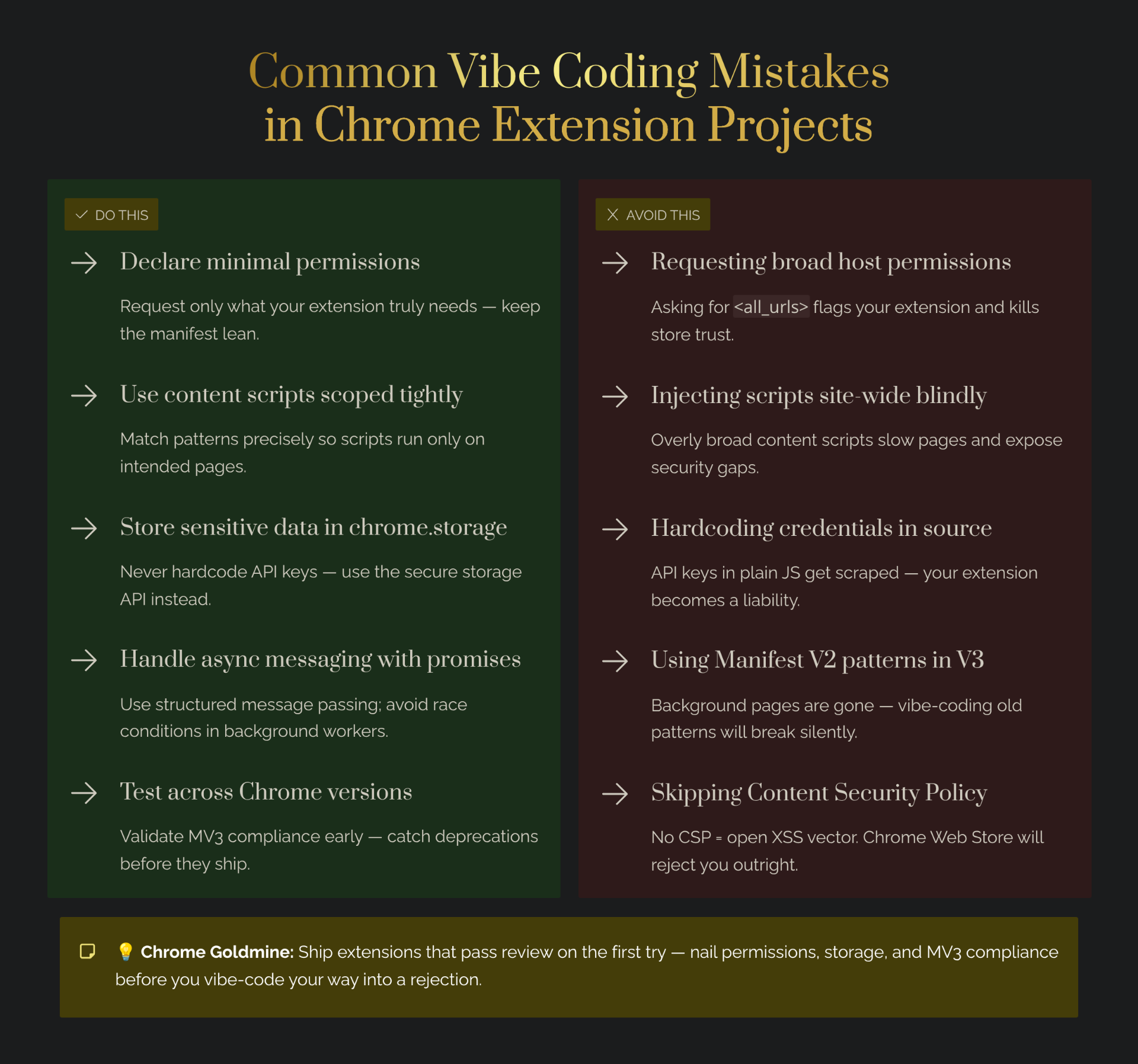
Hardcoding API keys and other secrets in your prompts is a major security risk. If your prompts are ever leaked, your secrets will be exposed. When you hardcode secrets in your code, anyone who has access to your extension's source code can see them—including users who install your extension.
Example of What NOT to Do: const API_KEY = "sk-1234567890abcdef"; // NEVER DO THIS
Example of What TO Do: Use Chrome's storage API to store user-specific API keys, or implement a backend server that handles API calls on behalf of users.
Mistake #7: Not Validating User Input
Always validate user input to prevent security vulnerabilities and errors. User input is the number one source of security vulnerabilities in web applications and Chrome extensions. If you don't validate input, users can inject malicious code, crash your extension, or access data they shouldn't be able to see. This becomes mission-critical the moment you start charging — see how the best solo-built extensions handle trust and reliability to keep paying users.
Input Validation Checklist: Check that required fields are not empty, verify email format, ensure numbers are within acceptable ranges, sanitize HTML input to prevent XSS attacks, validate URLs before navigating to them, check file types and sizes before processing uploads.
Bonus Mistake: Not Testing on Multiple Websites
This is a Chrome extension-specific mistake. Many beginners build an extension, test it on one or two websites, and assume it will work everywhere. Test your extension on a diverse set of websites before launching, including popular websites (Google, Facebook, Amazon), websites in your target niche, single-page apps, and websites with unusual layouts.
Conclusion: Vibe Code with Confidence
By avoiding these common vibe coding mistakes, you can build better products, save time and frustration, and vibe code with confidence. Remember to be specific with your prompts, iterate on your results, and have a basic understanding of the underlying logic. Plan before you build, secure your secrets, validate user input, and test thoroughly. When your extension is ready for paying users, Outseta handles subscription billing, CRM, and user authentication in a single platform — so you can skip the integration headaches.
For a more in-depth look at vibe coding tools and how to use them effectively, check out our pillar article: Vibe Coding Tools for Chrome Extension Development: 2026 Guide. Want to see the full tool stack mapped out? Our vibe coding tools, boilerplates, and AI workflows guide covers every layer from starter kits to launch infrastructure. For a complete walkthrough of using Claude to rebuild real expired extensions, see our Claude guide for Chrome extensions.