Email Extensions Gone: Building the Next Email Productivity Tool
See why Gmail/Outlook extensions got discontinued first and which email productivity gaps are still open for indie makers to rebuild.

Article content
Email extensions were the first to die. The average professional spends over 28% of their workweek on email, so it was no surprise that a thriving ecosystem of extensions emerged to help us manage the deluge. But just as quickly as they appeared, they vanished. This guide explains what happened, why they disappeared, and which gaps you can fill with a rebuilt email productivity tool. For a similar analysis in the productivity space, see our Productivity Extensions Shutdown guide. For all high-potential categories ranked, see our best expired extensions by category guide.
We will explore the rise and fall of the email extension era, analyze the reasons behind their demise, and identify the opportunities that have emerged from their ashes. By understanding the market dynamics and the needs of the users who were left behind, you can build the next generation of email extension alternatives and create a profitable business in the process. Before building, make sure to validate your idea with real users.
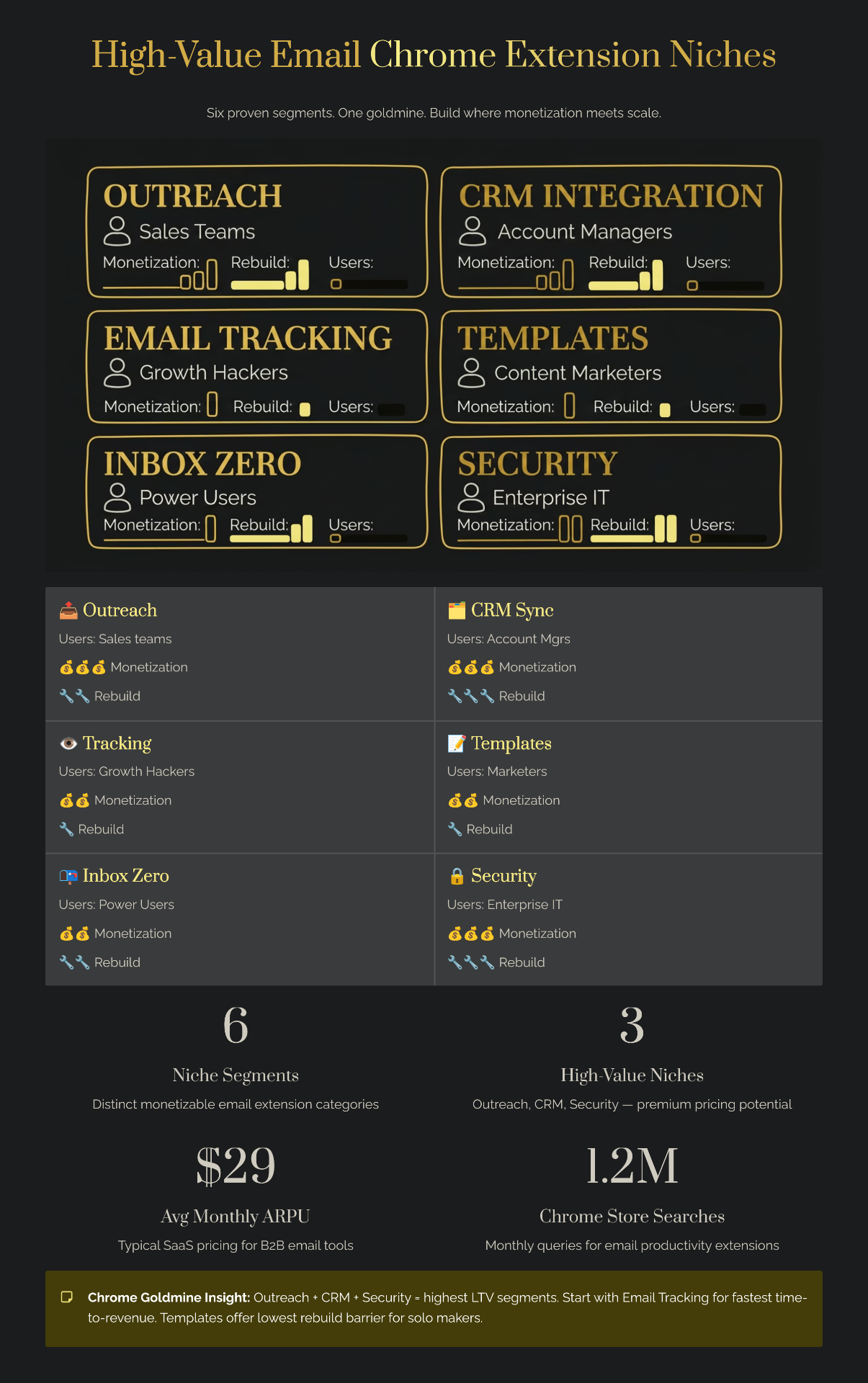
The Email Extension Era (What Existed)
The email extension era was a time of incredible innovation and experimentation. Developers from all over the world were building tools to solve the most common email pain points, and users were eagerly adopting them.
Original Email Extensions
Some of the most popular email extensions of the time included:
- Todoist for Gmail: This extension allowed users to turn emails into tasks in their Todoist account with a single click. It was a simple but powerful tool that saved users hours of time.
- Evernote Web Clipper: While not exclusively an email extension, the Evernote Web Clipper was a popular tool for saving important emails and attachments to Evernote.
- Boomerang: This extension allowed users to schedule emails to be sent later, and to be reminded if they didn't receive a reply. It was a game-changer for anyone who used email for sales or follow-ups.
- FollowUp.cc: Similar to Boomerang, FollowUp.cc was a popular tool for scheduling email reminders and follow-ups.
Market Size at Peak
The email productivity software market was a multi-billion dollar industry, with some estimates putting it at $7.8 billion in 2024. Email extensions were a significant part of this market, and they were a strategic category for many companies. Email is the lifeblood of business communication, and any tool that could help users be more productive in their inbox was in high demand. For the full picture of market dynamics across all categories, see our 2026 market analysis.
Why They Were Popular
The popularity of email extensions can be attributed to a simple fact: they solved real problems. The average professional spends over two and a half hours a day on email, and any tool that can help them be more efficient is a welcome addition to their workflow. Extensions that offered features like quick capture, follow-up reminders, and templates were particularly popular, as they addressed some of the most common email pain points.
Why Email Extensions Got Discontinued First
Despite their popularity, email extensions were the first to fall when the market shifted. There are a number of reasons for this.
Shift to Mobile-First Workflows
The world has gone mobile, and email is no exception. Over 70% of emails are now opened on a mobile device, and browser extensions simply don't work on mobile. This meant that any company that wanted to have a comprehensive email strategy had to have a mobile app, and for many, the browser extension became a secondary priority.
Gmail/Outlook Moving to Native Features
In recent years, both Gmail and Outlook have been aggressively adding new features to their platforms. Gmail introduced email scheduling in 2019, and both platforms now offer features like templates, smart compose, and auto-replies. This has made many of the features that were once the exclusive domain of browser extensions obsolete. Some classic Gmail browser extensions remain, like Trimless for Gmail V3, which has adapted to Manifest V3 immediately. For builders entering this space, ZeroBounce is worth considering if your extension handles email lists—clean data means better deliverability and happier users.
Privacy Regulations
The introduction of privacy regulations like GDPR has made it more difficult for developers to build email extensions. These regulations require developers to be more transparent about how they are using user data, and they have increased the scrutiny from companies like Apple and Microsoft. This has made it more difficult and expensive to build and maintain email extensions.
Maintenance Overhead
Browser extensions are not a "set it and forget it" product. They require constant maintenance to keep up with changes to the Chrome API, security patches, and compliance requirements. This can be a significant burden for small developers or companies with limited resources. The mandatory transition to Manifest V3 was the final nail in the coffin for many email extensions, as it required a complete rewrite of their codebase.
Discontinued Email Extensions Worth Rebuilding
The graveyard of dead email extensions is not just a cautionary tale; it is also a treasure map that can lead you to your next profitable idea.
List of Major Shutdowns
Some of the most popular email extensions that have been discontinued include:
- Todoist for Gmail: This extension was a victim of the shift to mobile-first workflows. As Todoist focused more on its mobile and web apps, the Gmail extension became a lower priority and was eventually discontinued.
- Evernote Web Clipper (email version): Similar to the Todoist extension, the Evernote Web Clipper for email was a victim of shifting priorities. As Evernote focused more on its core note-taking app, the email clipper was neglected and eventually became unusable for many users.
- Salesforce Engage for Gmail: This extension was a casualty of the Manifest V3 transition. Salesforce announced that it would be retiring the extension in June 2024 because it was built on the outdated Manifest V2 platform.
- Boomerang-style tools: While Boomerang itself is still around, many of its competitors have fallen by the wayside. These tools were victims of Gmail and Outlook adding native email scheduling features to their platforms.
User Base Analysis
The shutdown of these extensions has left millions of users looking for alternatives. A quick search on Reddit or Twitter will reveal countless threads of users complaining about the loss of their favorite extension and asking for recommendations for a replacement. This is a clear signal that there is a real demand for better email productivity tools. Our guide on finding expired extension ideas shows you how to systematically discover these opportunities.
Revenue Potential Each Represented
The revenue potential of these discontinued extensions is significant. GMass, a popular email marketing extension for Gmail, is doing over $5 million a year in revenue. COLDINBOX, another email productivity tool, is doing over $400,000 a year. These numbers show that there is a real opportunity to build a profitable business in this space.
Current Email Productivity Landscape
The email productivity landscape has changed dramatically in recent years. The days of a simple, free extension being a viable business are over. To succeed today, you need to have a clear niche, a strong value proposition, and a viable monetization strategy.
Native Gmail/Outlook Features
Both Gmail and Outlook have been aggressively adding new features to their platforms. They now offer features like email scheduling, templates, and smart compose, which were once the exclusive domain of browser extensions. However, these native features are often limited in their functionality, and they don't meet the needs of power users.
Third-Party Apps
The email productivity market has shifted from browser extensions to third-party apps. Tools like Superhuman, Loom, and Calendly have become popular by offering a more comprehensive and feature-rich experience than a browser extension can provide. These tools often integrate with email, but they are not dependent on it.
Gaps in Native Solutions
Despite the proliferation of new tools, there are still a number of gaps in the market. Power users are frustrated with the limitations of the native Gmail and Outlook features, and they are actively looking for better solutions. There are also a number of specific use cases that are not being served by the current market leaders. This is where the opportunity lies for indie makers.
Market Opportunity: Email Extension Rebuild Potential
The shutdown of so many email extensions has created a massive opportunity for indie makers who are willing to do the work. There are millions of users with unmet needs, and the platform consolidation has created gaps in the market that a savvy indie maker can exploit.
Estimated User Pool
The user pool for a rebuilt email extension is significant. There are millions of users who were left behind by the shutdown of their favorite extension, and they are actively looking for alternatives. Instead of manually searching, use the expired extension database to quickly find email tool opportunities with verified user counts and rebuild potential scores.
Revenue Models for Email Tools
There are a number of viable revenue models for email tools. A freemium model with a free tier for light users and a premium tier for power users is a popular option. A subscription model with different tiers for individuals, teams, and enterprises is another option. A one-time license is less viable in today's market, but it could work for a niche product with a clear value proposition. For help choosing the right model, see our decision framework for which extensions to rebuild.
Comparison Table: Old Extensions vs. Current Gaps
| Feature | Todoist Email | Current Gmail | Current Email Tools | Extension Opportunity |
|---|---|---|---|---|
| Quick Capture | Excellent | Good | Varies | High – speed advantage |
| Smart Parsing | Excellent | Limited | Medium | High – AI angle |
| Multi-inbox | Limited | N/A | Varies | Medium |
| Team Collaboration | Limited | No | Some | High – underserved |
| Mobile Support | Limited | Yes | Yes | Low – hard on mobile |
Building the Next Email Productivity Tool
To build the next great email productivity tool, you need to learn from the mistakes of the past and focus on creating a unique and valuable experience that can't be easily replicated. If you're building with AI-assisted tools, avoid these common vibe coding mistakes that trip up new extension developers.
Feature Set That Would Work as an Extension
A successful email extension today would need to have a clear and focused feature set. Some of the features that would be most valuable to users include:
- Quick email capture: A fast and easy way to save emails to a to-do list, note-taking app, or CRM.
- AI-powered categorization and tagging: The ability to automatically categorize and tag emails based on their content.
- Smart follow-up reminders: The ability to be reminded if you don't receive a reply to an important email.
- Template management: A simple and easy way to create and manage email templates.
- Integration with other tools: The ability to integrate with other popular productivity tools like Slack, Trello, and Asana.
Monetization Strategies
To succeed, you need to have a clear monetization strategy from day one. A freemium model with a premium tier for power users is a good option for an email extension—Outseta can handle the complete billing and subscription lifecycle out of the box. You could also consider a B2B focus with a per-seat pricing model for teams and enterprises. The key is to offer a clear value proposition that justifies the cost of your premium features.
Challenges (Platform Limitations)
Building an email extension is not without its challenges. You will need to contend with the limitations of the Chrome platform, including the lack of mobile support and the ever-changing API. You will also need to be mindful of the privacy and security concerns of your users, as email is a very personal and sensitive medium.
Email Tool Comparison: Old vs. Current vs. What You Could Build
To help you visualize the opportunity, here is a comparison of the old email extensions, the current state of the market, and what you could build to fill the gaps.
| Old Extensions (e.g., Todoist for Gmail) | Current Native Tools (e.g., Gmail) | Current 3rd-Party Apps (e.g., Superhuman) | What You Could Build | |
|---|---|---|---|---|
| Core Function | Quick capture, basic automation | Basic scheduling, templates | Full-featured email client | Niche-specific workflow automation |
| Target Audience | General users | General users | Power users | Specific professions (e.g., sales, legal) |
| Monetization | Freemium, often with a low price point | Free | Premium subscription ($30/month) | Freemium with a high-value premium tier |
| Weakness | Lack of mobile support, high maintenance | Limited functionality, no power user features | High price point, not accessible to everyone | Niche focus, may not appeal to a broad audience |
What Doesn't Work (Common Mistakes to Avoid)
When building an email productivity tool, there are a number of common mistakes that you should avoid.
Building a Generic To-Do List App
The market for generic to-do list apps is saturated. To succeed, you need to focus on a specific niche or a specific workflow. Don't try to be everything to everyone. Instead, focus on being the best solution for a specific group of users.
Ignoring the Mobile Experience
The world has gone mobile, and if you build an email productivity tool, you need to have a plan for how you will support mobile users. An extension-only strategy is a recipe for failure in the long run. Consider building a bundled product that includes an extension and a companion mobile app.
Not Having a Clear Monetization Strategy
To succeed, you need to have a clear monetization strategy from day one. Don't be afraid to charge for your product. If you provide a real value to your users, they will be willing to pay for it.
Conclusion: The Future of Email Productivity
The email extension era may be over, but the need for email productivity tools is stronger than ever. The shutdown of so many extensions has created a massive opportunity for indie makers who are willing to do the work. By learning from the mistakes of the past and focusing on creating a unique and valuable experience, you can build the next great email productivity tool and create a profitable business in the process. For a related case study, see our analysis of the Todoist alternative market.
Ready to build your own email productivity tool? Our Complete Guide to Expired Chrome Extensions provides a step-by-step framework for finding, validating, and building your own profitable extension.