How to Find & Launch Expired Chrome Extension Ideas
7 proven research methods, tools, and a spreadsheet template to find profitable expired Chrome extensions in 2 hours instead of 10.

Article content
Here are 7 proven methods to find expired Chrome extensions worth rebuilding, plus the specific tools to streamline your research from 10 hours to 2. Most indie makers spend 10+ hours manually searching for expired extensions. Here's how to shortcut the process to 2 hours. With an estimated 40,000-60,000 extensions being discontinued every year, the opportunity to find expired extension ideas is massive. This guide will teach you the discovery methods used by successful founders to find your next $1k/mo opportunity. If you'd rather start from a fresh, low-complexity concept instead of reviving a dead one, see our companion guide to easy Chrome extension ideas you can build and validate fast.
By the end of this article, you will learn seven distinct discovery methods, have access to a curated list of research tools and resources, and be equipped to find and validate your next profitable extension idea.
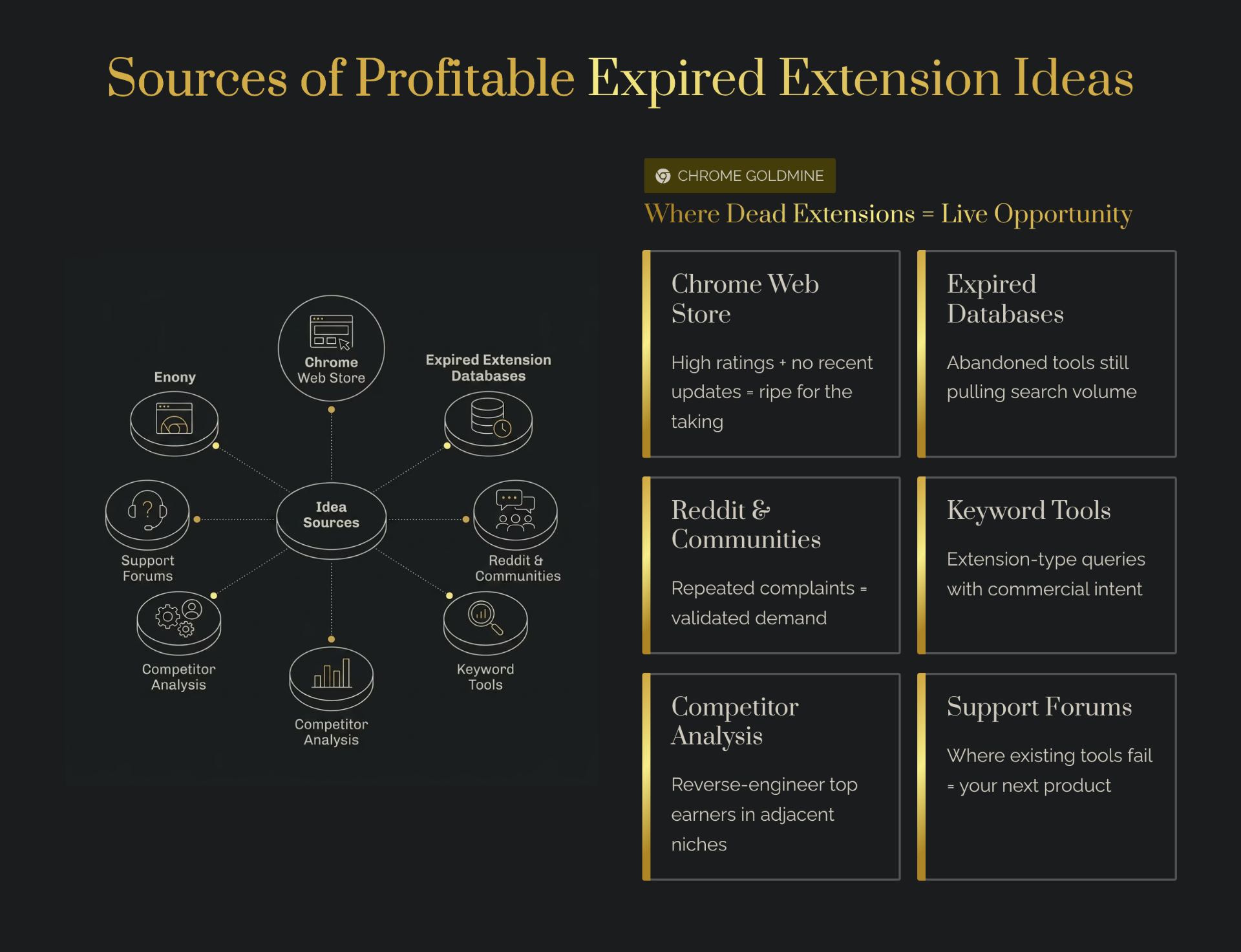
Method 1: Chrome Web Store Archives & Historical Data
The most direct way to find discontinued extensions is to go straight to the source: the Chrome Web Store and its historical data. While the store doesn't have a dedicated "graveyard" section, you can use a combination of search operators and third-party tools to uncover abandoned gems.
How to Search for Discontinued Extensions
One effective technique is to use advanced search queries within the Chrome Web Store, although this has become less reliable over time. A more robust method is to use the Wayback Machine from Archive.org. By entering the Chrome Web Store URL and browsing snapshots from previous years, you can identify extensions that were once listed but are no longer available. Look for extensions with a significant number of users and positive reviews that now lead to a 404 page.
Tools for Historical Research
- Archive.org (Wayback Machine): The primary tool for this method. It allows you to see what the Chrome Web Store looked like in the past, revealing extensions that have since been removed.
- Chrome Web Store API: For developers comfortable with APIs, the Chrome Web Store API can be used to programmatically query for extensions and identify those that have been unpublished.
What to Look For
When you find a potentially expired extension, look for a high number of downloads and a strong user rating. An extension with 50,000 users and a 4.5-star rating that was suddenly discontinued is a much stronger signal than one with 100 users and a 2-star rating.
Method 2: Subreddits & Developer Communities
Developer communities are a goldmine for finding problems that need solving. When an extension that developers rely on stops working, they are very vocal about it. Monitoring these communities can give you a direct line to validated ideas.
Which Subreddits to Search
- r/chrome_extensions: The most obvious and direct source. Look for posts with titles like "alternative to [extension]" or "[extension] stopped working."
- r/webdev, r/SaaS, r/microsaas, r/indiehackers: Broader communities where developers discuss their workflows and tools. A complaint about a missing piece of functionality can be a signal for a new extension idea.
Search Queries That Reveal Opportunities
Use specific search queries within these subreddits:
- "alternative to [popular extension]"
- "[extension name] discontinued"
- "looking for an extension that does [specific task]"
- "is there an extension for [problem]"
Case Example
A post on r/chrome_extensions asking "How do I come up with chrome extension ideas?" led to a discussion where one user recommended looking at the reviews of successfully monetized extensions to see what people are complaining about. This is a direct application of the "Pain Mining" method, and it highlights how community discussions can lead to actionable research strategies.

Method 3: Indie Hackers & Product Hunt
Indie Hackers and Product Hunt are platforms where developers showcase their projects and share their journeys. These platforms are invaluable for finding case studies, revenue data, and ideas that have been attempted but may have been abandoned.
Searching Past Launches
Browse through the history of Product Hunt launches, filtering for Chrome extensions. Look for products that had a successful launch (high upvotes and positive comments) but are no longer active. This can indicate a product with strong initial interest that may have been abandoned by the founder. Many of these extensions had proven monetization potential before being discontinued.
Community Threads on Discontinued Extensions
Indie Hackers has a wealth of community threads where founders discuss their projects. Search for terms like "shutting down my extension" or "failed extension" to find post-mortems. These threads often contain valuable insights into why the extension failed, which can help you avoid the same mistakes.
Revenue Data Available
Indie Hackers is unique in that many founders openly share their revenue data. This can help you validate the monetization potential of an idea. If you find an expired extension in a niche where other founders are successfully generating revenue, it's a strong signal that there is a paying market. Drop those reported MRR figures into our Chrome extension revenue calculator to reverse-engineer the user count and conversion rate you'd need to match them.
Method 4: Twitter/X & Developer Blogs
Following influential developers and creators on Twitter/X and reading their blogs can provide a steady stream of ideas and insights. These individuals are often on the cutting edge of new technologies and trends, and their discussions can reveal untapped opportunities.
Search Strategies
Use Twitter's advanced search to look for conversations about Chrome extensions. Search for keywords like "extension idea," "discontinued extension," or "I wish there was an extension for…" You can also follow hashtags like #buildinpublic to see what other indie makers are working on.
Following Key Developers
Identify and follow developers who are active in the extension ecosystem. Many of these developers share their research process, their successes, and their failures. This can provide you with a real-time feed of ideas and inspiration. Look for developers who are transparent about their process and willing to share their insights.
Identifying Emerging Opportunities
Developer blogs are another excellent resource. Many developers write detailed posts about their side projects, including the tools and techniques they use. These posts can be a great way to learn about new APIs, frameworks, and platforms that can be used to build extensions.
Method 5: Using Chrome Web Store Analytics Tools
While the Chrome Web Store itself provides basic data, a new generation of analytics tools offers much deeper insights into the extension market. These tools can help you track trends, monitor competitors, and identify underserved niches.
Tools That Track Extensions
- Extension Radar: This tool specializes in analyzing user reviews to identify pain points and feature requests. It can give you a quick, data-driven assessment of a competitor's weaknesses, which can be a direct source of ideas for your own extension.
- Chrome-Stats & DebugBear: These platforms provide high-level market data, such as the total number of extensions, category breakdowns, and user distribution. This data is useful for understanding the overall market landscape and identifying broad trends.
- Mangools: Use keyword research to discover high-volume, low-competition search terms like "alternative to [extension name]." This reveals exactly where users are actively searching for replacements to discontinued tools.
What Metrics Matter
When using these tools, focus on the following metrics:
- Negative Review Trends: A sudden spike in negative reviews for a popular extension can signal a recent update that broke functionality or introduced an unpopular change.
- User Churn: Tools like Extension Radar can show you the percentage of users who are switching to a competitor, and more importantly, why.
- Category Growth: A category that is growing quickly can be a good place to look for opportunities, as it indicates a rising tide of user interest.
Manually researching takes 10+ hours. Our Chrome Goldmine database has pre-researched and scored 500+ expired extensions, categorized by revenue potential. Skip the research, start validation.
What's the Fastest Way to Find Expired Chrome Extension Ideas?
The fastest way to find expired Chrome extension ideas is to use a combination of automated tools and targeted community research. While manually scouring the Chrome Web Store can take days, a tool-assisted approach can yield a list of promising candidates in just a few hours. The "Pain Mining" method, as described by Extension Radar, is a powerful shortcut. By analyzing the negative reviews of the top extensions in a category, you can quickly identify the most common complaints and feature requests. This gives you a direct, data-backed roadmap for what to build.
Another fast method is to leverage a pre-existing database of expired extensions. While these databases may come with a cost, they can save you dozens of hours of research by providing a curated and pre-scored list of opportunities. This allows you to jump straight to the validation phase, which is a much higher-leverage use of your time. For the full framework from research to revenue, see our Complete Guide to Expired Chrome Extensions.
Building Your Research System
A systematic approach to research is essential to avoid getting lost in a sea of information. To organize and score your shortlist, set up a Deal Flow CRM for Chrome extensions in Notion. You can also use Apify to automate data collection from the Chrome Web Store and competitor review pages, feeding structured data directly into your research pipeline. By creating a simple research system, you can track your findings, compare opportunities, and make a more informed decision.
Template: Research Spreadsheet
Create a spreadsheet with the following columns to track your potential extension ideas:
| Extension Name | Status | Category | Last Updated | User Count | Rating | Monetization | Key Complaint | Source |
|---|---|---|---|---|---|---|---|---|
| Example Extension | Discontinued | Productivity | 2024-06 | 50,000 | 4.5 | Freemium | Slow updates |
Tracking Metrics
- Status: Active, Discontinued, or Acquired.
- User Count & Rating: Key indicators of market adoption and user satisfaction.
- Monetization: Free, Freemium, Paid, or Acquired.
- Key Complaint: The #1 pain point from user reviews.
- Source: Where you found the opportunity (Reddit, Archive.org, etc.).
Shortlisting Process
Your goal is to move from a long list of potential ideas to a shortlist of 3-5 high-potential candidates. Use your research spreadsheet to filter and sort your list. Look for extensions with a high user count, a strong rating, a clear monetization precedent, and a validated key complaint. These are the opportunities that are worth a deeper dive. For example, our guide on expired email extensions shows how to evaluate a specific high-revenue category.
Time Investment: Manual Research vs. Database Shortcut
Your time as a developer is your most valuable asset. The following table breaks down the time and cost investment for different research methods, based on the experience of verified indie makers.
| Method | Research Time | Extensions Found | Validation Score | Tools Needed | Cost |
|---|---|---|---|---|---|
| Manual (subreddits + archive) | 10–20 hours | 5–10 | Unknown | Free | $0 |
| Semi-automated (analytics tools) | 5–8 hours | 10–15 | Partial | URLMonitor, Airtable | $50 |
| Database + shortcut | 2–3 hours | 20–50 (pre-scored) | Pre-validated | Chrome Goldmine | $19–59 |
Assumptions: Manual research based on verified indie maker experience. Database saves time by pre-scoring 500+ opportunities. Validation score based on data quality available. Time estimates are for beginner–intermediate skill level.
What Doesn't Work (Common Research Mistakes)
Knowing what not to do is just as important as knowing what to do. Many aspiring extension developers fall into the same traps. Here are the most common research mistakes to avoid.
Relying on Gut Feeling Without Data
Passion for an idea is important, but it's not a substitute for data. The biggest mistake you can make is to build an extension based solely on your own intuition, without validating that other people share your problem. Always seek external validation, whether it's through community discussions, competitor review analysis, or keyword research. Our analysis of productivity extension shutdowns provides concrete market data to help guide your decisions.
Copying Competitors Without Validation
Simply cloning a popular extension is not a strategy for success. The market leader often has a significant first-mover advantage, a loyal user base, and a well-established brand. Instead of copying, look for weaknesses. What are users complaining about? What features are they asking for? Your opportunity lies in solving the problems that the incumbent has ignored.
Ignoring User Sentiment
An extension can have a million users, but if they are all unhappy, it's a vulnerable business. User sentiment is a powerful leading indicator of market opportunity. Pay close attention to the language people use in their reviews and community discussions. Are they frustrated? Disappointed? Angry? These emotions are the raw material for a successful rebuild.
Which Discovery Method Works Best for a Specific Category?
While all seven methods can uncover opportunities, some are better suited to specific categories than others. Here's a breakdown of which method to prioritize based on the type of extension you're interested in.
- Productivity & Workflow Extensions: For this category, the Community Problem Discovery method is highly effective. Productivity users are very vocal about their workflows and the tools they use. Monitor subreddits like r/productivity and r/getdisciplined to find complaints and requests for new features.
- Developer Tools: The Personal Pain Point Method is often the most fruitful for this category. As a developer, you are your own target user. What parts of your workflow are clunky and inefficient? What tool do you wish you had? There's a high probability that other developers share your pain.
- E-commerce & Shopping Extensions: For this category, the Competitor Review Mining method is your best bet. The e-commerce space is crowded, but users are also very demanding. Analyze the reviews of the top shopping extensions to find complaints about slow performance, inaccurate pricing, or a lack of support for certain retailers.
- Niche & Hobbyist Extensions: For niche categories, such as extensions for a specific game or hobby, the Community Problem Discovery method is paramount. Immerse yourself in the online communities where your target users congregate. What are they talking about? What are their biggest frustrations? The answers to these questions will lead you directly to your next idea.
Conclusion: From Research to Launch
Finding a profitable expired extension idea is not a matter of luck; it's a matter of process. By using the seven discovery methods outlined in this guide, you can systematically uncover and validate opportunities that others have missed. The key is to move beyond passive browsing and adopt a structured, data-driven approach to your research.
Your next step is to choose one of these methods and dedicate a few hours to it. Start building your research spreadsheet, and don't be afraid to go down rabbit holes. The perfect idea is out there waiting to be found. With the right process, you are now equipped to find it. For market context and opportunity sizing, see our 2026 Market Analysis. For a curated list of opportunities by category, check out our best expired extensions by category 2026 guide.
Found a promising idea? Next: validate with real users and use our decision framework to confirm it's worth rebuilding. See our Todoist case study for a real-world example.
Prefer to mine ready-made lists? See our roundup of Chrome extension ideas on Reddit, our take on a curated Chrome extension ideas database for serious builders, ten real dead extensions with step-by-step rebuild plans, and creator-focused angles in Chrome extensions for content creators. Comparing subscription case-study libraries too? Read Starter Story vs Chrome Goldmine. If you'd rather skip the rebuild and buy a Chrome extension business outright, our buyer's guide walks you through due diligence.