








Profitable Chrome Extension Niches for Indie Makers
Skip the guesswork: browse 9,656 validated Chrome extension ideas from real discontinued extensions — with revenue data on which niches still make money.
9,656 expired extensions already mapped to these niches
20 free sample rows · no signup · 30-day refund
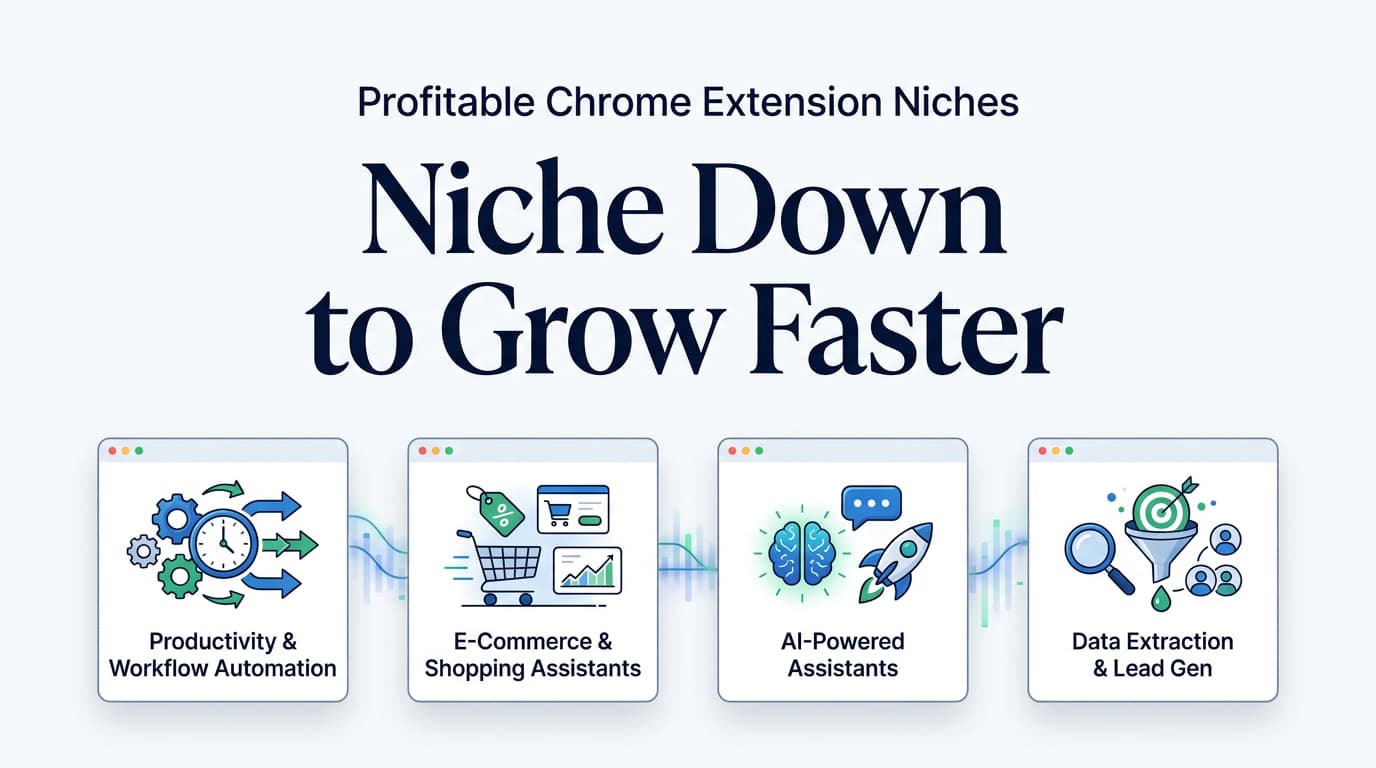
Are you looking for the most profitable Chrome extension niches to build your next micro-SaaS? The most lucrative opportunities in 2026 lie in B2B workflow automation, platform-specific seller tools (like Amazon or Poshmark), AI-powered meeting assistants, and e-commerce deal finders. By targeting these specific, underserved problems, indie makers and vibe coders can build lightweight browser extensions that generate significant monthly recurring revenue (MRR) with relatively low overhead.
Imagine launching a simple browser tool from your bedroom and watching it grow into a $40,000 per month business. While that might sound like a pipe dream, it is the reality for many solo founders operating in the right profitable Chrome extension niches. The Chrome Web Store is undergoing a massive shift. By mid-2024, the store hosted about 111,933 active extensions, which is actually an 18.5% reduction from 2020 as Google cleaned up inactive and policy-violating add-ons (AboutChromebooks, 2026). This cleanup has created a massive vacuum—and a golden opportunity for indie makers.
In this comprehensive guide, you will discover exactly how to identify profitable Chrome extension niches, validate your ideas faster, and significantly shorten your build time. Whether you are an experienced developer or a "vibe coder" leveraging AI to build products, this pillar page will give you the exact blueprint to succeed in the browser extension ecosystem.
Skip 80–300 hours of niche research
This guide shows which niches pay. Chrome Goldmine shows which expired extensions already proved demand inside those niches — historical users, why they died, rebuild difficulty, and a plan. 20 rows are free.
$23.20 one-time · lifetime quarterly updates · 30-day refund
What Makes Profitable Chrome Extension Niches in 2026?
The landscape of browser extensions has evolved dramatically. Gone are the days when a simple color-picker or ad-blocker could easily capture millions of users and monetize through display ads. Today, profitability is driven by solving highly specific, high-value problems for users who are willing to pay for convenience, speed, or enhanced capabilities.
The Power of the Long Tail
One of the most fascinating aspects of the Chrome Web Store is its long-tail distribution. Analyses reveal that roughly 85% to 87% of all extensions have fewer than 1,000 installs, and about half have fewer than 16 installs (Extension Monitor via 9to5Google, 2019). Furthermore, a staggering 86.3% of extensions have fewer than 1,000 active users, and over 60% have not been updated in more than a year (AboutChromebooks, 2026).
What does this mean for you? It means the market is incredibly fragmented. While only about 0.2% of extensions exceed 1 million installs, you do not need a million users to build a highly profitable business. In fact, many of the most profitable Chrome extension niches thrive in the long tail. By building a focused tool for a specific audience—such as a specialized scraper for real estate agents or an automation tool for freelance designers—you can dominate a small niche and charge a premium price.
The Shift Toward B2B and Micro-SaaS
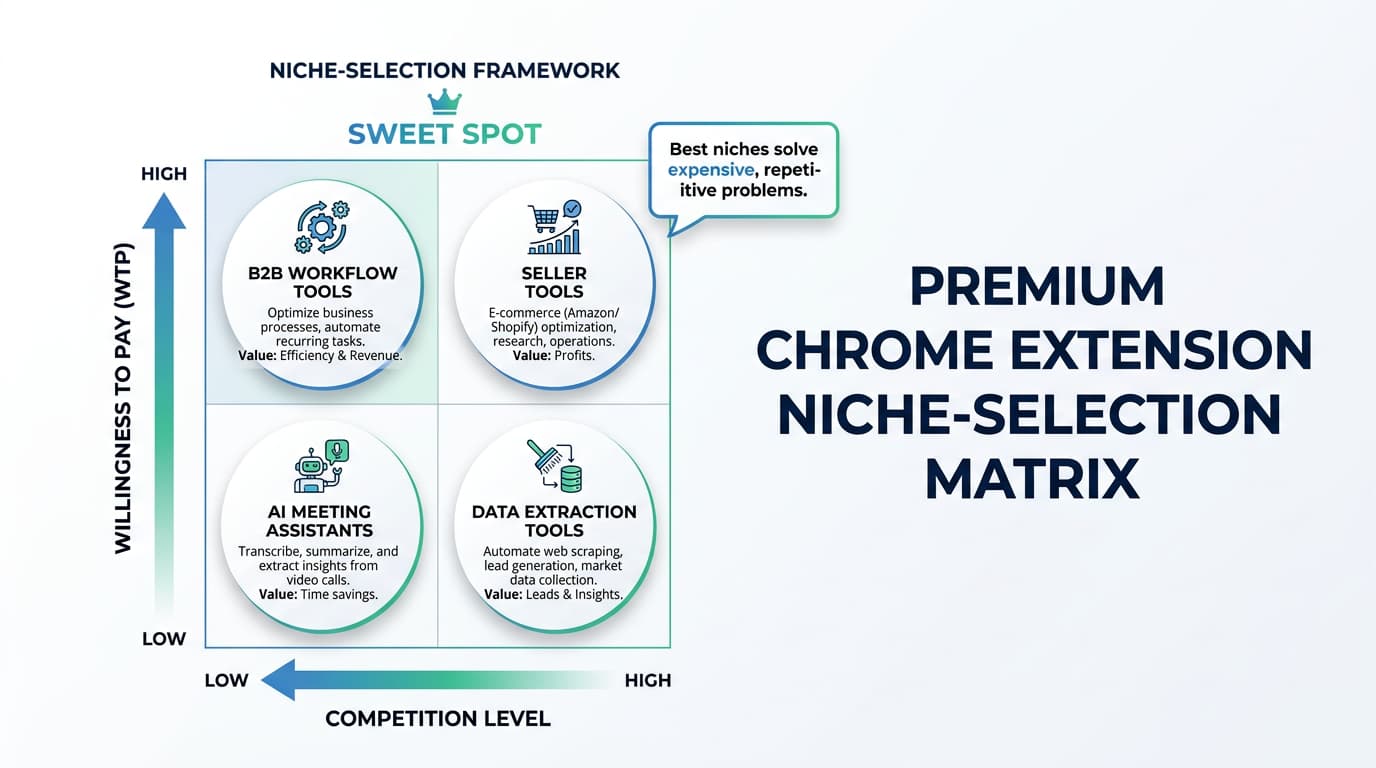
The most significant trend driving profitable Chrome extension niches is the shift toward B2B (business-to-business) applications and the micro-SaaS model. Consumers are often hesitant to pay for browser extensions, expecting them to be free. Businesses, on the other hand, will gladly pay $10, $20, or even $50 a month for a tool that saves their employees an hour of work each week.
The global Chrome extensions market was estimated at approximately $2.5 billion in 2024 and is projected to reach roughly $5.0 billion by 2033, growing at a compound annual growth rate (CAGR) of around 14% (HTF Market Insights, 2025). A closely related segment, browser extension management—which focuses on enterprise security and governance—is valued at $1.3 billion and forecast to reach $4.8 billion by 2033 (MarketIntelo, 2025). This data clearly indicates that enterprise and business adoption of extensions is accelerating.
The B2B / micro-SaaS shift is already sitting in the graveyard
Most of the profitable demand in 2026 is not a net-new idea. It is an extension that had users, then died in the Manifest V3 cleanup. Filter Goldmine to Productivity, Shopping, Developer Tools, or AI and you get rebuild candidates with user counts attached.
| Extension | Historical users | Difficulty | Est. monthly |
|---|---|---|---|
| Session StackSave and restore tab sessions. | 48,200 | Low | $500–$1,600 |
| Coupon ClipperAuto-applies working codes at checkout. | 40,500 | Medium | $800–$2,400 |
| Grammar LiteInline writing suggestions. | 36,700 | High | $1,000–$3,000 |
| Price WatchAlerts when a product drops. | 31,800 | Medium | $700–$2,000 |
Sample names on the marketing site are representative composites; estimates are conservative category benchmarks, not guarantees. The paid workspace unlocks all 9,656 listings.
How Much Can You Actually Earn with Chrome Extensions?
When exploring profitable Chrome extension niches, the first question most indie makers ask is: "What is the actual earning potential?" The answer varies wildly depending on your monetization strategy, your target audience, and the specific niche you choose. However, the data and case studies from the indie hacker community paint a very promising picture.
Revenue Models That Work
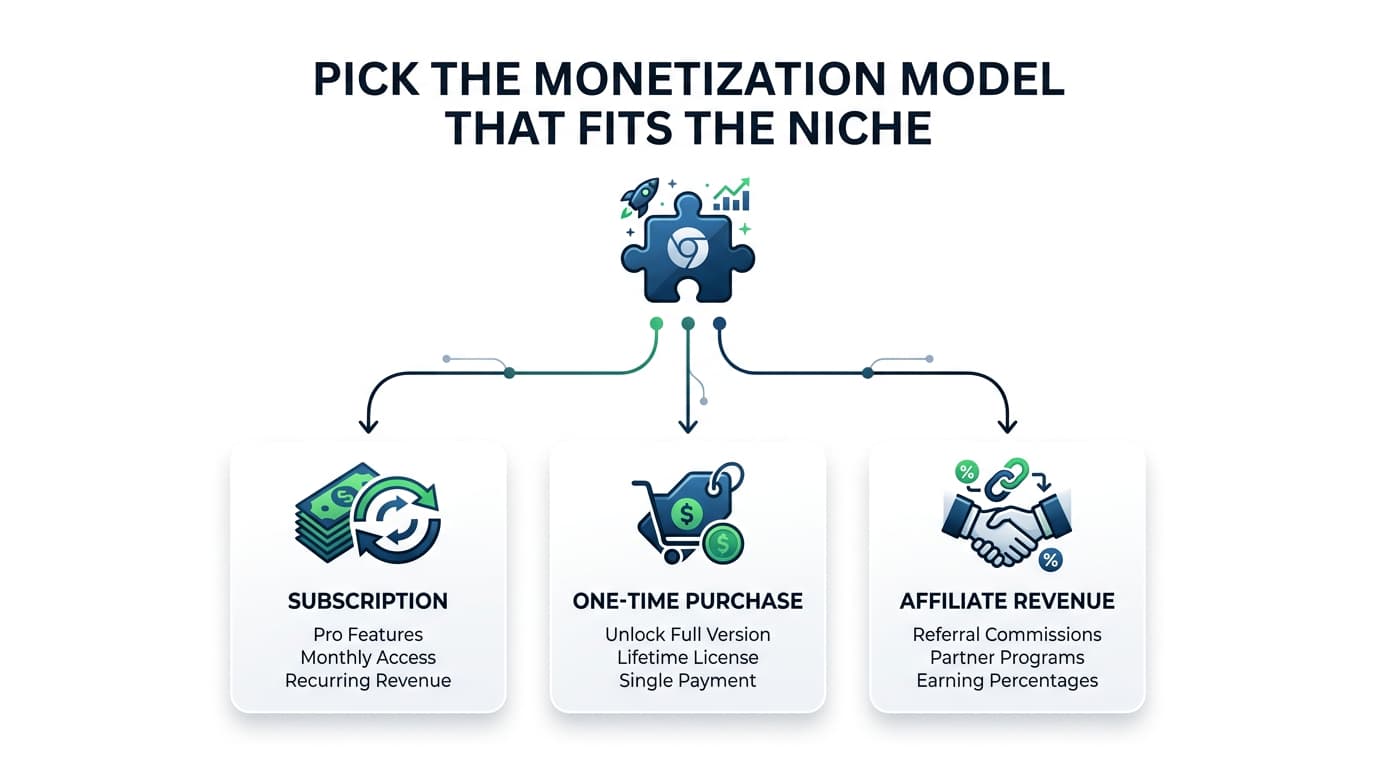
To understand the earning potential, you must first understand how extensions make money. The most successful indie makers typically employ one of the following revenue models. For a deep dive into each model, see our complete monetization guide.
- Freemium Subscriptions (Micro-SaaS): The extension is free to install and use for basic features, but users must pay a monthly or annual subscription for premium features. This is highly effective in B2B niches.
- One-Time Purchases: Users pay a single fee for lifetime access. This works well for developer tools and utilities where users are averse to subscription fatigue.
- Affiliate Commissions: The extension automatically applies coupon codes or redirects users to affiliate links when they shop online. Shopping extensions facilitate over $250 billion in yearly transaction volume (Forbes, 2025), making this a massive opportunity.
- Usage-Based Pricing: Users pay based on the volume of data they process, such as the number of emails sent or leads scraped.
The Earning Spectrum
Earnings in the Chrome extension space generally fall into three tiers:
- The Side Hustle Tier ($500 – $2,000 MRR): Many solo developers reach this tier within 6 to 12 months by solving a very specific problem for a small audience. For example, a niche tool that formats text for a specific CRM might only have 200 paying users at $5/month, but it provides a steady $1,000 MRR with almost zero maintenance.
- The Full-Time Income Tier ($5,000 – $15,000 MRR): This tier is achievable when you tap into a growing market or a high-value B2B niche. Extensions in this tier often serve professionals like marketers, recruiters, or Amazon sellers.
- The Empire Tier ($50,000+ MRR): These are the outlier successes that have scaled into full-fledged SaaS companies. They often start as simple extensions but grow to include web dashboards, team collaboration features, and enterprise integrations.
The broader browser-extension market is projected to become a $17.5 billion industry by 2035. This long-term upside means that even if you capture a microscopic fraction of the market, you can build a life-changing business. For realistic revenue expectations based on user count, see our revenue benchmarks guide. To understand how each model performs at different stages, our complete monetization guide covers all five proven approaches.
$23.20 vs. the cost of picking the wrong niche
The ROI table later on this page assumes 80–300 hours. Goldmine's job is to collapse the ideation and competitive-research slice of that. One-time $23.20. No subscription.
Deep Dive: High-Potential Chrome Extension Niches That Make Money
Now that you understand the market dynamics and earning potential, let's explore some of the most profitable Chrome extension niches that indie makers and vibe coders can target in 2026.
Match each niche to expired extensions that already had users
Pick a niche from this guide and see the kind of listing waiting inside the database.
Businesses pay monthly for a tool that saves an employee an hour a week.
GMass — $130K MRR| Extension | Historical users | Difficulty | Est. monthly |
|---|---|---|---|
| Tab Suspender ReloadedSleeps background tabs to cut RAM. | 91,400 | Medium | $600–$1,800 |
| Session StackSave and restore tab sessions. | 48,200 | Low | $500–$1,600 |
| Focus TimerPomodoro in the toolbar. | 17,200 | Low | $300–$1,000 |
Sample names on the marketing site are representative composites; estimates are conservative category benchmarks, not guarantees. The paid workspace unlocks all 9,656 listings.
1. Productivity & Workflow Automation
Productivity remains the largest category in the Chrome Web Store, but it's also the most saturated. The key to finding a profitable niche within productivity is to focus on hyper-specific workflows or integrations with underserved tools. Instead of building another generic to-do list, consider extensions that:
- Automate repetitive tasks within specific web applications (e.g., a tool that auto-fills forms on a particular CRM, or one that extracts data from a niche analytics dashboard).
- Enhance existing tools with missing features (e.g., a Gmail extension that adds advanced email scheduling or follow-up reminders beyond what Gmail offers natively).
- Streamline information capture and organization for specific professions (e.g., a content clipper for academic researchers, or a visual bookmarking tool for UX designers).
Case Study: GMass — $130K MRR from Gmail
GMass is a prime example of a highly profitable Chrome extension that carved out a niche within the vast productivity category by focusing on a specific workflow: email marketing directly from Gmail. Instead of building a standalone email marketing platform, GMass leveraged Gmail's existing infrastructure and user base (ExtensionPay, n.d.).
What they built: GMass allows users to send and schedule mass email campaigns, personalize emails, and track opens and clicks—all from within the familiar Gmail interface. It effectively turns Gmail into a lightweight outbound sales and email-marketing tool.
Key metric: The founder reported approximately $130,000 in monthly recurring revenue (MRR) from around 10,000 subscribers, with plans ranging from $8 to $20 per month. Timeline: GMass launched before 2019 and reached its six-figure MRR by that year, representing a multi-year climb from an MVP to a highly successful micro-SaaS.
Want expired extensions already in this niche? Filter Goldmine to Productivity →
A productivity extension that's waiting for a rebuild
GMass shows what a focused Gmail workflow can earn. Here's the other side of the coin — a row from the database sample: Session Stack (save and restore tab sessions). Its users were left without a replacement.
The database lists 9,656 expired extensions like this, filterable by niche, users and difficulty — so you start from proven demand instead of a guess.
Sample names are representative composites; benchmark is a category range, not this extension's revenue.
2. E-commerce & Shopping Assistants
The e-commerce sector is booming, and shopping extensions are at the forefront, facilitating over $250 billion in yearly transaction volume (Forbes, 2025). This niche is particularly attractive due to its clear monetization paths, primarily through affiliate commissions, but also through premium features for power users.
- Enhance the shopping experience on specific platforms (e.g., tools for Amazon sellers, eBay buyers, or users of niche marketplaces like Etsy or Poshmark).
- Automate deal finding and coupon application for a particular type of product or store.
- Provide price history and alerts for high-value items, helping users save money.
- Streamline product research for dropshippers or online arbitrageurs.
Case Study: Closet Tools — $42K MRR from Poshmark
Closet Tools exemplifies how focusing on a highly specific e-commerce platform can lead to significant success. It targets sellers on Poshmark, a popular fashion resale marketplace, by automating tedious tasks that consume valuable time (ExtensionPay, n.d.).
What they built: Closet Tools automates routine selling tasks on Poshmark, such as sharing listings, refreshing items, and optimizing activity to increase sales. Key metric: The creator publicly lists around $42,000 in monthly revenue on Indie Hackers, showcasing its growth as a solo-founder business.
Want expired extensions already in this niche? Filter Goldmine to Shopping →
3. Developer & Creator Tools
Developers and creators are often willing to pay for tools that save them time, automate repetitive coding tasks, or enhance their creative workflows. This niche is particularly appealing because developers understand the value of software and are typically early adopters of new technologies.
- Code snippet managers that integrate with popular IDEs or online code editors.
- Browser-based debugging aids or performance analysis tools.
- Design system helpers that extract colors, fonts, or spacing from web pages.
- Content creation assistants for specific platforms (e.g., a tool that optimizes images for a blog, or one that helps format articles for a particular CMS).
Case Study: Dubble — $2.7K MRR from Documentation
Dubble found its profitable niche by addressing a common pain point for teams: creating step-by-step guides and documentation. It leverages the browser to record actions and automatically generate visual instructions (MicroSaaSIdea, n.d.).
What they built: A Chrome extension that records browser actions and transforms them into step-by-step guides, tutorials, and onboarding documentation. Key metric: The founder reportedly crossed approximately $2,700 MRR with hundreds of paying customers within the first couple of years.
Want expired extensions already in this niche? Filter Goldmine to Developer Tools →
4. AI-Powered Solutions & Enhancements
The integration of Artificial Intelligence (AI) into Chrome extensions is one of the fastest-growing and most profitable niches. Indie makers can leverage readily available AI APIs to build powerful tools without needing deep AI expertise. For more ideas in this space, see our AI agent Chrome extension ideas guide.
- Summarize web pages or articles for quick information consumption.
- Generate content or rephrase text for marketers and writers.
- Provide real-time language translation or grammar correction within any text field.
- Automate data entry or extraction using intelligent recognition.
- Enhance video conferencing with AI-driven note-taking or sentiment analysis.
Case Study: Blue Dot — $3K MRR from Google Meet
Blue Dot identified a critical pain point in the modern remote work environment: inefficient meetings. By applying AI to Google Meet calls, they created an extension that helps teams capture and summarize insights (SaaS University, n.d.).
What they built: An AI-powered Chrome extension for Google Meet that captures and summarizes meeting insights. They pivoted from a Zoom-only solution to focus specifically on Google Meet, recognizing the easier adoption path. Key metric: Approximately $3,000/month in recurring revenue from business users.
Want expired extensions already in this niche? Filter Goldmine to AI →
5. Data & Information Extraction
Many businesses and individuals rely on web data for research, lead generation, or competitive analysis. Extensions that can intelligently extract, organize, and present this data offer immense value. Tools like Apify can handle the heavy lifting on the backend while your extension provides the user-facing interface.
- Scrape specific data points from public directories or listings (e.g., contact information from LinkedIn profiles, product details from e-commerce sites).
- Monitor changes on web pages and provide alerts (e.g., price drops, stock availability, content updates).
- Export structured data into CSV, Excel, or other formats for analysis.
- Visualize data directly on the web page (e.g., overlaying historical trends on a stock chart).
Want expired extensions already in this niche? Filter Goldmine to Data Extraction →
6. Niche-Specific Utility Tools
Beyond the broader categories, there's a vast ocean of profitable micro-niches. These are often overlooked by larger companies but represent significant pain points for a small, dedicated group of users. The key here is to identify communities or professions with unique, unmet needs.
- Tools for specific online games or communities (e.g., inventory managers for an online RPG, trading assistants for a digital card game).
- Accessibility enhancements for users with specific needs (e.g., advanced text-to-speech, color contrast adjusters for specific websites).
- Browser customization tools for power users who want to deeply personalize their browsing experience.
- Tools for niche content platforms (e.g., a tool that enhances the reading experience on academic journals, or one that helps manage subscriptions on a specific news site).
Want expired extensions already in this niche? Filter Goldmine to long-tail utilities →
How to Validate a Chrome Extension Niche
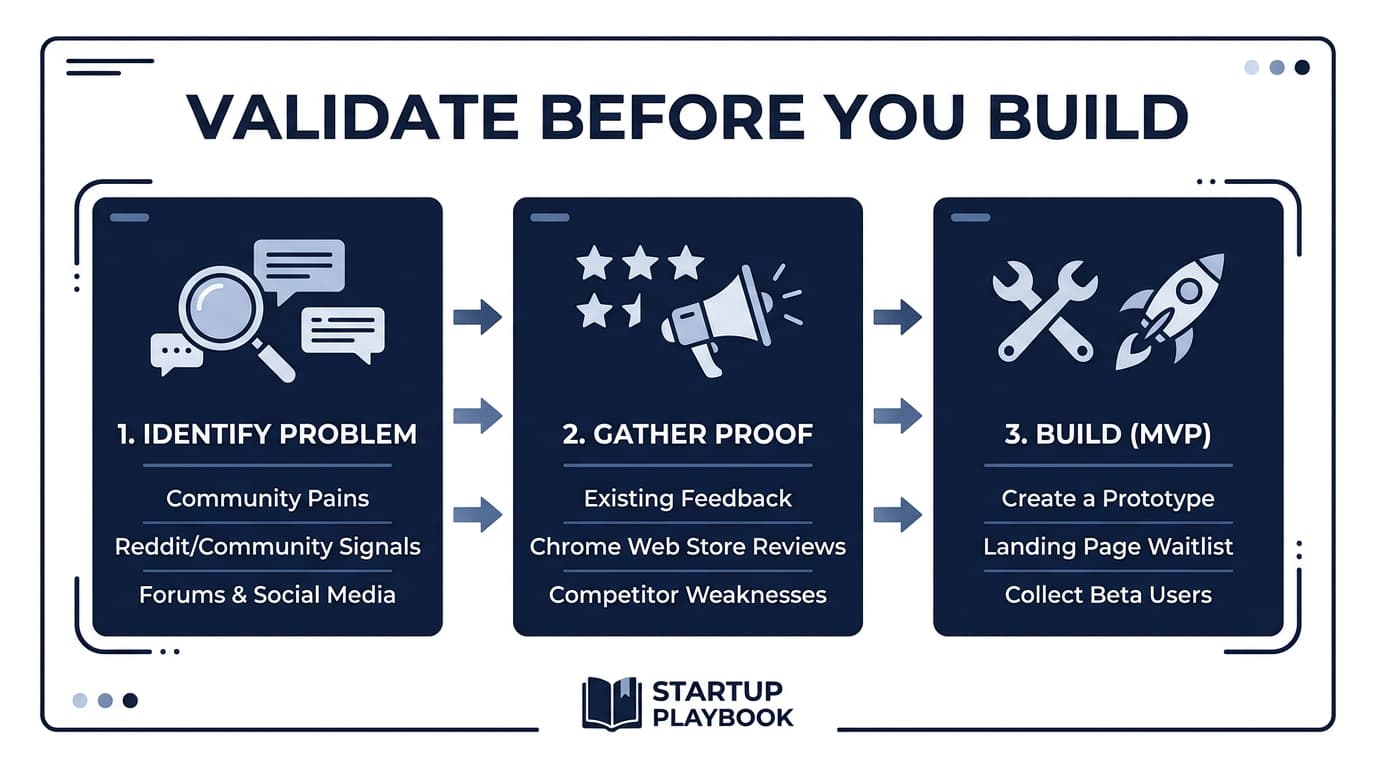
Identifying a promising niche is only half the battle. Before you invest precious time and resources into building, you absolutely must validate your idea. The graveyard of failed extensions is filled with products that solved problems nobody actually had, or problems nobody was willing to pay to solve. For a complete validation framework, read our idea validation guide.
Step 1: Chrome Web Store Research
Start by thoroughly researching the Chrome Web Store for existing extensions in your target niche. Look for extensions with a decent number of installs but poor ratings or outdated functionality. These are indicators of unmet demand. Also, look for expired extensions that once served your target audience — their user reviews are a goldmine of validated pain points.
Step 2: Community Validation
Engage directly with your target audience. Join online communities like Reddit, Twitter/X, and niche-specific forums. Post questions about their workflow pain points, and pay close attention to the language they use. You can also test interest with a simple landing page built with Framer that describes your extension's value proposition and collects email addresses.
Step 3: Keyword & Market Analysis
Use SEO tools like Mangools to research keyword volume and competition for your extension's niche. High search volume with low competition is the sweet spot. This data will also inform your Chrome Web Store listing optimization and marketing strategy.
Step 4: Competitive Analysis
Study your competitors. Analyze their extension listings, pricing strategies, user reviews, and feature sets. Look for gaps in their offerings that you can fill. Our guide on reverse engineering Chrome extensions can help you understand exactly how competitors build their products.
Validation without a four-step scavenger hunt
The four steps above still matter. Goldmine front-loads Step 1 and Step 4: store history, death reason, difficulty, competitors, revenue band. You still do the community and keyword work — you just do not start from a blank Chrome Web Store scrape.
$23.20 one-time · lifetime quarterly updates · 30-day refund
Building Your Extension Faster with AI and No-Code Tools
*Build stack (affiliate tools) — separate from the idea database.* Pick the idea in Chrome Goldmine, then build it with the tools below.
One of the biggest advantages indie makers have today is access to powerful AI coding tools that can dramatically reduce build time. "Vibe coding" — using AI assistants to write, debug, and iterate on code — has become a game-changer for solo founders. Tools like Lovable.dev, Bolt.new, and Cursor allow you to build functional Chrome extensions in days rather than weeks.
For complete tutorials on building Chrome extensions with AI, see our vibe coding pillar and the Claude tutorial. If you prefer the no-code approach, check our no-code guide to Chrome extensions.
When you're ready to scale beyond a simple extension and add subscription billing, user authentication, or team features, battle-tested SaaS boilerplates like Supastarter and Launchfast can save weeks of backend development. For monetization infrastructure, Outseta provides an all-in-one platform combining billing, CRM, and email marketing — ideal for solo makers who want to avoid juggling multiple tools.
What Doesn't Work (and Why): Common Mistakes Indie Makers Make
While the potential for profitable Chrome extension niches is vast, it's equally important to understand the pitfalls that can lead to wasted time and effort. Many indie makers fall into common traps that prevent their extensions from gaining traction or generating revenue. For an expanded list, see our guide on common vibe coding mistakes.
1. Building a Solution Without a Problem
The most common mistake is developing an extension based on a perceived need rather than a validated problem. This often results in a beautifully coded extension that nobody wants to use, let alone pay for. Without thorough market research and direct user feedback, you risk building in a vacuum.
Common Pitfall: Many developers build what *they* think is cool or useful, rather than what a specific audience *desperately needs*. This leads to low adoption and zero revenue. Always start with a problem, not a solution.
Expired-extension reviews are a shortcut to problems people already paid attention to.
2. Ignoring Chrome Web Store Policies
Google has significantly tightened its Chrome Web Store Developer Program Policies (Google, 2025). Extensions that violate these policies—especially regarding data privacy, deceptive practices, or excessive permissions—are swiftly removed. Google's cleanup efforts led to an 18.5% reduction in active extensions between 2020 and mid-2024, primarily due to the removal of inactive or policy-violating add-ons.
3. Building for the Masses (Instead of a Niche)
While it might seem counterintuitive, trying to appeal to everyone often means appealing to no one. Generic extensions face immense competition and struggle to differentiate themselves. The most profitable Chrome extension niches are often those that serve a very specific, underserved audience with a critical need. This is where the long tail of the Chrome Web Store truly shines.
4. Underestimating Monetization and Marketing
Many indie makers focus solely on building the product and neglect the crucial aspects of monetization and marketing. A great extension won't sell itself. You need a clear pricing strategy and a plan to reach your target audience. Without a solid marketing plan, even the most innovative extension can languish in obscurity.
5. Ignoring User Feedback and Iteration
Building a successful Chrome extension is rarely a one-and-done process. It requires continuous iteration based on user feedback. Launching an MVP and then ignoring feature requests, bug reports, or changing market demands is a recipe for stagnation. The most successful extensions evolve with their users.
Is Building a Chrome Extension Worth Your Time?
For indie makers and vibe coders, the question of time and resource investment versus potential return is paramount. Building a Chrome extension can be an incredibly rewarding venture, both financially and creatively, but it requires a realistic understanding of the commitment involved.
The ROI Equation
| Time Investment (hours) | Monetary Investment ($) | Expected Outcome (range) | Assumptions |
|---|---|---|---|
| 80–300 hours | $5–$500 | $500–$5,000 MRR | Focused niche, clear monetization, basic marketing |
Assumptions: Based on data from various indie hacker success stories and community discussions (Indie Hackers). Assumes a foundational understanding of web development or proficiency with AI-assisted coding tools. Monetary investment primarily covers developer fees ($5 for Chrome Web Store, Google, 2020), domain, basic hosting, and a payment processor subscription. These numbers are estimates — real outcomes vary significantly based on execution, market demand, and luck.
| Path | Research time | Cash outlay | What you skip |
|---|---|---|---|
| DIY from a blank store | 80–300 hrs | $5–$500 | Nothing |
| This guide + Chrome Goldmine | Research slice compressed | $23.20 + the same build costs | Blank-slate ideation and competitor archaeology |
Goldmine does not promise revenue. It compresses your time-to-shortlist — the slice between "I want to build something" and "here are three candidates with proven demand."
The Power of Leverage: Building on Existing Demand
One of the most effective strategies for maximizing ROI is to leverage existing demand. Instead of trying to invent a new problem to solve, look for problems that are already being solved inefficiently or expensively. This is where tools like Chrome Goldmine become invaluable. By identifying expired or abandoned extensions, you can gain insights into proven demand and even user feedback that already exists.
Conclusion: Your Path to Building a Profitable Chrome Extension
The journey to building a profitable Chrome extension in 2026 is more accessible and lucrative than ever for indie makers and vibe coders. The market is ripe with opportunities, particularly in specialized niches that cater to B2B workflows, e-commerce power users, developers, and those seeking AI-powered enhancements. While the Chrome Web Store has matured, its long-tail distribution means that focused, high-value tools can still command premium pricing and attract dedicated users.
By understanding the market dynamics, learning from successful case studies, and avoiding common pitfalls, you can significantly increase your chances of success. Remember to start with a validated problem, adhere to Chrome Web Store policies, niche down, and prioritize continuous iteration based on user feedback.
Pick one. Rebuild it. Make Money.
You just read the niche map. The listings are in the database.
9,656 expired extensions with demand already proven. Filter to the six niches in this guide. 20 rows are live with no signup. The rest unlock at checkout.
4.9★ · 45+ indie makers · 30-day refund · quarterly updates for life
“Found 3 great ideas in the first 20 minutes.” — Marcus L.
One-time purchase. Was $29. Instant Notion workspace + CSV + Quick Start Guide.
Recommended Tools & Platforms
Here are the tools we recommend for building and growing a Chrome extension business. Browse our complete partners directory for even more options.
- Outseta — All-in-one platform for billing, CRM, and email marketing. Perfect for solo makers who want one tool instead of five.
- MailerLite — Email marketing and automation for building your audience and reducing churn.
- Mangools — SEO keyword research to find untapped niches and optimize your Chrome Web Store listing.
- Apify — Backend data scraping infrastructure if your extension needs web data extraction.
- Lovable.dev & Bolt.new — AI-powered builders for rapidly prototyping your extension's web dashboard.
- Supastarter & TurboStarter — Battle-tested SaaS boilerplates to add subscriptions and user management.
Deep Dives in This Series
This pillar covers everything you need to know about profitable Chrome extension niches. Explore the in-depth guides below as they are published:
- Easy Chrome Extension Ideas: 35 Low-Complexity Ideas You Can Build and Validate Fast — A filtered list of 35 beginner-friendly extension ideas plus a framework for picking ones that are easy to ship, validate, and maintain.
- Chrome Extensions for Content Creators: YouTube, TikTok & Instagram — Content-creator extension ideas plus revenue paths for the creator economy.
- Chrome Extension Ideas Database for Serious Builders — How a curated Chrome extension ideas database compares to raw scraping and manual research.
Compare the Tools Behind Every Niche Decision
Before you commit to a niche, it helps to know which research tool actually surfaces validated demand. Our Chrome extension tool comparisons put idea databases, AI validators, and analytics platforms head-to-head — including Starter Story vs Chrome Goldmine for business-idea libraries and BigIdeasDB vs Chrome Goldmine for AI-mined complaint mining.