Chrome Extension Code Structure and Project Organization: A Guide for Indie Makers
The recommended entrypoints/src folder layout for Manifest V3 extensions using WXT and React — with state, storage, and messaging patterns.

Article content
A solid chrome extension project structure is the architectural blueprint that determines whether your micro-SaaS scales effortlessly or collapses under the weight of its own technical debt. For indie makers and vibe coders, organizing your codebase correctly from day one is the difference between shipping features in hours versus spending weeks debugging spaghetti code.
When you are building a browser extension, you are essentially developing three separate applications — a background service worker, a popup UI, and content scripts — that must communicate flawlessly via message passing. The Chrome extensions market is valued at $2.5 Billion in 2025 and is projected to reach $5.0 Billion by 2033 (HTF Market Insights, 2025). For the full build playbook, see the complete guide to building Chrome extensions).
What Makes Chrome Extension Project Structure Profitable?
The profitability of an indie SaaS project is directly tied to developer velocity. With over 3.83 billion internet users relying on Chrome (Backlinko, 2025), the audience is there; the challenge is executing efficiently.
A well-structured project separates concerns. Your UI components should not be tangled with your Chrome API calls (storage, alarms, messaging). When you isolate these layers, you can test your UI in a standard browser environment without constantly reloading the extension. For example, when indie maker CorpoCoder built "GPT Pro," they struggled with developer experience. By migrating to WXT, they drastically improved maintainability (Indie Hackers, 2025).
Manifest V3 enforces strict architectural rules. Background pages have been replaced by ephemeral service workers, meaning you can no longer rely on global variables to store state. If your project doesn't account for this by centralizing state management (e.g., using `chrome.storage.local`), your extension will break unpredictably.
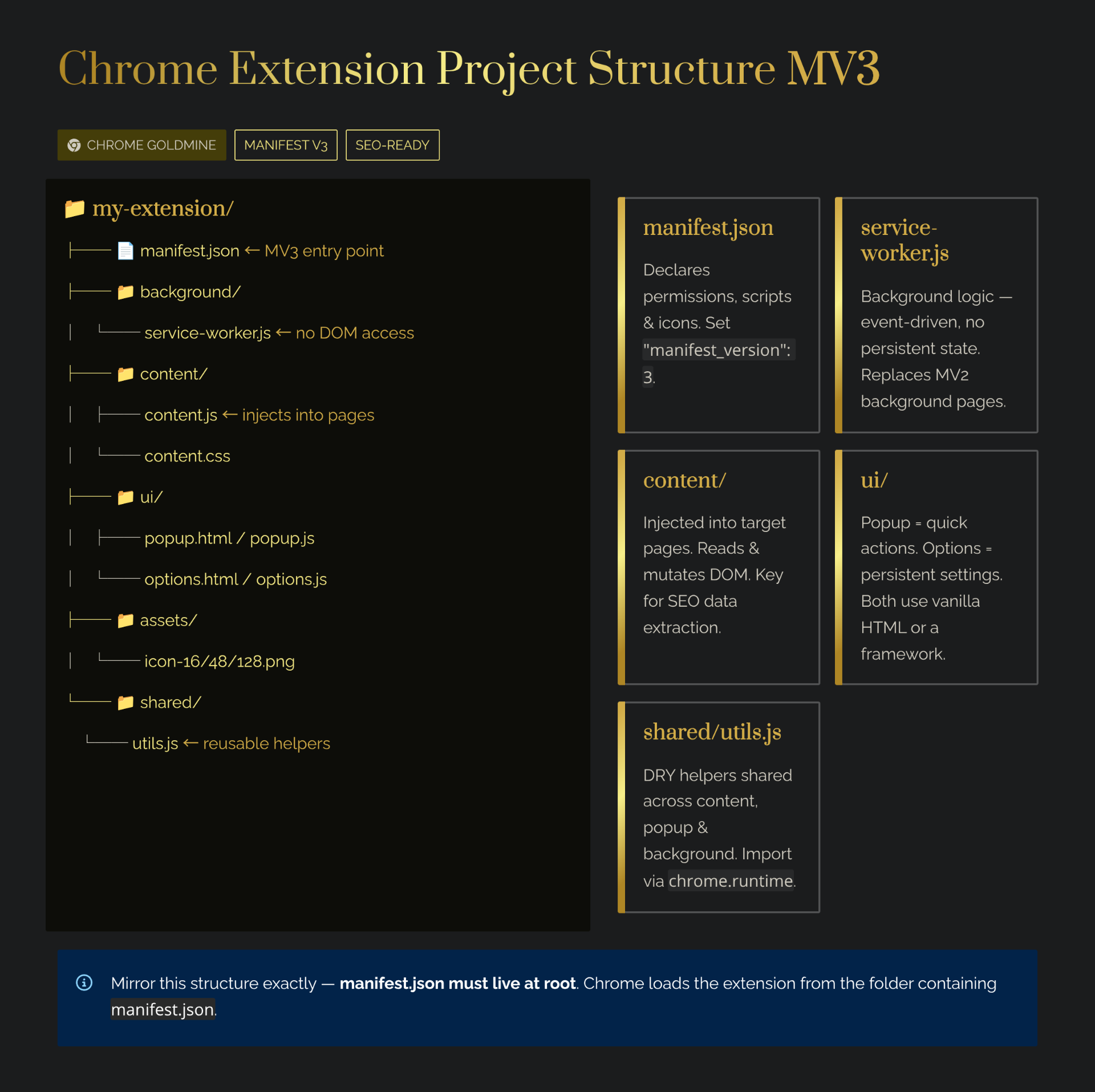
The Anatomy of a Manifest V3 Extension
Regardless of whether you use vanilla JavaScript or React, every Chrome extension relies on these fundamental building blocks (Chrome for Developers, 2025):
- The Manifest File (`manifest.json`) — The heart of your extension. Defines permissions, entry points, and metadata. In MV3, declare your background script as a service worker with `"type": "module"`.
- Service Worker (`background.js`) — Runs in the background, handling browser events. Ephemeral and stateless — terminates when not in use.
- Content Scripts (`content.js`) — Injected into web pages. Can read and modify the DOM but run in an isolated world.
- Popup and Options Pages (UI) — Standard HTML/CSS/JS files providing the user interface.
The challenge in chrome extension project structure is managing the communication between these isolated environments. Your popup cannot directly call a function in your content script — it must use Chrome's message passing API. A clean architecture abstracts this messaging layer into reusable utility functions.
Vanilla JS vs. Modern Frameworks
For incredibly simple extensions, vanilla JS is sufficient — zero build steps, no dependencies, tiny footprint. However, if you are building a micro-SaaS intended to generate revenue, vanilla JS quickly becomes a liability.
Consider Edmund Yong, who built "Easy Folders" for organizing ChatGPT prompts. Within 6 months of launch, the extension hit $3,700+ MRR and $42,000+ in total revenue (Indie Hackers, 2024). Building a complex, folder-based UI requires the component-driven architecture that React provides. For AI-powered building, try Lovable.dev or Bolt.new to generate extension UIs from prompts.
The Rise of WXT: The Next-Gen Framework for Indie Makers
In 2024–2025, developers began flocking to WXT (Web Extension Framework) — an open-source tool powered by Vite that drastically simplifies cross-browser extension development.
Why are vibe coders obsessed with WXT?
- File-based routing — Create a file at `entrypoints/popup/index.html` and WXT automatically generates the corresponding manifest entries. No manual `manifest.json` management.
- Unparalleled HMR — Hot Module Replacement that actually works across popups, options, and content scripts. No more clicking "Refresh" hundreds of times a day.
- TypeScript support — Auto-generated type definitions for browser APIs ensure your code is robust before you compile.
Recommended Folder Structure for React + WXT
my-extension-project/
├── entrypoints/               # WXT automatically reads this folder
│   ├── background.ts          # Your MV3 Service Worker
│   ├── popup/
│   │   ├── index.html         # Popup UI entry point
│   │   └── index.tsx          # React root for the popup
│   ├── options/
│   │   ├── index.html         # Options page entry point
│   │   └── index.tsx          # React root for settings
│   └── content/
│       ├── index.ts           # Content script injection logic
│       └── style.css          # Styles injected into the host page
├── assets/                    # Static assets (icons, fonts)
├── src/                       # Your core application logic
│   ├── components/            # Reusable React components
│   ├── hooks/                 # Custom React hooks (e.g., useStorage)
│   ├── lib/                   # Business logic and API wrappers
│   └── utils/                 # Helper functions (messaging, formatting)
├── wxt.config.ts              # Global configuration and permissions
├── package.json
└── tsconfig.json
This structure enforces a strict separation of concerns. The `entrypoints` folder handles Chrome-specific integration, while `src` contains your standard React application. You can easily test your UI components in Storybook or a standard web environment without mocking the entire Chrome API.
Handling State and Storage in Manifest V3
One of the biggest hurdles in extension architecture is managing state. In MV3, the service worker shuts down after a few seconds of inactivity, wiping out any in-memory variables.
All persistent data must be saved using the chrome.storage API. Best practices dictate creating a centralized storage module within your `src/lib/` folder, wrapping the asynchronous `chrome.storage.local` or `chrome.storage.sync` calls, and providing a clean interface for the rest of your application. Create a custom hook like `useExtensionStorage()` to abstract the Chrome API and handle loading states reactively.
What Doesn't Work in Extension Architecture
- Tightly coupling UI code with Chrome APIs — Writing `chrome.tabs.query` inside a React `onClick` handler creates brittle, untestable architecture.
- Ignoring async message passing — When a popup sends a message to a background script, the listener must `return true` for asynchronous responses. Missing this detail causes the "message port closed" error. See our error handling guide.
- Monolithic content scripts — If your extension injects a complex UI, use your framework to render into a Shadow DOM element injected by the content script. This prevents CSS bleeding.
ROI of Modern Architecture
| Time Investment (hours) | Monetary Investment ($) | Expected Outcome (range) | Assumptions |
|---|---|---|---|
| 10–20 hours | $0 (Open Source Tools) | 50%–80% reduction in bug fixing time | Based on developer reports migrating from MV2/Vanilla to MV3/WXT. |
| 20–40 hours | $199 (BoiledSaaS) | Faster time-to-market for premium features | Assumes using a paid boilerplate to skip setup. |
Based on typical indie maker development cycles in 2024–2025. Assumes a baseline understanding of JavaScript and React. These numbers are estimates; real outcomes vary based on execution and project complexity.
Consider Robert Shaw, who built "Side Space" to solve his own browser frustration. By focusing on a clean implementation, he was able to quickly secure a $10,000 acquisition offer (Indie Hackers, 2025). A clean codebase makes your project not only easier to maintain but also significantly more attractive to potential buyers. For more on exits, see our guide on how to sell your Chrome extension.