Chrome Extension Service Workers Guide: Mastering Manifest V3 for Indie Makers
Why your MV3 service worker dies after 30 seconds, how to keep state with chrome.storage and alarms, and offscreen document code you can paste in.
Article content
A chrome extension service worker is an event-driven, non-persistent JavaScript file that runs in the background to handle core extension logic, listen for browser events, and manage state without needing direct access to the DOM. In Manifest V3, service workers have completely replaced persistent background pages, forcing developers to adopt a more secure, resource-efficient architecture. If you want to build a profitable micro-SaaS on the Chrome Web Store today, mastering service worker lifecycles and event handling is absolutely non-negotiable.
Building robust Chrome extensions has always been a lucrative path for indie makers. With 3.83 billion internet users globally using Chrome (Backlinko, 2025), the distribution potential is massive. However, the transition to Manifest V3 (MV3) has fundamentally changed how extensions operate behind the scenes. As of January 2026, MV3 is strictly enforced, and older MV2 extensions are no longer supported (Chrome for Developers, 2026). For the full build playbook, see the complete guide to building Chrome extensions.
This shift has caused headaches for many solo developers used to the old ways. But it also presents a massive opportunity. By mastering the chrome extension service worker, you can validate ideas faster, build more performant products, and even shorten your build time by acquiring and upgrading expired extensions. In this guide, you will learn how to navigate the service worker lifecycle, implement event-driven architecture, and avoid the common pitfalls that cause state loss and premature termination.
What Are Chrome Extension Service Workers in Manifest V3?
A service worker is essentially a script that your browser runs in the background, separate from a web page. It opens the door to features that don't need a web page or user interaction, like push notifications and background synchronization. In the context of Chrome extensions, the service worker acts as the central event handler. It listens for specific triggers — like a user clicking your extension icon, a new tab opening, or a message arriving from a content script — and executes logic in response.
Because nine out of ten new extensions are being uploaded in Manifest V3 (NDSS Symposium, 2024), understanding this architecture is your ticket to the Chrome Web Store. The most critical aspect of a service worker is that it is non-persistent. It wakes up when an event occurs, does its job, and then goes back to sleep to conserve system resources.
Service Workers vs. Persistent Scripts: The Paradigm Shift
If you built extensions before 2023, you likely relied on Manifest V2 background pages. These were essentially hidden HTML pages that ran continuously in the background. They were incredibly forgiving; you could store variables in global scope, access the DOM directly, and keep WebSocket connections open indefinitely. Manifest V3 threw that playbook out the window. If you're migrating an older codebase, our Manifest V2 replacement guide walks through every deprecated API and its MV3 equivalent.
- Event-Driven vs. Always-On: MV2 background pages were always running, consuming memory even when idle. MV3 service workers are strictly event-driven. They terminate after a period of inactivity (usually around 5 minutes).
- No Direct DOM Access: Service workers do not have access to the `window` or `document` objects. If your extension needs to parse HTML, play audio, or interact with the clipboard, you must use offscreen documents or content scripts.
- State Management: Because service workers terminate, any data stored in global variables is lost. You must persist state using the `chrome.storage` API.
This shift forces you to write cleaner, more modular code. While it has a steeper learning curve, the resulting extensions are significantly lighter and faster, which leads to better user reviews and higher retention rates.
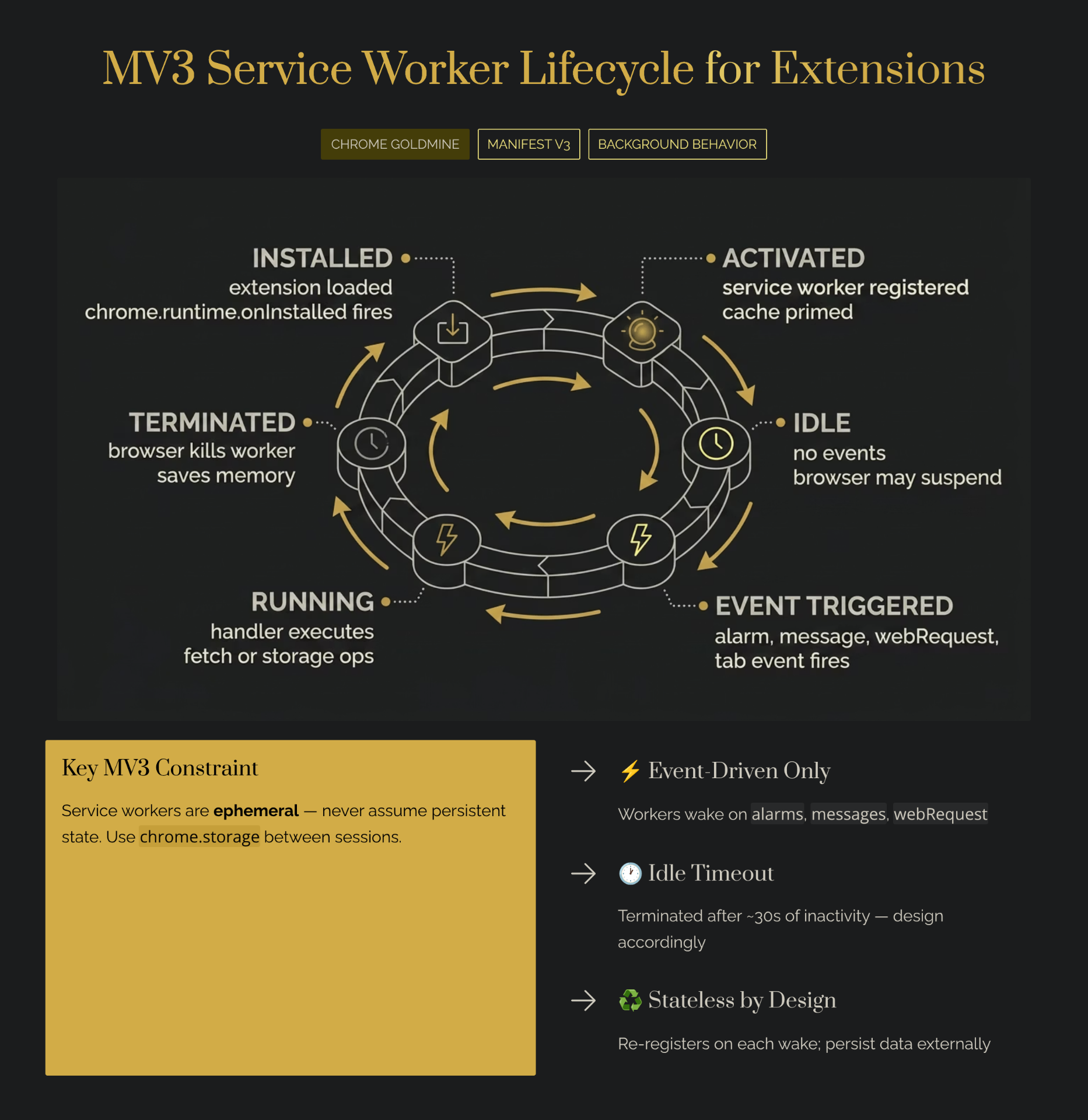
The Lifecycle of a Chrome Extension Service Worker
Managing the lifecycle of your service worker is the most challenging part of Manifest V3 development. If you don't understand when your worker wakes up and when it dies, your extension will suffer from unpredictable bugs and silent failures.
1. Installation and Activation
When a user installs your extension, the browser registers the service worker. During this phase, the `chrome.runtime.onInstalled` event is fired. This is the perfect place to initialize default settings, set up context menus, or open an onboarding page.
2. Event Handling (The Active State)
Your service worker spends most of its life waiting for events. When an event occurs — such as a message from a content script via `chrome.runtime.sendMessage` — the browser wakes up the service worker. It is crucial to register all your event listeners synchronously at the top level of your script. If you register them asynchronously inside a promise, the browser might not know your worker can handle the event.
3. Inactivity and Termination
If no events are received for a few minutes, the browser forcefully terminates the service worker to free up RAM. When the worker is terminated, all local variables are wiped. When the next event occurs, the worker restarts from scratch. You must design your architecture to assume that the worker could die at any millisecond.
Practical Implementation: Building Event-Driven Architecture
To thrive in the Manifest V3 ecosystem, you must embrace event-driven architecture. This means decoupling your logic and relying heavily on message passing and persistent storage.
{
  "manifest_version": 3,
  "name": "My Micro-SaaS Extension",
  "version": "1.0",
  "background": {
    "service_worker": "background.js"
  },
  "permissions": ["storage", "alarms"]
}
Inside your `background.js`, you should immediately set up your listeners. For example, if you are building a tool like GMass, which generates $5.4M/year (Starter Story), you need reliable message handling between your UI and your background logic.
// background.js
chrome.runtime.onInstalled.addListener(() => {
  chrome.storage.local.set({ isInitialized: true });
  console.log("Extension installed and state initialized.");
});

chrome.runtime.onMessage.addListener((request, sender, sendResponse) => {
  if (request.action === "fetchData") {
    handleDataFetch().then(sendResponse);
    return true; // Keeps the message channel open for the async response
  }
});
Notice the `return true;` in the message listener. This is a critical pattern. Because service workers handle tasks asynchronously, returning `true` tells the browser to keep the communication channel open until `sendResponse` is called. If you forget this, your content scripts will receive undefined responses, breaking your extension's functionality. For more on this, see our error handling guide.
Advanced Patterns: Offscreen Documents and Alarms
Using Offscreen Documents for DOM Access
If you are building a web scraping tool, you might need to parse complex HTML or interact with the clipboard. Since service workers cannot access the DOM, Chrome introduced Offscreen Documents in Chrome 109. An offscreen document is a hidden HTML page that your service worker can create dynamically. It has full DOM access but does not interrupt the user's browsing experience.
// Inside your service worker
async function setupOffscreenDocument(path) {
  const existingContexts = await chrome.runtime.getContexts({
    contextTypes: ['OFFSCREEN_DOCUMENT']
  });

  if (existingContexts.length > 0) {
    return; // Document already exists
  }

  await chrome.offscreen.createDocument({
    url: path,
    reasons: ['DOM_PARSER'],
    justification: 'Need to parse HTML for data extraction'
  });
}
Keeping Logic Alive with the Alarms API
Because service workers terminate after ~5 minutes, you cannot use `setInterval` or `setTimeout` for long-running background tasks. If you need to poll an API every 15 minutes or sync data periodically, you must use the `chrome.alarms` API. The Alarms API allows you to schedule code to run at a specific time or at regular intervals. When the alarm fires, it wakes up the service worker, executes the listener, and lets the worker go back to sleep. This is the only reliable way to handle periodic background tasks in Manifest V3.
Debugging Service Workers
Debugging service workers is notoriously difficult for indie makers transitioning from Manifest V2. The primary tool is the Chrome DevTools. Navigate to `chrome://extensions`, find your extension, and click the "Inspect views: service worker" link.
However, there is a massive catch: leaving the DevTools window open artificially keeps the service worker alive. If you are testing how your extension handles state loss or termination, you must close the DevTools window. Otherwise, your worker will never terminate, and your extension will work perfectly in development but fail in production. Use `chrome://serviceworker-internals` to manually stop the worker and observe how your extension recovers.
Common Mistakes Indie Makers Make
1. Relying on Global Variables for State
The most frequent mistake is storing user data or authentication tokens in global variables within `background.js`. Because the service worker terminates after 5 minutes of inactivity, those variables are wiped from memory. You must always persist critical state using `chrome.storage.local` or `chrome.storage.session`.
2. Asynchronous Event Listener Registration
If you wrap your `chrome.runtime.onMessage.addListener` inside an asynchronous function or a promise chain, the browser will not register it in time. When the service worker wakes up, it reads the top-level code synchronously. If the listener isn't there immediately, the message is dropped. Always register your listeners at the top level of your script.
3. Forgetting to Return True in Message Handlers
If your message listener performs an asynchronous operation before calling `sendResponse`, you must return `true` from the listener function. Failing to do this closes the message port prematurely, resulting in the dreaded "The message port closed before a response was received" error. For more pitfalls, see common vibe coding mistakes.
ROI: Is Building with Service Workers Worth It?
The market for AI-powered Chrome extensions alone is projected to reach $8.24 billion by 2033 (Market Research Intellect, 2024). By leveraging the performance benefits of service workers, your extension will consume less memory and run faster than older MV2 competitors. For payment integration in your MV3 extension, Outseta provides all-in-one auth, billing, and CRM.
| Time Investment (hours) | Monetary Investment ($) | Expected Outcome (range) | Assumptions |
|---|---|---|---|
| 80–200 hours | $0–$500 | $50–$500 MRR / 1k–10k downloads | Based on typical indie dev project, minimal marketing spend, niche focus |
Based on case studies from Indie Hackers and Starter Story (2021-2024). Assumes intermediate JavaScript/web development skill level and the use of modern frameworks like WXT or React. These numbers are estimates; real outcomes vary significantly.
Conclusion
Mastering the chrome extension service worker is the defining challenge for indie makers in the Manifest V3 era. By understanding the event-driven lifecycle, utilizing offscreen documents for complex DOM tasks, and rigorously managing state with the storage API, you can build incredibly powerful and efficient micro-SaaS products.
The transition away from persistent scripts forces better engineering practices. While debugging premature termination can be frustrating, the end result is a lighter, faster extension that users love. To put this architecture into a wider project, see our code structure & project organization guide for how the service worker fits alongside content scripts, popups, and shared utilities. Now that you understand the architecture, the next step is finding the right idea. Instead of starting from scratch, explore Chrome Goldmine. By acquiring an expired extension with an existing user base, you can apply your new MV3 knowledge to upgrade the background logic. Try the Weekend Challenge for a structured 48-hour sprint. Browse the database →
Put your MV3 skills on a proven extension
Thousands of extensions died in the MV3 switch. Pick one with an existing user base and rebuild it with the fixes above.
$23.20 $29 · 20% off for the first 100 buyers · one-time payment