Master Chrome Extension Error Handling: A 2026 Guide for Indie Makers
Fix MV3 service worker state loss, async sendResponse bugs, and CSP errors with proven Chrome extension error-handling patterns.
Article content
Effective chrome extension error handling is crucial for building reliable, user-friendly, and profitable browser extensions in 2026. It ensures a smooth user experience, minimizes negative reviews, and ultimately drives user retention and monetization.
The Chrome extension market is booming, projected to reach a staggering $5.0 Billion by 2033, growing at a CAGR of 14.00% (HTF Market Intelligence, 2025). For indie makers and vibe coders, mastering chrome extension error handling isn't just about fixing bugs; it's about building trust, reducing churn, and protecting your micro-SaaS revenue. This guide will equip you with the knowledge and strategies to proactively prevent, detect, and fix extension errors in the complex Manifest V3 environment. For the full build-to-publish playbook, see the complete guide to building Chrome extensions.
Why Robust Error Handling is Your Secret Weapon
For indie makers, every user counts. A single unhandled error can lead to a frustrated user, a negative review, and a lost customer. In the fast-paced world of Chrome extensions, where first impressions are everything, robust error handling is not a luxury — it's a necessity.
Building Trust and Credibility
Users expect extensions to work flawlessly. When an extension crashes, freezes, or behaves unexpectedly, it erodes trust. By implementing comprehensive error handling, you demonstrate professionalism and attention to detail. This builds a reputation for reliability, which is invaluable for attracting and retaining users in a crowded marketplace.
Minimizing Negative Reviews and Maximizing Retention
Negative reviews on the Chrome Web Store can severely impact your extension's visibility and download rates. Many negative reviews stem from unhandled errors or confusing error messages. Proactive troubleshooting and providing clear feedback to users can turn a potential one-star review into a positive interaction. This directly contributes to higher user retention, which is critical for any subscription-based micro-SaaS model. Before you launch, validate your idea with Mangools to ensure the niche has demand.
The Manifest V3 Imperative
The transition to Manifest V3 has introduced new architectural paradigms, particularly with service workers replacing persistent background pages. This shift brings significant benefits in terms of security and performance but also new challenges for error handling. Service workers are event-driven and non-persistent, meaning they can terminate when idle and lose in-memory state. Understanding and mitigating these Manifest V3 errors is paramount for any extension developer in 2026.
Decoding Manifest V3 Error Handling: New Challenges
Service Worker Lifecycle: The Stateless Challenge
In Manifest V3, your service worker is not persistent. It can be terminated by the browser after about 30 seconds of inactivity to conserve resources. This stateless nature is the source of many service worker errors. A common pitfall is storing state in global variables within the service worker script. When the worker terminates and restarts, those variables are reset, leading to unexpected behavior or crashes. The golden rule for MV3 service workers is: treat them as stateless.
// ❌ WRONG - userProjects will be empty on wake-up
let userProjects = [];
chrome.runtime.onMessage.addListener((message, sender, sendResponse) => {
  sendResponse({ projects: userProjects });
});// ✅ CORRECT - fetches state from storage on demand
chrome.runtime.onMessage.addListener((message, sender, sendResponse) => {
if (message.type === 'GET_PROJECTS') {
chrome.storage.local.get(['projects'], (result) => {
sendResponse({ projects: result.projects || [] });
});
return true; // Critical: keeps message channel open for async response
}
});Failing to return `true` for asynchronous `sendResponse` calls is another subtle but pervasive Manifest V3 error. If you don't return `true`, the message channel closes before your async operation completes, leading to silent failures that are incredibly difficult to debug.
Content Security Policy (CSP) and Script Execution
Manifest V3 enforces a stricter Content Security Policy (CSP), which can lead to extension errors related to script execution. Inline JavaScript and remotely hosted code are largely disallowed. This means all your code must be bundled within your extension package. Developers migrating from MV2 often encounter CSP violations if they haven't refactored their code to comply with these new rules. For more on how content scripts interact with CSP, see our dedicated guide.
Declarative Net Request: Rule Validation Errors
MV3 replaces the powerful `webRequest` blocking API with `declarativeNetRequest`. Instead of intercepting network requests at runtime, you define static rulesets upfront. While more performant and secure, this shift introduces new validation challenges. Chrome parses these rulesets at install time, and only the first few errors are typically displayed, potentially hiding deeper configuration problems. Developers must rigorously test their `declarativeNetRequest` rules by installing unpacked extensions.
Proactive Prevention: Strategies to Avoid Common Problems
1. Defensive Coding and Input Validation
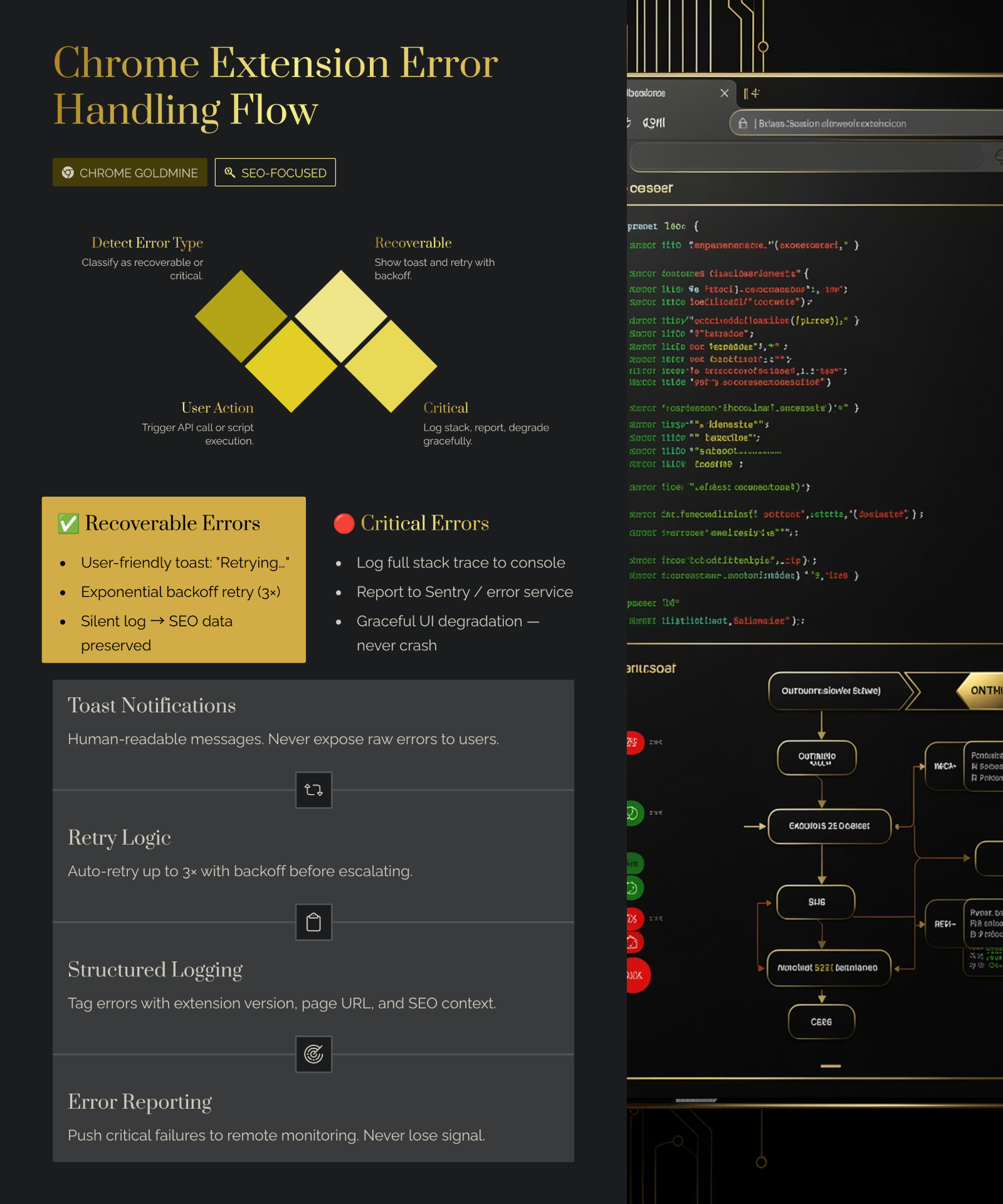
Always assume user input, API responses, and even internal data can be malformed or missing. Implement robust input validation at every boundary. Use `try-catch` blocks liberally, especially around asynchronous operations and external API calls.
async function getSettings() {
  const defaultSettings = {
    theme: 'dark',
    notifications: true,
    dataLimit: 5000
  };
  const settings = await chrome.storage.local.get(defaultSettings);
  return settings;
}
2. Clear State Management for Service Workers
Since service workers are stateless, avoid storing critical application state in global variables. Instead, rely on `chrome.storage` for persistent data and pass necessary information between different parts of your extension (popup, content script, service worker) using message passing. When a service worker wakes up, it should re-initialize its state from `chrome.storage`.
3. Comprehensive Testing
- Unit Tests: Test individual functions and modules in isolation.
- Integration Tests: Verify that different parts of your extension (e.g., content script communicating with service worker) work together correctly.
- End-to-End (E2E) Tests: Simulate real user interactions to ensure your extension functions as expected in a browser environment.
Debugging Like a Pro: Chrome DevTools and Beyond
When extension errors inevitably occur, knowing how to efficiently debug is paramount. Chrome DevTools is your most powerful ally, offering a comprehensive suite of tools for inspecting, profiling, and debugging your extension.
- Service Worker: Navigate to `chrome://extensions`, enable Developer Mode, and click the "service worker" link to open a dedicated DevTools instance.
- Popup: Right-click your extension icon → Inspect Popup to open DevTools for the popup context.
- Content Scripts: Open DevTools on any page where your content script runs. Your console.log statements appear in the page's console.
What Doesn't Work (and Why): Common Pitfalls
1. Ignoring User Reports
Many indie makers deprioritize user bug reports. This is a critical mistake. Users are your unpaid QA team. Often, one report represents many silent sufferers. Always acknowledge user reports, even if you can't fix them immediately. Provide a clear channel for feedback.
2. Over-reliance on console.log() in Production
- Performance overhead: Excessive logging can slow down your extension, especially in content scripts.
- Security risks: Sensitive information might accidentally be logged to the console.
- Clutter: A noisy console makes it harder to debug real problems.
What works better is using a structured logging approach with different log levels and integrating a remote error tracking service. For more common mistakes, see 7 common vibe coding mistakes.
3. Neglecting Manifest V3 Specifics
Attempting to develop a Manifest V3 extension with an MV2 mindset is a recipe for disaster. Specifically, treating service workers as persistent background pages will lead to state loss and unexpected termination. Embrace the event-driven nature of service workers and design your data persistence and communication accordingly.
ROI of Proactive Error Handling
| Investment Area | Initial Effort (hours) | Long-Term Savings (hours/month) | Impact on MRR/Growth |
|---|---|---|---|
| Basic Error Handling (try-catch, logging) | 10–20 | 5–10 | Prevents immediate crashes, reduces negative reviews. |
| Automated Error Tracking (Sentry/Jam.dev) | 20–40 | 10–20 | Proactive bug fixes, improved user retention, higher ratings. |
| Comprehensive Testing (Unit/E2E) | 40–80 | 15–30 | Catches bugs before release, ensures stability, builds trust. |
Based on typical indie maker development cycles. Assumes an extension with 1,000+ active users. These numbers are estimates; real outcomes vary based on extension complexity, user base, and development practices.
Investing in error handling is an investment in the longevity and profitability of your micro-SaaS. By reducing the time spent on reactive bug fixing, you free up valuable hours to develop new features and grow your business. For payment and subscription management, Outseta provides an all-in-one solution covering auth, billing, and CRM.
Conclusion
Mastering chrome extension error handling is not just a technical skill; it's a strategic advantage for indie makers in the competitive 2026 Chrome extension market. By understanding the nuances of Manifest V3, embracing proactive prevention strategies, and leveraging powerful debugging tools, you can build extensions that are not only functional but also incredibly robust and user-friendly.
The journey from idea to profitable micro-SaaS is fraught with challenges, but unhandled errors don't have to be one of them. Start implementing these strategies today, and transform potential extension errors into opportunities for learning and improvement. To go deeper on the debugging side, our Chrome Extension DevTools guide covers the inspector workflows, profiling tricks, and service-worker debugging tips that pair directly with the error-handling patterns above. For a structured approach to finding and validating ideas, check the Weekend Challenge.