Chrome Extension Screen Capture API for Indie Makers
Build a screenshot or screen-recording Chrome extension with desktopCapture and getDisplayMedia — pricing benchmarks and real case studies.
Article content
Chrome extension screen capture is one of the cleanest niches you can build in if you want fast validation and a clear user need. The browser already gives you a job to solve: capture a visible tab, grab a full page screenshot, record a screen, or let users share a window with one click. Chrome's Desktop Capture API supports screens, windows, and tabs, while MDN's Screen Capture API centers on `getDisplayMedia()` for user-selected capture streams. (Chrome for Developers)
For indie makers, that matters because the category has room, the workflow is easy to understand, and the monetization path is obvious. You can ship a tiny utility, validate demand quickly, and learn whether users want a screenshot extension API, chrome screen recording, or a full-page screenshot extension before you build anything larger. The Chrome ecosystem itself is large too: DebugBear counted 111,933 Chrome extensions in 2024 (DebugBear, 2024). Before you start, run a keyword check with Mangools to confirm your idea has real search demand.
Why Chrome Extension Screen Capture Is a Goldmine for Indie Makers
This niche sits at the intersection of a growing browser ecosystem and a growing capture market. The AI-powered Chrome extension market is growing 9.7% annually from 2026 to 2033, and the screen capture software market is moving from $10.92 billion in 2025 to $18.25 billion by 2029 (LinkedIn, 2026; Research and Markets, 2025). That is a healthy signal for a utility that solves a simple browser problem.
The best part is that screen capture is easy to explain. Users do not need a long onboarding sequence to understand why a tool matters. They already know what they want: save time, show a bug, record a demo, or capture a long page without manual stitching. That clarity is a gift for indie makers because clarity reduces support load and shortens the path to product-market fit.
You also get a natural distribution advantage. People search for screenshots, recording, and browser capture tools all the time, which gives you SEO-friendly long-tail opportunities like "capture visible tab," "chrome screen recording," and "full page screenshot extension." If you want a shortcut to explore those angles, Chrome Goldmine can help you scan vetted opportunities and expired extension patterns faster.
What Is the Chrome Extension Screen Capture API, Really?
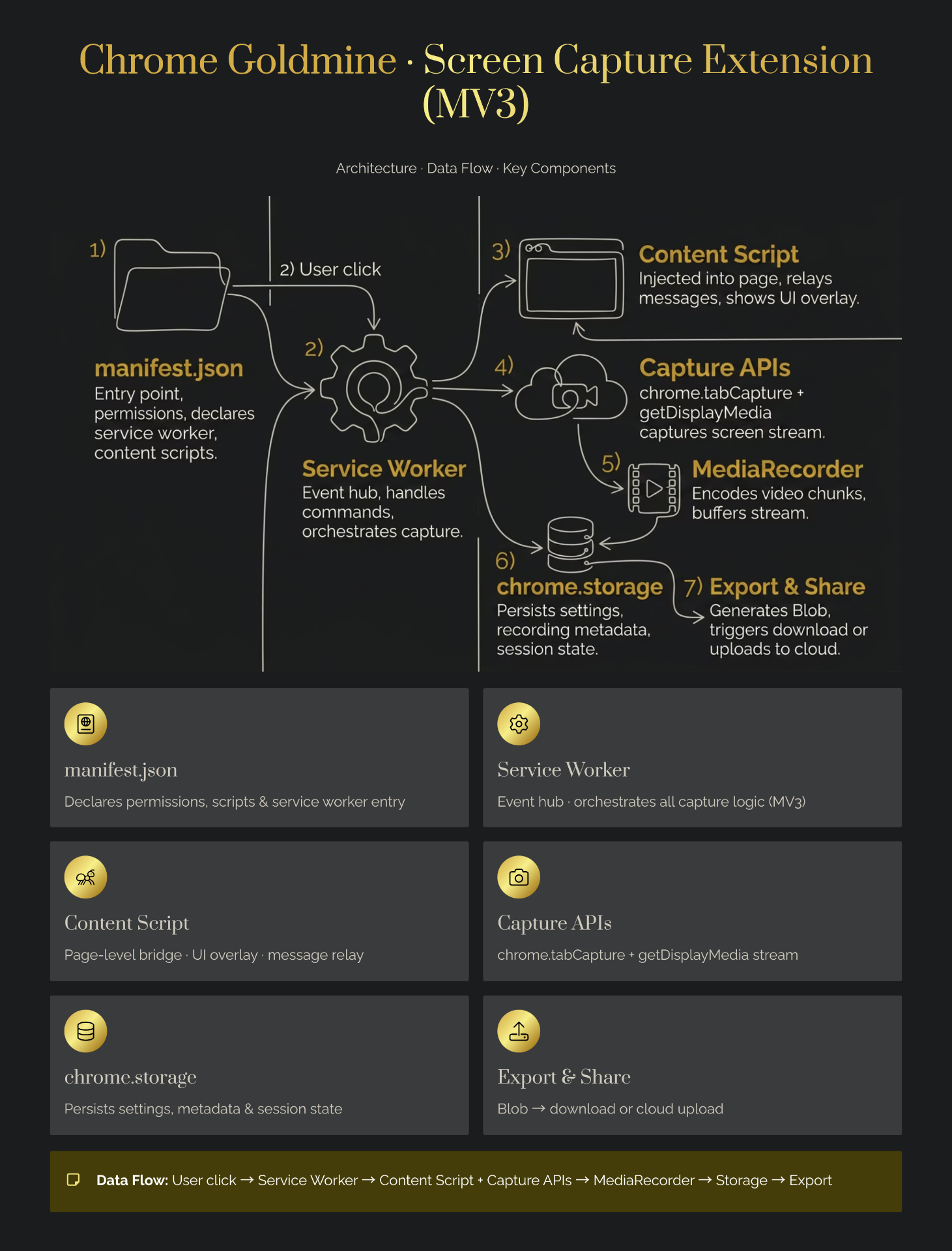
In practice, "chrome extension screen capture" is a family of browser-capability choices, not a single feature. Chrome's `desktopCapture` API lets extensions capture the screen, a window, or a tab, and it exposes source types such as `screen`, `window`, `tab`, and `audio` (Chrome for Developers). On the web side, the Screen Capture API uses `navigator.mediaDevices.getDisplayMedia()` to ask the user to choose a display surface and return a `MediaStream` (MDN, 2026).
That distinction matters because the API you choose shapes the product you can ship. If you want a lightweight screenshot extension, you might focus on visible-tab capture and annotate after the capture. If you want a chrome screen recording tool, you need media stream handling, recording logic, storage, and export flow. If you want a full-page screenshot extension, you need scrolling logic, stitching, or capture orchestration.
Chrome's permission model also changes the UX. Google says most extension APIs require declared permissions, and some permissions trigger warnings that users must approve (Chrome for Developers). That means the best extension products usually win by asking for as little as possible and explaining the benefit in plain language.
A Simple Build Path
- Decide your first job: screenshot, recording, or both.
- Capture the smallest useful surface: visible tab first, full page later.
- Add one export path: PNG for screenshots, WebM or MP4-style flow for recordings.
- Store only what you need, and avoid scary permissions unless the feature truly needs them.
That is enough to validate interest before you overbuild the app. For a broader roadmap, check the complete guide to building Chrome extensions and use it as the "what to make" companion piece.
What Makes Chrome Extension Screen Capture Profitable in 2026?
The money comes from specificity. The strongest products in this space do one job better than broad suites, and users pay for that convenience. GoFullPage wins because it stays focused on full-page screenshots, while Awesome Screenshot wins because it combines capture and recording for a wide audience (Chrome Web Store; Awesome Screenshot). The gap for indie makers is not "build another general tool." It is "build the fastest possible tool for one job and one audience."
The audience matters as much as the feature. Indie makers, vibe coders, and solopreneurs often want a simple browser capture tool for demos, bug reports, design feedback, or content creation. That means the product can stay small, but the use case can stay valuable. A small surface area also makes support easier, which is one reason these products can be so appealing as side projects.
There is also an SEO angle. Search intent around screen capture is fragmented, which helps you rank for focused queries rather than fighting for a single huge keyword. You can target "screenshot extension API," "chrome screen recording," "capture visible tab," and "full page screenshot extension" with separate pages, use cases, and examples.
Real Indie Maker Examples That Prove the Model
The proof is already visible in the indie community. Alma's Showesome Screen Recorder was built as a free, unlimited Chrome extension focused on speed, cleanliness, no limits, privacy, and zero cost, and it grew from 19 users to 59 users in two days (Indie Hackers, 2025). That kind of early traction is exactly what you want from a browser utility: fast feedback and clear user intent.
Xnapper shows the other side of the same opportunity. It is a screenshot app, not a browser extension, but it still demonstrates how screenshot tooling can become a real business. The founder discussed reaching $6K/month as part of a broader solopreneur journey to $45K/month in two years (Indie Hackers, 2023). The lesson is simple: visual capture tools can monetize when they save people time and make output look polished.
A Reddit builder shared a Chrome extension for developers and designers that helps fix UI issues, and they reported paid customers after roughly 30 months of work (Reddit, 2024). Another example comes from an AI Chrome extension that reportedly made $3,500 in two months after the founder sold ownership and source code (Medium, 2025). These examples prove there is room for both bootstrapped products and quick-turn validation.
What to Copy from These Wins
- Keep the first version narrow.
- Make the value obvious in seconds.
- Optimize for privacy and trust.
- Ship the smallest thing that gets a repeat use.
Common Mistakes Indie Makers Make With Screen Capture Extensions
The biggest mistake is building a broad "record everything" suite too early. That puts you in direct competition with tools like Loom, Vidyard, and other general capture platforms, where brand and distribution matter more than your feature list. The pricing snapshot shows that many of those tools are not priced for solo builders, but they are still strong incumbents with broad positioning (BetterBugs.io). Avoid these common vibe coding mistakes when building your first capture tool.
A second mistake is asking for too many permissions up front. Chrome explicitly warns that some permissions trigger user-facing warnings, and those warnings can kill trust before the first capture even happens (Chrome for Developers). If your extension asks for broad access before it proves value, you will lose users who would otherwise try the tool.
The third mistake is ignoring the actual workflow. People do not buy "screen capture" in the abstract. They buy "send a bug report faster," "create a clean tutorial screenshot," or "record a demo without opening another app." When you forget the job-to-be-done, you end up with a technically correct product that no one feels compelled to use.
Essential Tools, Permissions, and Build Choices
Start with the official APIs, then add only what the product truly needs. On the capture side, Chrome's `desktopCapture` API handles screen, window, and tab capture, while MDN's Screen Capture docs explain how `getDisplayMedia()` returns a stream you can record or share. On the extension side, Chrome's permissions and storage APIs help you keep state and request access responsibly.
For monetization, the pricing map gives you a good benchmark. BetterBugs sits at $10/user/month for Teams, Loom at $18/user/month for Business and $24/user/month for Business + AI, Awesome Screenshot at $5–$6/month, ScreenPal from $4 to $10/user/month, and Vidyard starting at $59/seat/month (BetterBugs.io). Those numbers show two things: the market accepts paid capture software, and a solo-friendly price tier can be competitive. For payment integration, Outseta provides an all-in-one solution covering auth, billing, and CRM.
A Lean Stack for a First Version
- Chrome extension manifest and permissions
- `desktopCapture` or `getDisplayMedia()` depending on your use case
- `chrome.storage` for local state
- A simple landing page with one clear promise
- A checkout or license flow if you are monetizing from day one
ROI: Is Chrome Extension Screen Capture Worth Your Time?
| Time Investment (hours) | Monetary Investment ($) | Expected Outcome (range) | Assumptions |
|---|---|---|---|
| 20–60 hours | 0–300 | 0–500 downloads or $0–$500 MRR | Solo builder, one core capture feature, basic landing page, light marketing |
| 60–120 hours | 50–500 | 500–2,000 downloads or $500–$3,000 MRR | Better onboarding, polished UX, some SEO content, and a clear niche |
| 120–200 hours | 100–1,000 | 2,000+ downloads or $3,000–$6,000+ MRR | Strong positioning, distribution, and a product that solves one urgent workflow well |
These numbers are estimates based on indie case studies and pricing snapshots. Assumes a solo builder with decent JavaScript skills and no large paid ad budget. Real outcomes vary widely.
A good shortcut is to compare your idea against real opportunity data before you build. That is exactly where a curated opportunity database helps: you can use it to look for categories, historical demand, and patterns that tend to repeat. If you want fewer false starts, Chrome Goldmine gives you a faster way to pressure-test the idea before you spend a weekend building the wrong thing. Check the Weekend Challenge for a structured 48-hour sprint approach.
Conclusion
Chrome extension screen capture is a strong indie-maker opportunity because it combines a clear job, a familiar browser context, and multiple monetization paths. You can start with a single screen capture feature, validate demand quickly, and expand only after people show real behavior. That is the kind of small, useful product that often turns into a real business.
The smartest move is to keep the first version narrow, minimize permissions, and build around one user pain. If you want a faster path from idea to launch, use Chrome Goldmine to find patterns, expired opportunities, and other signals before you commit to a build. For more niche ideas, explore the profitable Chrome extension niches pillar.