Chrome Extension Development Guide 2026: Build, Launch, and Grow a Profitable MV3 Extension
The complete 2026 roadmap for building, validating, and launching a Chrome extension on Manifest V3 — architecture to monetization.
Article content
Chrome extension development in 2026 is best approached as a Manifest V3-first, workflow-driven product discipline. If you want the short answer, here it is: start with a narrow problem, build on MV3 from day one, keep permissions minimal, validate demand before polishing, and treat the Chrome Web Store as both a distribution channel and a trust surface. That matters because Chrome still holds 66.7% worldwide browser market share according to StatCounter's March 2026 data, and the Chrome extension ecosystem remains enormous, with 236,680 extensions tracked by Chrome-Stats as of April 15, 2026. In other words, the opportunity is real, but so is the competition.
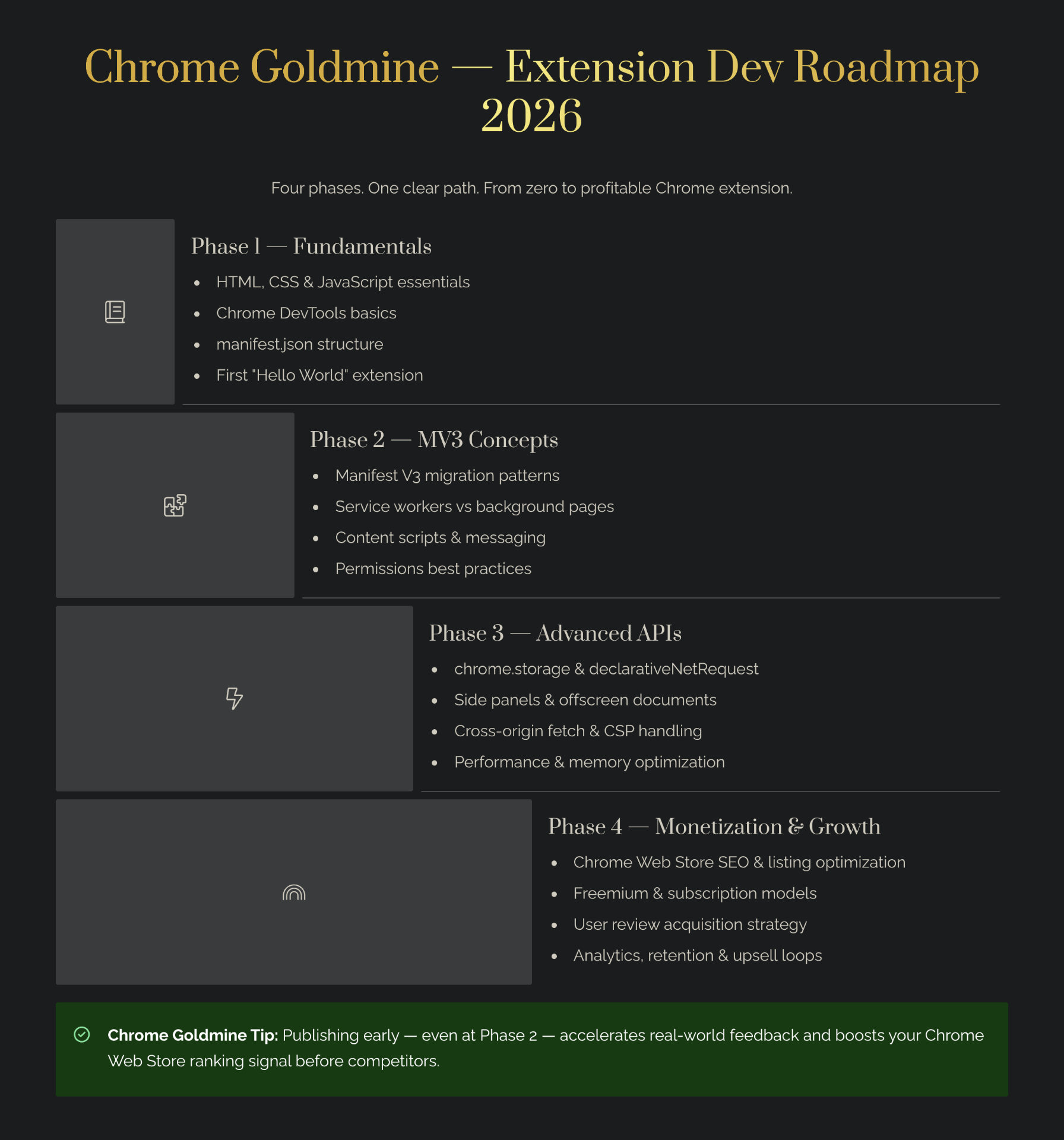
This guide shows you how to build a Chrome extension the right way in 2026. You will learn how Manifest V3 changes architecture, how to validate ideas before you sink weeks into code, how to ship an MVP faster with modern starter kits and AI builders, how to publish without triggering avoidable review issues, and how to think about monetization like an indie maker instead of a hobbyist. I will also show you what does not work, because the biggest trap in browser extensions is assuming installs automatically become a business.
What is the best way to approach Chrome extension development in 2026?
The best way to approach Chrome extension development in 2026 is to think in three layers: product, architecture, and distribution. Product comes first because a browser extension only wins when it solves a repetitive in-browser problem. Architecture comes second because Google's extension platform now revolves around Manifest V3, service workers, strict code packaging, and tighter permission expectations. Distribution comes third because Chrome Web Store discoverability, reviews, onboarding, and retention often matter more than how elegant your initial codebase looks.
Google's own documentation is clear that Manifest V3 is the current version and that the Chrome Web Store no longer accepts Manifest V2 extensions (Chrome for Developers). Google also explains that MV3 replaces long-lived background pages with service workers, disallows remotely hosted code, and moves many network-modification use cases toward declarativeNetRequest for privacy, security, and performance reasons (Chrome for Developers). So, if you still start from old tutorials, you are building on the wrong foundation.
For indie makers, the practical playbook looks like this:
| Layer | Main question | What good looks like in 2026 |
|---|---|---|
| Product | What painful browser task am I removing? | High-frequency, obvious pain, fast time-to-value |
| Architecture | How do I implement it on MV3 cleanly? | Minimal permissions, service-worker-safe design, no remote code |
| Distribution | How will users discover, trust, and pay for it? | Strong listing copy, screenshots, onboarding, and monetization path |
If you keep those three layers in order, you avoid the most common founder mistake: spending a month polishing a technically impressive extension that nobody really needs.
Why Chrome extensions are still a strong product channel in 2026
Many founders default to SaaS or mobile apps, but Chrome extensions still offer a structural advantage that few channels can match. A good extension lives inside the user's existing workflow. It sits on the websites they already use, appears exactly when the problem occurs, and reduces switching costs. That context is powerful. A standalone SaaS asks users to open a tab, sign in, and remember to come back. A useful extension often becomes part of a habit loop.
That opportunity is especially interesting in 2026 because Chrome remains the dominant browser worldwide at 66.7% share (StatCounter), and the Web Store is large enough to prove enduring demand, with 236,680 tracked extensions (Chrome-Stats). The market is crowded, but crowded does not mean closed. It means users already understand the format, trust the install flow, and actively search for tools that save time.
The best categories usually share four traits. First, they are tied to repeated workflows like recruiting, sales outreach, writing, summarization, research, e-commerce, or browser-based operations. Second, the value appears quickly. Third, the extension can either save money or make money. Fourth, the problem is visible enough that users can describe it in search language.
A good mental model is this: a Chrome extension is often not your entire business. It is your distribution wedge. Honey used that wedge so effectively that PayPal acquired it for $4 billion, a reminder that a browser extension can become a strategic asset rather than a side utility (Inc. coverage). At the smaller end, Tactiq used a browser extension format to grow rapidly around a clear workflow problem, and one Indie Hackers case study reports 150,000+ new users from a targeted TikTok creator campaign with just $1,820 in spend (Indie Hackers).
That said, you should not romanticize the channel. Browser extensions are only strong when the product is tightly tied to the browser. If your core value happens outside the browser, the extension might be a feature, not the main product.
If you are still looking for extension ideas or expansion angles, a curated database such as Chrome Goldmine can help you spot patterns faster than manual browsing. It is most useful when you already understand the workflow pain you want to target and need inspiration, category signals, or examples to reverse-engineer.
How Chrome extensions actually work under Manifest V3
Manifest V3 changes how you should think about extension architecture. The mental model is simpler when you break it into five moving parts: the manifest, the service worker, content scripts, the popup or side panel UI, and storage or messaging.
1. The manifest defines your contract with Chrome
The `manifest.json` file tells Chrome what your extension is, what permissions it needs, and which files should run in which context. In 2026, your manifest should feel conservative. Ask only for permissions you can justify to a skeptical user and to the review team.
{
  "manifest_version": 3,
  "name": "Page Insight Mini",
  "version": "0.1.0",
  "description": "Analyze the current page and summarize key metadata.",
  "permissions": ["activeTab", "storage", "scripting"],
  "host_permissions": ["https://api.example.com/*"],
  "background": {
    "service_worker": "background.js",
    "type": "module"
  },
  "action": {
    "default_popup": "popup.html",
    "default_title": "Analyze page"
  }
}
That small file already tells you a lot about extension design. The extension uses MV3, runs a service worker, opens a popup, and requests only the permissions required to inspect the active page and persist lightweight state.
2. The service worker is event-driven, not always on
Google explains that MV3 replaces long-lived background pages with service workers that run only when needed (Chrome for Developers). This is the architectural shift that breaks the most old tutorials. You can no longer assume an always-awake background process that stores everything in memory forever.
Instead, you design for wake, handle, persist, exit. That means storing state deliberately, using alarms or messaging where appropriate, and avoiding fragile in-memory assumptions.
chrome.runtime.onMessage.addListener((message, sender, sendResponse) => {
  if (message.type === 'ANALYZE_PAGE') {
    analyzePage(message.payload)
      .then((result) => sendResponse({ ok: true, result }))
      .catch((error) => sendResponse({ ok: false, error: error.message }));

    return true; // keeps the message channel open for async response
  }
});

async function analyzePage(payload) {
  const { title, metaDescription, headings } = payload;
  const score = [title, metaDescription, headings?.length > 0].filter(Boolean).length;
  await chrome.storage.local.set({ lastAuditAt: Date.now() });
  return { score, title, metaDescription, headingCount: headings.length };
}
3. Content scripts are your page-level operators
Content scripts run inside the target page and can read or modify the DOM. They are perfect for extracting context, injecting UI, or listening for user interactions on specific sites. They are not where you want brittle business logic or secret keys.
const title = document.title;
const metaDescription = document.querySelector('meta[name="description"]')?.content || '';
const headings = [...document.querySelectorAll('h1, h2, h3')].map((el) => el.textContent?.trim());

chrome.runtime.sendMessage({
  type: 'ANALYZE_PAGE',
  payload: { title, metaDescription, headings }
});
4. The popup is the user-facing control layer
The popup is usually your fastest path to usable UI. For simple tools, plain HTML, CSS, and JavaScript still work well. For more ambitious products, React plus a lightweight bundler is common. If you want to prototype popup UIs faster, AI-assisted builders such as Bolt.new or Lovable can help you draft interfaces and flows quickly. However, you still need to adapt the generated code to MV3 packaging, permission boundaries, and extension-specific UX.
5. Security and trust are part of architecture now
Google explicitly frames MV3 around privacy, security, and performance, and it also prohibits remotely hosted code in extensions (Chrome for Developers). That means you should bundle code, minimize third-party dependencies, document why every permission exists, and prepare a plain-language privacy policy. In 2026, users are far more skeptical of browser add-ons that feel opaque.
How to build a Chrome extension step by step
The biggest difference between shipping and stalling is not technical brilliance. It is sequencing. Strong extension builders work from validation to architecture to MVP to review readiness. Weak extension builders start with cool implementation details and hope the market catches up.
Step 1: Validate the workflow before writing much code
Start by describing the user problem in one sentence: "When I am on this page, I need to do this repeated task faster, more accurately, or with less friction." If you cannot finish that sentence clearly, your extension idea is probably not ready.
Use this quick validation scorecard:
| Validation question | Strong answer | Weak answer |
|---|---|---|
| Is the problem visible inside the browser? | Yes, on every relevant page or site | No, mostly outside the browser |
| Is it frequent? | Daily or weekly | Rare or niche-only |
| Is the pain expensive? | Saves money, time, or decisions | Mild convenience only |
| Can users describe it in plain language? | Yes, easy search terms | Hard to explain |
| Is there a logical paid upgrade? | Yes, premium workflow or data layer | No monetization path |
If you want to move faster, use idea libraries, category research, and existing store patterns. This is where Chrome Goldmine can function as a shortcut. Instead of guessing which categories are crowded, stale, or promising, you can study the market with more intention.
Step 2: Pick your build strategy honestly
You do not need the same stack for every extension. A minimal utility extension may need no framework at all. A heavier product with auth, dashboards, and synced data may justify React, typed APIs, and shared backend infrastructure.
| Build strategy | Best for | Trade-off |
|---|---|---|
| Vanilla JS + HTML/CSS | Small utilities, low-complexity MVPs | Fastest start, weaker long-term structure |
| TypeScript + Vite | Most serious indie projects | Slightly more setup, cleaner scaling |
| Full starter kit | Monetized products, faster shipping | Less educational, more abstraction |
| AI-assisted prototyping | Early UI exploration | Generated code still needs review and cleanup |
If your goal is speed, starter kits can save days or weeks. For example, TurboStarter is relevant if you want a starter that can ship web apps, mobile apps, and browser extensions from a shared workflow. LaunchFast can also fit if you want Chrome extension starter kits without rebuilding surrounding infrastructure from scratch.
Step 3: Keep the MVP brutally small
Your first version should solve one job. Not five. Not a platform. One job.
Good MVP examples include summarizing a page, extracting structured data, autofilling repetitive text, annotating specific elements, checking metadata, comparing visible offers, or triggering a workflow on a known site. Bad MVPs include giant "AI assistant" extensions that request broad permissions, support ten websites, and try to be your next startup in week one.
A useful rule is to define one primary success event. For example:
- "User clicks icon and gets a useful summary in under 10 seconds."
- "User saves 5 minutes per form submission."
- "User can collect structured page data in one click."
Once you define the success event, your product decisions become easier.
Step 4: Design for permissions and trust early
Do not leave permissions until the end. Permissions shape user trust, review friction, and retention. Asking for `activeTab` on click feels different from asking for permanent access to all sites. In many cases, narrower scope improves installs because users understand what they are granting.
Step 5: Test in real usage conditions
A local happy-path demo is not enough. Test cold starts. Test service worker wake-ups. Test refresh behavior. Test different websites. Test empty states. Test what happens when APIs fail. Test what happens when the popup closes mid-flow.
Step 6: Prepare your Chrome Web Store assets
Before submission, prepare these essentials:
| Asset | Why it matters |
|---|---|
| Clear title and subtitle | Drives store CTR and trust |
| Screenshots with real value moments | Helps users understand outcomes fast |
| Privacy policy | Required or expected in many cases |
| Simple onboarding screen | Reduces uninstall risk |
| Support contact | Signals legitimacy |
| FAQ-ready description copy | Helps answer objections before install |
Step 7: Ship, observe, and tighten
Shipping is where the learning starts. Track search impressions, install conversion, activation, and early retention. Most extension founders over-focus on install counts and under-focus on activation quality. A thousand curious installs can matter less than fifty users who hit the core success event consistently.
What makes a Chrome extension idea profitable in 2026?
A profitable Chrome extension idea is not just a feature people like. It is a repeated, painful, monetizable browser moment. The easiest way to judge an idea is to ask whether the user would feel ongoing relief if the extension worked perfectly.
The best ideas usually sit at the intersection of context, frequency, and economic value. Context means the extension appears exactly where the work happens. Frequency means users encounter the problem often enough to care. Economic value means the extension either helps them earn more, save time, reduce errors, or protect revenue.
| Attribute | Why it matters | Ideal sign |
|---|---|---|
| Repetition | Repeated use drives retention | Daily or weekly workflow |
| Context | In-browser context creates wedge advantage | Happens on known sites or pages |
| Pain intensity | Strong pain supports willingness to pay | Users already use manual workarounds |
| Outcome clarity | Clear outcomes improve conversion | "Save X minutes" or "avoid Y error" |
| Expansion potential | Great extensions often lead to broader products | Can grow into team, API, or SaaS layer |
Tactiq is a good example of the upside. According to an Indie Hackers case study, it used a focused workflow around meeting transcription and notes, then amplified distribution with creator marketing to acquire 150,000+ new users and scale beyond 180,000 users (Indie Hackers). That is not just "a cool extension." It is a workflow product with obvious, repeated value.
Honey represents the opposite extreme: a browser-native behavior, huge consumer familiarity, and a compelling economic story that ultimately led to a $4 billion acquisition (Inc. coverage). You should not expect Honey-scale outcomes, but it shows the format can support very large businesses when the wedge is strong.
If you are an indie maker, start with narrower categories such as:
- productivity overlays for specific roles
- browser-based research workflows
- e-commerce tools for specific merchant types
- AI-assisted writing or summarization inside target apps
- form automation
- lead enrichment
- QA, SEO, or metadata auditing
- marketplace helpers
These niches also pair well with content and affiliate business models. For instance, if your extension helps builders audit pages or improve listings, it can naturally point advanced users toward complementary tools like Mangools for keyword research or Alli AI for deployment-oriented SEO workflows.
What doesn't work in Chrome extension businesses, and why?
This is the section many glossy guides skip. Chrome extensions can absolutely work, but several common approaches fail predictably.
1. Chasing installs without a monetization model
The clearest cautionary tale in the research is the Indie Hackers founder behind a responsive-testing extension who reported 70,000+ users and only about $30 at best from ads (Indie Hackers). That is a perfect reminder that install counts are a vanity metric if they do not connect to revenue, lead capture, paid features, or downstream product value.
2. Building too much before validating demand
Another founder story illustrates a different failure mode. Productpanel.io took roughly two years of part-time effort to build, yet the founder disclosed 426 registered users, 4 paying customers, and about $36 MRR (Indie Hackers). The product may have been real, but the market proof came too late and too weakly.
3. Asking for broad permissions too early
Users are more privacy-conscious now, and MV3 itself pushes the ecosystem toward tighter security expectations. If your extension asks for more access than the user expects, installs drop and trust erodes. Minimal permissions are not just a technical best practice. They are a growth tactic.
4. Treating the Web Store listing as an afterthought
Some founders spend weeks coding and ten minutes on screenshots, description copy, and onboarding. That is backwards. The store listing is your landing page. Your screenshots, first sentence, subtitle, and review profile do real conversion work.
5. Assuming AI-generated code is production-ready
AI builders can speed you up. I use them as accelerators, not substitutes for technical judgment. If you prototype a popup with Replit, Bolt.new, or Lovable, that is fine. But generated code still needs permission review, bundling review, service-worker awareness, and Chrome Web Store compliance checks.
A browser extension is not automatically a business. It becomes a business when you pair product utility with trust, retention, and a monetization path.
Is Chrome extension development worth it in 2026? ROI, time, and cost ranges
For the right problem, yes. Chrome extension development can be one of the highest-leverage product bets for indie makers because the distribution is built into the browser and the MVP can be relatively small. But the economics vary wildly depending on the problem, complexity, and go-to-market approach.
| Project type | Time (hours) | Cost ($) | Expected outcome | Assumptions |
|---|---|---|---|---|
| Tiny utility MVP | 15–40 | 0–300 | Early validation, a few dozen to a few hundred installs | You already know the niche and ship a single-job extension |
| Serious niche extension | 40–120 | 100–1,500 | Hundreds to low thousands of installs, first monetization signal | Decent execution and basic launch distribution |
| Monetized workflow product | 120–300 | 500–5,000 | Low hundreds to low thousands in MRR over time | Painful workflow solved with onboarding, pricing, and retention |
| Aggressive growth play | 150–400+ | 1,000–10,000+ | Strong user acquisition and a chance to build a defensible business | Product-market fit with serious content, partnerships, or creator distribution |
A useful way to think about ROI is not "How much money can any extension make?" but "How quickly can I validate whether this browser-native pain deserves a real product?" Extensions are often excellent for cheap validation. They let you test usage and willingness to pay closer to the workflow than a standalone SaaS landing page ever could.
This is where tooling choices matter. If you can reduce setup friction with a relevant starter such as TurboStarter or LaunchFast, you may improve ROI simply by reaching feedback sooner. Likewise, if you use AI coding help through Replit or UI generation through Lovable, you can shift more of your time into validation and less into repetitive setup.
How to launch, grow, and monetize a Chrome extension
A Chrome extension rarely wins because of code alone. It wins because the value is easy to understand, the install feels safe, and the user experiences the benefit quickly.
Chrome Web Store SEO basics
Chrome Web Store SEO is not the same as Google SEO, but the principles overlap. Use a clear title, a descriptive subtitle, screenshots that show outcomes, and listing copy that repeats the user problem in natural language. Avoid clever names that hide what the extension does.
A strong listing should answer these questions in seconds:
- What does this extension do?
- Who is it for?
- What result appears after installation?
- Why is it safe?
- What makes it better than the manual method?
Activation matters more than raw installs
Your first-run experience should reduce uncertainty. Show one clear action. Delay optional settings. Explain permissions in plain language. If the user needs to connect an account, make the reason obvious.
Pick a monetization model that matches the job
| Model | Best for | Risk |
|---|---|---|
| Freemium | Broad adoption categories | Can attract many free users with weak conversion |
| One-time payment | Small but durable utilities | Harder to fund ongoing support |
| Subscription | Workflow products with continuing value | Requires retention and strong onboarding |
| Lead generation | B2B or service businesses | Indirect monetization can be hard to measure |
| Affiliate layer | Comparison, discovery, or optimization use cases | Must remain useful and honest |
If you promote affiliate programs, extensions can fit nicely when the product naturally surfaces adjacent tools. For example, an extension that audits pages could recommend Mangools for deeper keyword research. A builder-oriented extension could point users toward TurboStarter when they outgrow the MVP. The key is to make the recommendation feel like a logical next step, not a forced insert. Read more about affiliate marketing for Chrome extensions.
Distribution is often more creative than technical
The Tactiq case study is powerful because it shows that distribution creativity can be the unlock. The company reportedly reached out to 320 creators, partnered with 16, published 22 TikToks, spent $1,820, and acquired 150,000+ users (Indie Hackers). That is not a generic "post on social media" lesson. It is a lesson in persona-channel fit.
Indie makers can adapt that approach in smaller ways:
- launch with use-case content, not just product announcements
- record short before-and-after demos
- publish walkthroughs in the communities where the workflow already exists
- collect email addresses early
- ask active users what the paid upgrade should be
If you want long-term leverage, pair the extension with a content engine. A newsletter through Kit, Beehiiv, or MailerLite can help you own the audience instead of relying entirely on Web Store traffic.
Chrome extension security, privacy, and trust checklist
E-E-A-T matters for extension content because trust is central to installs. Users are deciding whether to give your code access to their browser behavior. So your article, your product, and your listing all need to signal competence and restraint.
| Trust area | What to do |
|---|---|
| Permissions | Request the minimum viable set and explain each one plainly |
| Code packaging | Bundle code locally and avoid remotely hosted executable code |
| Privacy | State what you collect, why, where it is stored, and how users can contact you |
| UI clarity | Make actions predictable and reversible where possible |
| Reviews and support | Respond to feedback and show an active maintenance posture |
| Updates | Ship visible fixes and changelogs so users feel the product is alive |
Google's MV3 platform direction reinforces this trust-first approach. The official docs emphasize security, privacy, performance, and the removal of remotely hosted code (Chrome for Developers). That means extension founders who still think like "growth hackers first, trust later" are fighting the platform.
A practical 30-day workflow for shipping your first serious Chrome extension
If you feel overwhelmed by the gap between "I have an idea" and "I have a launch-ready extension," use a short-cycle workflow instead of an open-ended build.
Days 1–3: Define the job and pressure-test the idea
Write a one-line problem statement, collect ten examples of the workflow happening in the wild, and compare existing extensions in the category. Your goal here is not originality for its own sake. Your goal is to discover whether users already understand the problem and whether current tools leave obvious gaps.
Days 4–7: Design the MVP and trust model
Decide which permissions you truly need, which pages the extension touches, and what the first successful outcome looks like. Draw the architecture before you code. This is also the right time to write the first version of your privacy explanation.
Days 8–14: Build the smallest usable version
Ship one workflow. Resist feature branching. If you are strong in frontend but weak in setup, this is the window where a tool like Replit can help you prototype faster, while a starter kit such as TurboStarter or LaunchFast can save time on repetitive scaffolding.
Days 15–21: Test edge cases and tighten onboarding
Test the extension on real pages, not toy examples. Watch for breakpoints caused by missing DOM elements, timing issues, permissions confusion, or popup-state assumptions. Rewrite any confusing microcopy. Cut settings that do not help the user reach value faster.
Days 22–26: Prepare the listing and launch assets
Write the title, subtitle, description, and screenshot captions after the product exists, but before launch. Many founders do this too late and end up describing implementation instead of outcomes. Users care about the result. Reviewers care about clarity.
Days 27–30: Launch narrowly and learn quickly
Do not wait for perfect branding. Launch to a narrow audience, a relevant community, an email list, or a small creator cluster. Your goal is to collect behavior, not applause. If a small group installs but fails to activate, improve onboarding. If they activate but never return, the workflow is not sticky enough. If they return but will not pay, the monetization model is weak or premature.
Conclusion: the real opportunity in Chrome extension development in 2026
Chrome extension development in 2026 is not dead, and it is not easy. It is one of the best channels for products that solve real browser-native pain. The winning formula is straightforward: build on Manifest V3, pick a narrow problem, keep permissions tight, launch before you overbuild, and treat trust as part of the product.
The case studies make the lesson even clearer. A focused extension with a sharp growth strategy can scale quickly, as the Tactiq story suggests. A popular extension without monetization can stall, as the 70,000-user case shows. A two-year build can still underperform if positioning is weak. The outcome depends less on whether extensions "still work" and more on whether your product deserves repeated use.
If you now want the fastest next step, do not start by polishing code. Start by validating the problem and studying the category. That is exactly where Chrome Goldmine can help. And if you already have a strong idea, use the right tooling, ship the smallest version that proves value, and let the market teach you what deserves to scale.
Related reading
- How to Build Chrome Extensions: The Complete Guide — our full pillar guide covering everything from scratch
- Revive an Expired Chrome Extension — step-by-step guide to rebuilding abandoned extensions
- Weekend Challenge: Build and Ship in 48 Hours — a sprint-based approach to shipping fast
- Chrome Extension Monetization — pricing, payments, and revenue strategies
- Reverse Engineering Chrome Extensions — learn from what top extensions do right
- Service Workers Deep Dive — mastering the MV3 background model
- Code Structure & Project Organization — how to lay out a maintainable MV3 codebase
- Chrome Extension DevTools Guide — debug, profile, and ship faster with the right tooling