








Content Scripts in Chrome Extensions: A Complete Tutorial for Indie Developers
Learn Chrome extension content scripts: MV3 injection, Shadow DOM UI, SPA navigation fixes, and avoiding brittle CSS selectors.
Article content
Chrome extension content scripts are JavaScript files that run in the context of web pages, allowing you to read details of the web pages the browser visits, make changes to them, and inject custom user interfaces. By mastering content scripts, indie makers can build powerful micro-SaaS products that seamlessly integrate into users' existing workflows, directly manipulating the DOM to add AI features, productivity overlays, or data extraction tools.
If you are an indie maker or a vibe coder looking to build a profitable micro-SaaS, understanding how to leverage chrome extension content scripts is your golden ticket. The Chrome extensions market is booming, currently valued at $2.5 billion in 2025 and projected to hit $5.0 billion by 2033 (HTF Market Intelligence, 2025). This massive growth means there is unprecedented opportunity for solo developers to carve out lucrative niches.
By the end of this comprehensive guide, you will know exactly how to inject scripts into a webpage, manipulate the DOM safely under Manifest V3, and avoid the common pitfalls that cause extensions to crash. More importantly, you will learn how to validate your ideas faster and shorten your build time, turning a simple `content.js` file into a revenue-generating asset. For the full build-to-publish playbook, see the complete guide to building Chrome extensions.
What Makes Content Scripts Profitable in 2026?
The true power of a Chrome extension lies in its ability to meet users exactly where they already work. Instead of forcing a user to open a new tab, log into a dashboard, and learn a new interface, content scripts allow you to bring your software directly to them. This frictionless experience is the cornerstone of profitable micro-SaaS products.
When you use a content script chrome extension, you are essentially augmenting reality for the web browser. You can inject a floating AI writing assistant directly into Gmail, overlay price comparison data on Amazon product pages, or add custom CRM buttons inside LinkedIn. This direct webpage manipulation solves immediate pain points, making users highly willing to pay for the convenience.
Consider the case of indie maker sara_builds, who recently launched ReviewReact (Indie Hackers, 2026). By using content scripts to inject an AI response generator directly into the Google Maps interface, she created a tool that saves business owners hours of tedious work. With pricing tiers up to $149/month, the value proposition is clear.
Similarly, Rick Blyth built a suite of extensions for Amazon sellers (Merch Wizard, KDP Wizard) that heavily relied on DOM access to extract and manipulate data on Amazon's backend pages. This deep integration allowed him to generate over $500,000 in total revenue and achieve a multi six-figure exit (Rick Blyth, 2024). The profitability of content scripts stems from their ability to turn generic web pages into specialized, high-value workspaces.
How Do Content Scripts Work in Manifest V3?
With the mandatory shift to Manifest V3 (MV3), the architecture of Chrome extensions has fundamentally changed. However, the core concept of the `content.js` chrome file remains largely the same, albeit with stricter security and performance guidelines.
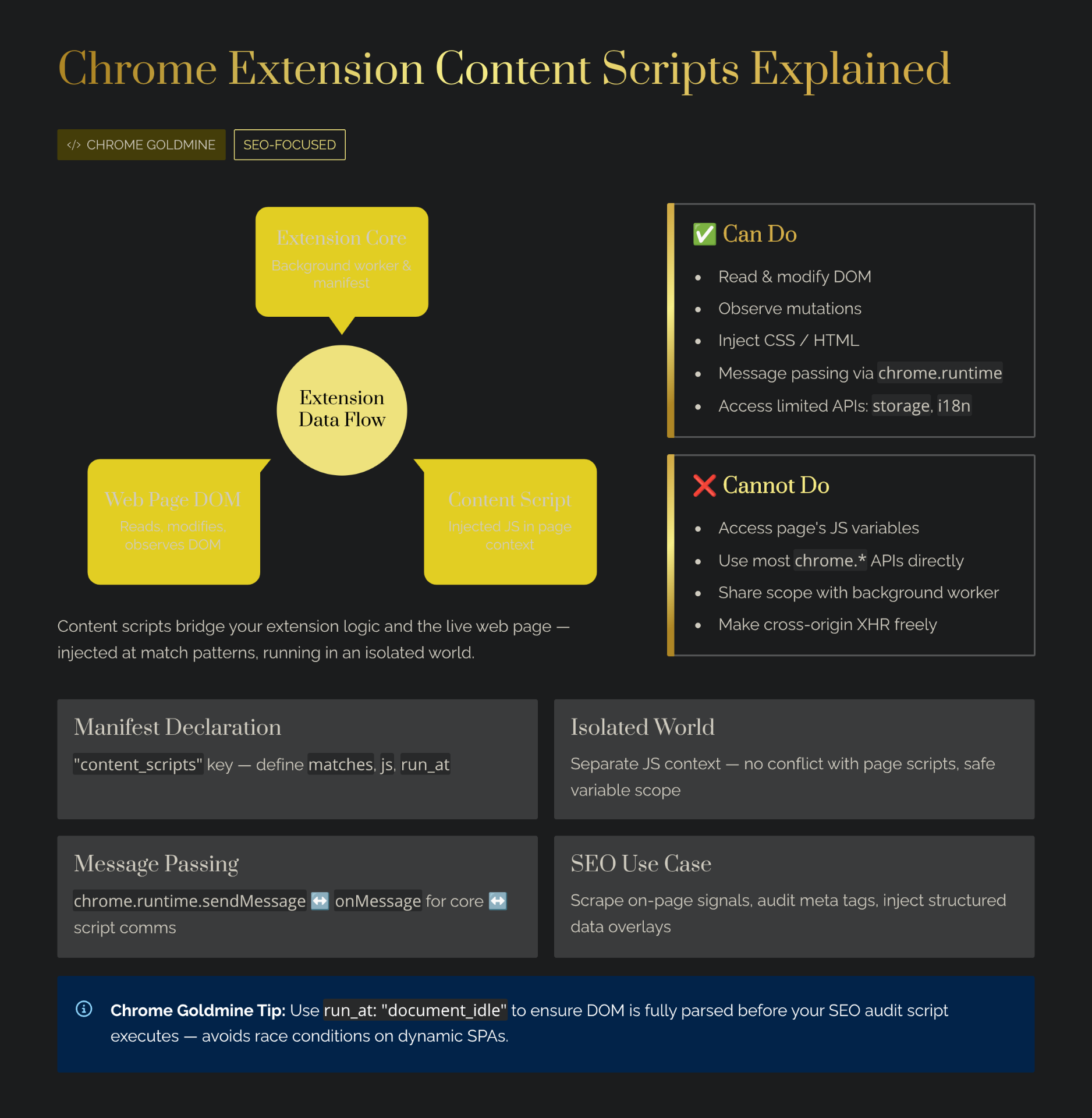
Content scripts run in what Chrome calls an "isolated world." This means that while your content script can read and modify the DOM of the webpage, it cannot access the JavaScript variables or functions created by the webpage itself. Conversely, the webpage cannot access the variables or functions in your content script. This isolation is a critical security feature (Chrome for Developers, 2024).
To declare a content script, you must update your `manifest.json` file. You specify the JavaScript files you want to inject and the URLs where they should run using match patterns.
{
  "manifest_version": 3,
  "name": "My Profitable Extension",
  "version": "1.0",
  "content_scripts": [
    {
      "matches": ["https://*.linkedin.com/*"],
      "css": ["styles.css"],
      "js": ["content.js"],
      "run_at": "document_idle"
    }
  ]
}
In this example, the `content.js` file and `styles.css` will only be injected into LinkedIn pages. The `run_at` property determines when the script is injected; `document_idle` is the default and recommended setting, as it ensures the page has fully loaded before your script executes, preventing performance bottlenecks.
Because content scripts live in an isolated world, they cannot directly use most of the `chrome.*` APIs. If your content script needs to access the extension's storage, make a cross-origin network request, or interact with the user's tabs, it must communicate with the extension's service worker (the background script) using message passing.
Injecting UI: The Art of Webpage Manipulation
The most lucrative use case for content scripts is injecting custom user interfaces into existing web applications. This is how tools like Grammarly, Honey, and Loom operate. They don't just read data; they fundamentally alter the user experience of the host website.
When you inject scripts into a webpage to build a UI, you must be incredibly careful not to break the host site's layout or functionality. The host site's CSS can easily bleed into your injected elements, causing your components to look distorted.
To prevent this, modern indie makers use the Shadow DOM. By attaching a Shadow Root to a container element injected by your content script, you create a boundary that encapsulates your CSS. The host page's styles cannot affect your UI, and your styles will not accidentally alter the host page.
// content.js
function injectMyUI() {
  const container = document.createElement('div');
  container.id = 'my-micro-saas-container';

  // Attach a shadow root
  const shadowRoot = container.attachShadow({ mode: 'open' });

  const myButton = document.createElement('button');
  myButton.textContent = 'Generate AI Reply';

  // Add isolated styles
  const style = document.createElement('style');
  style.textContent = `
    button {
      background-color: #6366f1;
      color: white;
      padding: 8px 16px;
      border-radius: 6px;
      border: none;
      cursor: pointer;
      font-weight: bold;
    }
    button:hover {
      background-color: #4f46e5;
    }
  `;

  shadowRoot.appendChild(style);
  shadowRoot.appendChild(myButton);

  const targetElement = document.querySelector('.comment-box-wrapper');
  if (targetElement) {
    targetElement.appendChild(container);
  }
}

injectMyUI();
This pattern is the foundation of almost every successful productivity overlay. Whether you are building with vanilla JS, React, or Svelte, encapsulating your UI within a Shadow DOM via your content script is non-negotiable for a professional, commercial-grade product. If you prefer an AI-assisted approach, check our vibe coding guide for building Chrome extensions with Claude.
Overcoming the Blank Page Problem: The Chrome Goldmine Shortcut
Building a robust content script that perfectly integrates with a complex site like LinkedIn or Amazon takes weeks of reverse-engineering the host site's DOM structure. Host sites frequently change their class names and layouts, meaning your DOM access logic can break overnight. Our reverse engineering guide walks through how to deconstruct what made top extensions successful.
For indie makers, spending 100 hours writing brittle DOM selectors before validating if users will actually pay for the feature is a massive risk. Instead of starting from scratch, many successful makers acquire expired or abandoned Chrome extensions that already have the DOM manipulation logic built out. By using Chrome Goldmine, you can find extensions in your target niche that already have a user base and functional content scripts. Learn more in our guide on how to revive an expired extension.
How Much Can You Actually Earn with Content Scripts?
The earning potential for extensions that heavily utilize content scripts is substantial, primarily because they offer high utility by integrating directly into the user's workflow. Unlike standalone web apps where user acquisition requires changing behavior, an extension enhances the behavior the user is already engaged in.
Consider the indie maker Tetrev, who built Productpanel.io, an extension for Amazon sellers. By using content scripts to overlay critical analytics data directly onto Amazon search results, he was able to secure paying users and reach $36 MRR (Indie Hackers, 2024). While $36 MRR might seem small, it represents validation in a highly competitive B2B niche, built entirely by a solo developer.
Extensions that inject AI capabilities into text areas (like email clients or social media platforms) are currently commanding premium pricing. Users are willing to pay $10 to $30 per month for tools that save them hours of typing, provided the UI injection is seamless and bug-free. For payment integration, Outseta provides an all-in-one solution covering auth, billing, and CRM — perfect for monetizing your content script extension.
Common Mistakes Indie Makers Make with Content Scripts
1. Relying on Brittle CSS Selectors
The most frequent mistake is hardcoding DOM access using highly specific, auto-generated CSS classes (e.g., `document.querySelector('.xY7-zb-qw')`). Modern web apps built with React or Tailwind often use dynamic class names that change with every deployment. If your content script relies on these, your extension will break weekly.
What works instead: Target stable attributes like `data-testid`, `aria-labels`, or structural relationships (e.g., finding the nearest `form` element relative to a known heading). If the host site is highly volatile, you must implement robust error handling and fallback selectors.
2. Ignoring Single Page Application (SPA) Navigation
If your extension targets a site like YouTube or Twitter, you are dealing with a Single Page Application. In an SPA, the URL changes and the content updates without the browser actually reloading the page. If your `manifest.json` is set to inject the script on `document_idle`, it will only run on the *initial* hard load. When the user clicks a link within the SPA, your content script won't re-run, and your injected UI will disappear.
What works instead: You must use a `MutationObserver` within your content script to watch for changes in the DOM, or have your background service worker listen for `chrome.webNavigation.onHistoryStateUpdated` events and send a message to the content script to re-initialize the UI.
3. Blocking the Main Thread
Content scripts run on the same thread as the webpage. If your script performs heavy synchronous computations — like parsing a massive table of data or running a complex regex over the entire document body — you will freeze the webpage. The user will experience severe lag, blame your extension, and uninstall it immediately.
What works instead: Offload heavy processing to the background service worker via message passing, or use `requestIdleCallback` and `setTimeout` to break up large tasks into smaller chunks that don't block the browser's rendering pipeline. For more pitfalls to avoid, see common vibe coding mistakes.
ROI of Building Content Script Extensions
Is it worth spending your nights and weekends mastering DOM manipulation and Manifest V3 messaging? For indie makers looking for high-margin, low-overhead businesses, the answer is yes.
| Time Investment (hours) | Monetary Investment ($) | Expected Outcome (range) | Assumptions |
|---|---|---|---|
| 60–150 hours | $5–$100 | $100–$1,000 MRR / 500–5k users | Based on B2B productivity niche, organic Chrome Web Store traffic |
Based on indie maker reports from Indie Hackers (2024-2026). Assumes intermediate JavaScript skills and the use of modern frameworks. These numbers are estimates; real outcomes vary significantly based on market demand and execution quality.
The beauty of this model is the incredibly low financial barrier to entry. Your primary investment is time. By focusing on B2B use cases — where businesses are happy to pay $20/month to save an employee one hour a week — you can achieve profitability with a surprisingly small user base. For a structured approach to reaching $1K/month, see the side income blueprint.
Advanced Content Script Patterns for 2026
Dynamic Injection via the Scripting API
Instead of declaring all your content scripts in the `manifest.json`, modern extensions use the `chrome.scripting` API to inject scripts programmatically. This allows you to only inject your code when the user explicitly clicks your extension icon or when specific conditions are met in the background worker.
// background.js (Service Worker)
chrome.action.onClicked.addListener((tab) => {
  chrome.scripting.executeScript({
    target: { tabId: tab.id },
    files: ['content.js']
  });
});
This approach drastically reduces the memory footprint of your extension, as your code isn't sitting idle on every single webpage the user visits. It also prevents the dreaded "This extension can read and change all your data on all websites" warning during installation, improving your conversion rates.
Managing State Between the Page and the Extension
Because content scripts live in an isolated world, sharing state with the host page requires a workaround. If you need to access a JavaScript variable defined by the host website (e.g., a hidden API token or a React state object), you must inject a `