Manifest V2 Replacement: The Complete Guide for Chrome Extension Builders in 2026
Manifest V2 is gone — see exactly what replaces it, the Chrome timeline, and a 4-step migration to Manifest V3 with code examples.
Article content
Short answer: the replacement for Manifest V2 in Chrome extensions is Manifest V3. If you build or maintain Chrome extensions, the practical shift is no longer theoretical. Chrome has disabled Manifest V2 extensions broadly, and developers now need to migrate background pages to service workers, replace many blocking `webRequest` patterns with `declarativeNetRequest`, remove remotely hosted code, and rethink permissions and performance around the MV3 model (Chrome MV2 deprecation timeline, What is MV3).
If you searched for manifest v2 replacement, you probably want more than the one-line answer. You want to know what changed, why it changed, what breaks during migration, whether old extensions are still salvageable, and what this means if you build Chrome extensions as a side project, micro-SaaS, or indie product. That is exactly what this guide covers.
For builders, this topic is bigger than a compliance update. It is a market reset. DebugBear's analysis counted 111,933 Chrome extensions in 2024, yet 85% had fewer than 1,000 installs, and only 0.2% exceeded one million installs (DebugBear). In other words, the Chrome ecosystem is still large, but most extensions remain under-monetized or poorly distributed. When aging Manifest V2 extensions disappear, that creates both technical pain and commercial opportunity.
This guide explains the Manifest V2 to Manifest V3 migration, shows code-level examples, highlights common failure modes, and frames the transition from the perspective of founders and developers who want to build faster and smarter. For deeper coverage of the underlying build patterns, pair this with our Chrome Extension Development Guide 2026 and the pillar overview.
Why "Manifest V2 Replacement" Really Means "Manifest V3 Strategy"
At a surface level, the answer is simple: Manifest V3 replaces Manifest V2 in Chrome (Chrome for Developers). However, most articles stop there, and that is why they fail the reader. Developers do not struggle because they missed the name of the new standard. They struggle because the migration changes the extension architecture itself.
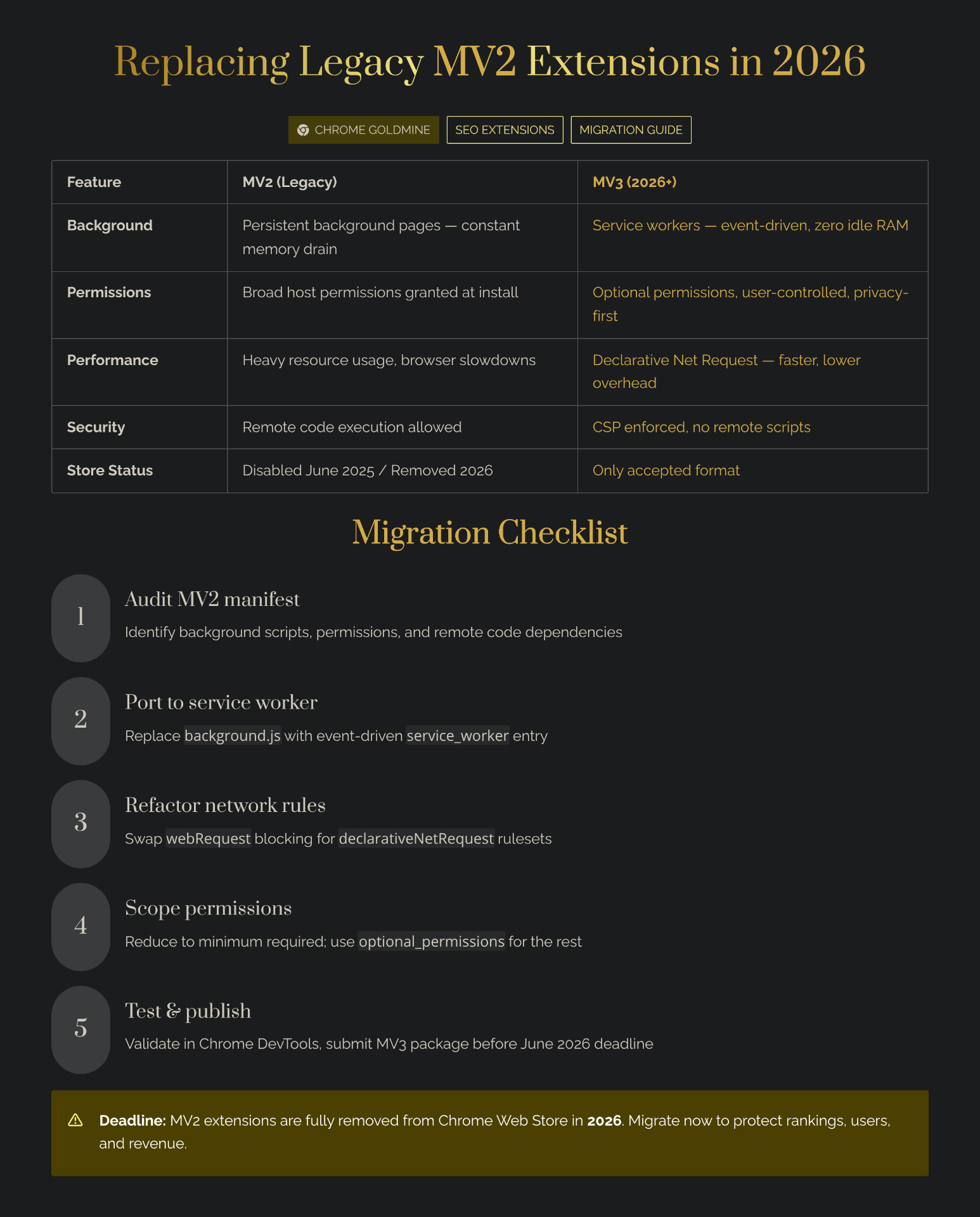
Under Manifest V2, many extensions depended on a persistent background page, permissive network interception, and implementation patterns that felt close to a small always-on web app. Manifest V3 moves that model toward event-driven service workers, tighter reviewability, and more declarative APIs. That means migration is not just a search-and-replace task. For many products, it is a redesign — see our deep dive on the Manifest V3 service worker lifecycle.
Google frames Manifest V3 around security, privacy, and performance. The platform specifically highlights the move away from long-lived background pages, the prohibition on remotely hosted code, and the introduction of safer request-modification models such as `declarativeNetRequest`. From Chrome's perspective, this reduces abuse risk, improves resource use, and limits the chance that extensions execute code that never passed store review.
From a builder's perspective, though, the consequences are mixed. Some categories migrate cleanly. Others need substantial rewrites. And a few old ideas become far less attractive unless you redesign them around the new APIs.
The Current Manifest V2 Timeline, and Why It Matters Now
If you are still wondering whether migration can wait, Chrome's official Manifest V2 support timeline answers that clearly. Chrome documented that Manifest V2 was disabled everywhere with Chrome 138, and that Chrome 139 removes the enterprise policy workaround, ending the last broad escape hatch for users and organizations relying on MV2. Chrome had already begun gradually disabling installed MV2 extensions in stable before that, while the Chrome Web Store stopped accepting new public and unlisted MV2 extensions back in January 2022, followed by private MV2 extensions in June 2022.
The timeline matters because it changes the decision tree. If you own an existing extension, the question is no longer whether to migrate. The real question is whether the extension is worth migrating, worth rebuilding, or worth replacing with a more focused product. If you are an indie maker looking for opportunities, this is also why expired, abandoned, and weakly maintained extension niches are interesting — see our guide on reviving an expired extension in 7 days.
| Timeline milestone | What happened | Why builders should care |
|---|---|---|
| January 2022 | New public and unlisted MV2 extensions no longer accepted in the Chrome Web Store | New products could no longer rely on MV2 going forward |
| June 2022 | New private MV2 extensions also stopped being accepted | Internal and private extension teams also lost the easy path |
| June 2024 onward | Warnings and phased disabling began across channels | Developers received clear migration urgency signals |
| March 31, 2025 | MV2 disabled by default, though some users could temporarily re-enable | Support burden increased and user trust started eroding |
| July 24, 2025 / Chrome 138 | MV2 disabled everywhere | Consumer support effectively ended |
| Chrome 139 | Enterprise policy workaround removed | Final broad technical fallback disappeared |
This is why the phrase manifest v2 replacement should trigger both a technical audit and a product audit. Some extensions deserve migration. Others deserve retirement. A smaller number deserve a strategic rebuild with better positioning, better onboarding, and a cleaner monetization model.
What Actually Changed Between Manifest V2 and Manifest V3?
The biggest mistake developers make is thinking Manifest V3 is just "Manifest V2 with stricter rules." In practice, the two models differ in architecture, execution model, and store compliance assumptions.
Under MV2, background pages were often persistent. Under MV3, the background context becomes a service worker that runs when needed rather than sitting in memory indefinitely. That improves efficiency, but it also changes how you handle state, alarms, message passing, and long-lived tasks. Code that silently relied on a persistent runtime can behave unpredictably after migration if you do not redesign for wake-sleep behavior.
Similarly, remotely hosted code is no longer allowed under MV3. If your old extension fetched external JavaScript or used runtime code-loading tricks, the store-review story changes immediately. That does not just affect compliance. It affects product velocity, plugin architectures, and experimentation workflows.
The third major shift is request handling. Chrome deprecated the blocking form of `webRequest` for many common use cases and steered developers toward `declarativeNetRequest` instead (blocking web requests guide). That matters a lot for content filtering, privacy tools, redirect tools, and workflow automations that previously relied on more dynamic runtime interception.
| Area | Manifest V2 | Manifest V3 | Practical implication |
|---|---|---|---|
| Background execution | Persistent background pages | Event-driven service workers | You must redesign for lifecycle interruptions |
| Request modification | Blocking webRequest commonly used | declarativeNetRequest preferred for many use cases | Dynamic logic may need rule-based rethinking |
| Remote code | Often abused or loosely handled in legacy extensions | Remotely hosted code prohibited | Packaging and review discipline become stricter |
| Security posture | More permissive | More restrictive and reviewable | Better trust model, but less implementation flexibility |
| Performance profile | Higher idle overhead possible | Improved resource efficiency | Better for users, stricter for developers |
This is also where founder-level thinking helps. When platform rules tighten, weak products become harder to maintain, but strong products become easier to defend. If you can solve a real problem with a simpler, cleaner MV3 architecture, you may face less noisy competition over time.
How to Migrate a Chrome Extension from Manifest V2 to Manifest V3
The best migration path is not to start coding immediately. Start with an audit. You need to know which parts of your extension are structural, which are replaceable, and which are no longer viable.
I recommend a four-step audit process. First, inspect your manifest and map all permissions, background logic, content scripts, and network interception patterns. Second, list every place where you assume persistent runtime state. Third, identify any remotely hosted code or questionable dependency loading. Fourth, classify each feature as safe to port, needs redesign, or should be removed.
Once you do that, the actual migration gets less emotional. You stop asking, "How do I keep everything?" and start asking, "What is the smallest reliable MV3 product that still solves the core problem?" That mindset saves time.
Step 1: Update the manifest structure
At a minimum, your manifest needs the new manifest version, revised background configuration, and often updated permissions or host permissions. A simplified comparison looks like this.
// Manifest V2
{
  "manifest_version": 2,
  "name": "Example Extension",
  "version": "1.0.0",
  "background": {
    "scripts": ["background.js"],
    "persistent": true
  },
  "permissions": [
    "storage",
    "tabs",
    "webRequest",
    "webRequestBlocking",
    "https://*/*"
  ]
}// Manifest V3
{
"manifest_version": 3,
"name": "Example Extension",
"version": "2.0.0",
"background": {
"service_worker": "service-worker.js"
},
"permissions": [
"storage",
"tabs",
"declarativeNetRequest"
],
"host_permissions": [
"https://*/*"
]
}That example is intentionally simple, but it captures the migration direction accurately. Background scripts become service workers. Request-blocking permissions change. Host access gets modeled more explicitly.
Step 2: Move persistent background logic to a service worker
The service worker shift is where many extensions stumble. In MV2, developers often stored live state in memory and assumed their background page was always there. In MV3, the runtime can suspend and restart the worker, which means state handling must become more deliberate.
A safer pattern is to store recoverable state in `chrome.storage`, derive transient state on activation, and use alarms or event listeners instead of long-lived loops. See our Chrome Storage API guide for the full pattern.
// service-worker.js
chrome.runtime.onInstalled.addListener(() => {
  console.log('MV3 extension installed');
});

chrome.action.onClicked.addListener(async (tab) => {
  const data = await chrome.storage.local.get(['clickCount']);
  const clickCount = (data.clickCount || 0) + 1;
  await chrome.storage.local.set({ clickCount });

  console.log(`Toolbar clicked ${clickCount} times`);

  if (tab?.id) {
    await chrome.scripting.executeScript({
      target: { tabId: tab.id },
      func: () => alert('Hello from an MV3 extension')
    });
  }
});
That pattern is not glamorous, but it is robust. It assumes the worker may stop and restart. That is the right mental model.
Step 3: Replace blocking webRequest logic with declarativeNetRequest
Google's migration guidance is explicit here. In Chrome's official page on replacing blocking web request listeners, the recommended replacement for many blocking `webRequest` use cases is the `declarativeNetRequest` API. Instead of programmatically intercepting each request and deciding what to do at runtime, you define rules that Chrome applies declaratively.
A simple block rule looks like this.
[
  {
    "id": 1,
    "priority": 1,
    "action": { "type": "block" },
    "condition": {
      "urlFilter": "||example.com",
      "resourceTypes": ["main_frame"]
    }
  }
]
A simple redirect rule looks like this.
[
  {
    "id": 2,
    "priority": 1,
    "action": {
      "type": "redirect",
      "redirect": {
        "url": "https://yourdomain.com/updated-page"
      }
    },
    "condition": {
      "urlFilter": "https://oldsite.example/*",
      "resourceTypes": ["main_frame"]
    }
  }
]
The key lesson is that MV3 rewards predictable rule sets more than bespoke interception logic. If your extension depends on highly contextual, user-specific request mutation, migration may require a broader feature rethink, not just a rule-file addition.
Step 4: Remove remotely hosted code and review dependencies
This step is boring, but it is often where store review catches people. If your extension loads scripts from a CDN at runtime, uses injected remote bundles, or relies on code paths that are hard to audit, you should assume that needs cleanup under MV3.
In practical terms, this means bundling your executable JavaScript with the extension package, minimizing unnecessary dependencies, and making sure your update path still works without remote execution tricks. If you treat this as a security cleanup instead of a compliance chore, your codebase usually ends up better. Pair this with solid error handling patterns and a clean project structure.
What Doesn't Work, and Why Many MV2 Migrations Fail
The most dangerous advice in this niche is "just migrate to Manifest V3." That makes the process sound mechanical. In reality, many migrations fail because the product was fragile before the migration even started.
One common failure mode is porting architecture without porting assumptions. Developers move a background file into a service worker, but they keep coding as if memory will persist forever. Then they discover missed events, inconsistent state, or flaky automation.
Another failure mode is trying to preserve every legacy feature, even when the old implementation depended on patterns that MV3 discourages. A better strategy is often to reduce scope, protect the core value proposition, and relaunch with tighter positioning.
The business side fails just as often. On Indie Hackers, one extension creator reported 70,000+ users and revenue peaking at only about $30 from ads. Another founder spent nearly two years building an Amazon-seller extension, reached 426 registered users, but only 4 paying users and $36 MRR (IndieHackers). Those examples are important because they show a hard truth: a successful migration does not automatically create a viable business.
Builder takeaway: if your extension has weak monetization, weak distribution, or fuzzy positioning, MV3 migration may simply expose existing business problems faster.
That is why your migration checklist should include product questions.
| Migration mistake | Why it fails | Better approach |
|---|---|---|
| Copying MV2 background logic directly into MV3 | Service worker lifecycle breaks hidden assumptions | Redesign around events, alarms, and storage-backed state |
| Replacing APIs mechanically | New API model may require feature redesign | Audit each feature by use case, not by file name |
| Keeping every legacy feature | Complexity explodes and review risk rises | Preserve the highest-value workflow first |
| Ignoring monetization during migration | You may save the code but not the product | Use migration as a chance to tighten pricing and positioning |
| Shipping without user communication | Existing users assume the extension is broken | Explain the change and relaunch with a clear upgrade path |
For indie makers, this section matters because migration time is opportunity cost. If you spend six weeks "saving" a weak extension, that is six weeks you did not spend on a more defensible rebuild.
Is Manifest V2 Replacement a Threat or an Opportunity for Indie Makers?
It is both, depending on how you approach it.
If you own a legacy extension with a real user base, the transition is a threat because inactivity leads to churn, bad reviews, and store decay. But if you are scanning the ecosystem for opportunities, it is also a filter that removes weak operators. That is exactly the kind of platform shift that creates room for focused builders.
DebugBear's 2024 Chrome extension statistics analysis supports this interpretation. A huge Chrome ecosystem exists, but most extensions remain small. That means the market is not just defined by giant winners. It is full of fragmented categories, half-maintained tools, abandoned workflows, and small user groups with sharp needs.
This is where a database like Chrome Goldmine fits naturally. Instead of manually hunting for abandoned or weakened extension niches one by one, a curated database can help you identify opportunities faster, especially in categories where the user pain still exists but the original implementation is outdated. The Manifest V2 replacement wave did not only kill old code — it surfaced fresh demand signals.
If you want to move quickly once you find an opportunity, it can also help to use tools that compress setup work. A browser-extension-ready starter such as TurboStarter can reduce boilerplate overhead, while a template bundle like Launchfast can be useful when you want prebuilt infrastructure around launch flows, auth, or landing pages. For interface prototyping, tools such as Bolt.new or Lovable.dev can help you validate a UI before you invest in a full production implementation. Those are not magic. They just buy back time when the opportunity window is real.
The ROI of Rebuilding or Replacing a Manifest V2 Extension
Founders usually ask the wrong ROI question. They ask, "How much can I make?" before asking, "How fast can I verify whether this deserves more work?" A better framing for manifest v2 replacement is not maximum upside. It is time-to-confidence.
The case studies above show why. Large user counts do not guarantee money, and multi-year builds can still produce weak MRR if positioning is off. So a rational builder should favor quick validation loops: small rewrite, narrow audience, strong onboarding, explicit monetization hypothesis.
| Time investment (hours) | Monetary investment ($) | Expected outcome (range) | Assumptions |
|---|---|---|---|
| 10–20 hours | $0–$150 | Proof-of-concept, first testers, architecture clarity | You already know the niche and only validate feasibility |
| 30–60 hours | $50–$500 | Working MV3 rebuild, beta users, early distribution signals | You reuse a starter, keep scope tight, and launch to a defined audience |
| 60–120 hours | $150–$1,500 | Early paid test, first conversions, or strong no-go signal | You build onboarding, pricing, and analytics rather than code alone |
| 120+ hours | $300–$3,000+ | Small micro-SaaS candidate or expensive lesson | Only sensible if early validation already looks promising |
Assumptions: these numbers are estimates based on Chrome's official MV3 documentation and on public indie case studies showing that install counts and revenue often diverge sharply. The low end assumes you reuse an existing codebase or a quality starter kit. The high end assumes custom product work, onboarding, support, and relaunch costs. Real outcomes vary by category, distribution, pricing, and user urgency.
The real lesson is that you should not treat MV3 migration as engineering work alone. Treat it as product discovery. If you can rebuild a legacy workflow in 30 to 60 focused hours and get feedback quickly, that may be worth it. If you need months before you can test demand, the opportunity probably needs re-scoping. For a structured opportunity workflow, see our $1K/month side income blueprint.
A Smarter Build Stack for Manifest V3 Projects
One reason some developers overestimate migration cost is that they mix platform change with infrastructure reinvention. You do not need to handcraft every layer from scratch just because Chrome changed its extension model.
For example, if your core challenge is extension architecture, use a starter that reduces surrounding complexity. If your challenge is landing pages, onboarding, or product experiments, use separate tools for those jobs. That keeps the migration focused.
A practical stack might look like this:
- Browser extension starter — TurboStarter for a faster browser-extension-friendly setup.
- Launch template / bundle — Launchfast when you want product scaffolding around the extension.
- Fast UI prototyping — Bolt.new or Lovable.dev to validate the interface before committing to production code.
- SEO content support after launch — Mangools or Outrank.so if the extension also needs content-led acquisition.
- Browse AI builders and SaaS boilerplates in the partner directory for more options.
The important point is not the tools themselves. It is that the Manifest V2 replacement event creates urgency, and urgency rewards leverage. Builders who compress the boring parts can spend more time on user interviews, positioning, and testing.
How to Turn the Manifest V2 Reset Into an Extension Opportunity
If you are not maintaining an old extension yourself, the best play is often to look for orphaned user demand. In plain language, that means users still want a job done, but the original extension is deprecated, abandoned, or no longer competitive.
A smart opportunity workflow looks like this. Start by identifying extension categories where the user problem is durable, such as productivity, research, workflow automation, and creator tools. Then check whether the existing leaders are weakly maintained, poorly rated, or obviously under-monetized. After that, review whether MV3 changes make the old implementation harder while leaving the user problem intact. If yes, you may have a niche worth rebuilding. Our reverse engineering guide walks you through that diagnostic step by step.
This is also where curated research shortcuts matter. Chrome Goldmine can function as a discovery layer for exactly this kind of process, especially if you are trying to find opportunity clusters instead of browsing the Chrome Web Store blindly. Rather than asking, "What extension should I build?" you can ask, "Which user needs were exposed by the Manifest V2 transition, and which ones still deserve a better product?"
A strong modern execution path often looks like this: identify demand, prototype quickly, migrate only the high-value workflow, and communicate clearly why your rebuilt extension is more reliable under MV3. Users care less about the standards terminology than about whether the product now works, remains updated, and saves them time.
Conclusion
The direct answer to manifest v2 replacement is easy: Manifest V3 replaced Manifest V2 in Chrome, as documented in Chrome's official deprecation timeline and Manifest V3 overview. The harder answer is what you should do with that reality. For developers, the right response is not blind migration. It is deliberate migration.
Audit the architecture. Preserve the workflow that users actually value. Remove the legacy assumptions that MV3 no longer rewards. Then decide whether you are fixing an existing product or exploiting a new market opening. That distinction matters.
For many builders, this platform transition is not just a maintenance burden. It is a chance to discover neglected extension categories, rebuild them with better positioning, and ship faster with a more modern stack. If that is your angle, Chrome Goldmine is well positioned to be the discovery layer that helps you find those openings before everyone else notices them.
MV3 migration also matters when acquiring assets — our guide on how to buy a Chrome extension business treats MV2-only listings as a major red flag you need to price in before you sign anything.