Mastering Chrome Extension DevTools: A Guide for Indie Makers
Use the chrome.devtools API to build custom panels, integrate Gemini Nano, and monetize a developer-tools Chrome extension.
Article content
For indie makers and vibe coders, building a custom chrome extension devtools can unlock powerful debugging capabilities, streamline workflows, and even create lucrative micro-SaaS opportunities in 2026. This guide will show you how to leverage the Chrome DevTools API, integrate cutting-edge AI, and apply modern development practices to craft indispensable tools that developers will pay for.
The Chrome extension ecosystem is projected to reach $5.0 Billion by 2033, with Chrome commanding a dominant 68.9% worldwide browser market share. Within this landscape, the developer tools market is also experiencing significant growth, expected to hit $7.44 billion in 2026. This presents a unique opportunity for indie makers to carve out a niche by creating specialized chrome extension devtools. For the full build playbook, see the complete guide to building Chrome extensions.
Why Build a Custom Chrome Extension DevTools?
Solving Niche Problems for a Paying Audience
Developers are often willing to pay for tools that save them time. The built-in Chrome DevTools are powerful, but they can't cover every specialized use case. For example, Waldo, a visual regression testing tool, garnered over 50,000 users and an estimated $10k+/year revenue by addressing a specific developer need. By focusing on a particular framework or debugging challenge, you can create a highly targeted solution.
Building a Micro-SaaS Around DevTools
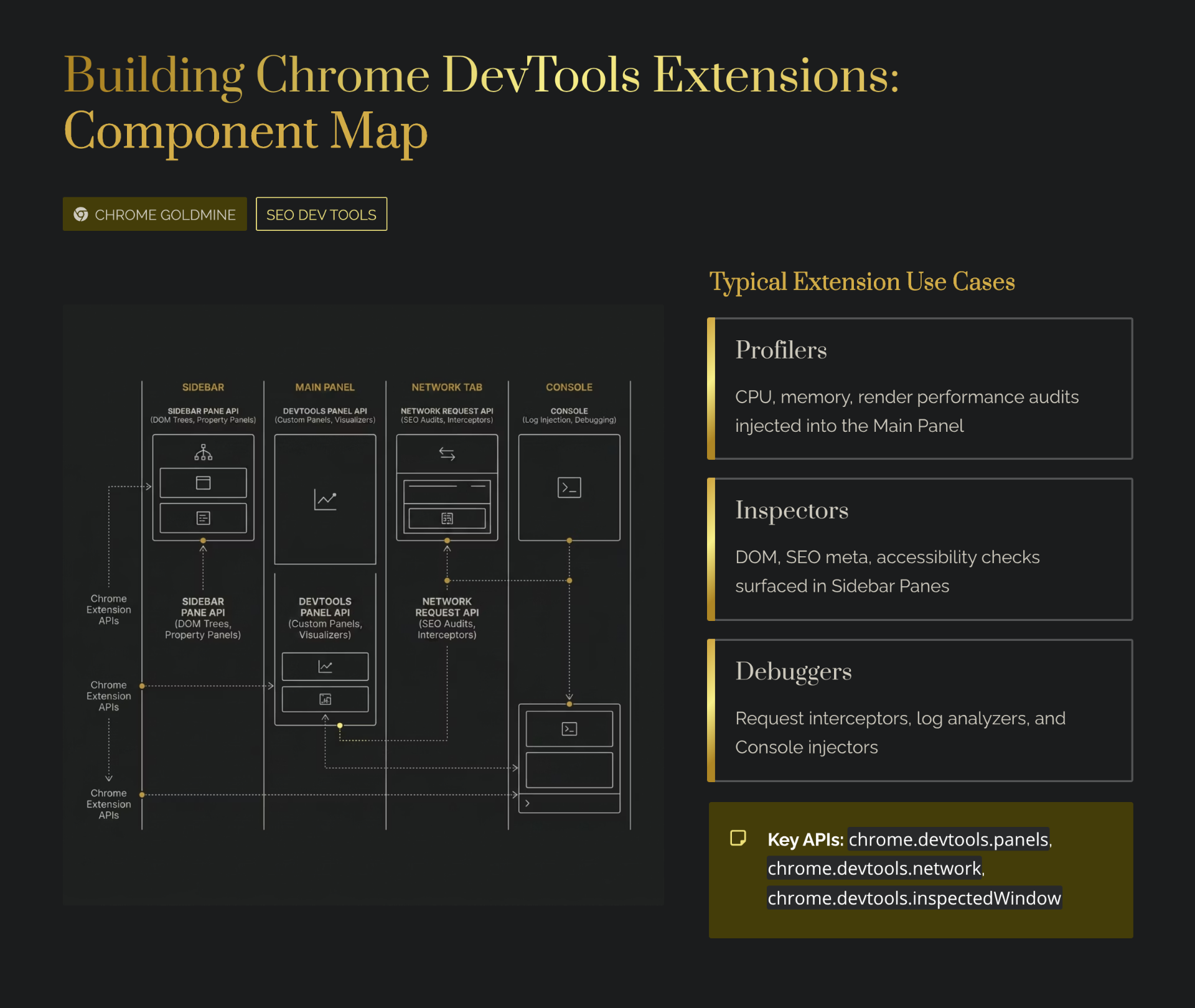
The `chrome.devtools` API allows you to create custom panels, sidebar panes, and interact with the inspected window. Debuggy, a network inspector extension, achieved $2,000/month MRR through sponsorships and subscriptions by offering advanced features to its 15,000 users. For monetization strategies, check our dedicated pillar guide.
The Technical Foundation: Chrome DevTools API and Manifest V3
Declaring Your DevTools Page in manifest.json
DevTools extensions require a specific entry point in your `manifest.json` to declare the DevTools page using the `devtools_page` key:
{
  "manifest_version": 3,
  "name": "My DevTools Extension",
  "version": "1.0",
  "devtools_page": "devtools.html"
}
The `devtools.html` file runs in its own isolated environment, separate from your background service worker and content scripts. It has access to the `chrome.devtools` APIs.
Key DevTools APIs
The `chrome.devtools` namespace provides several powerful APIs:
- chrome.devtools.panels — Create custom panels and sidebar panes within the DevTools window. Use `chrome.devtools.panels.create()` to add a new panel with title, icon, and HTML page.
- chrome.devtools.inspectedWindow — Access information about the inspected page and evaluate JavaScript code within its context. Essential for interacting with the page you're debugging.
- chrome.devtools.network — Access information about network requests made by the inspected window. Monitor requests, modify headers, and analyze performance.
// devtools.js (loaded by devtools.html)
chrome.devtools.panels.create(
  "My Custom Panel",
  "icon.png",
  "panel.html",
  function(panel) {
    // Panel created successfully
  }
);
Communication Between Components
Effective chrome extension devtools require communication between different parts of your extension. Use `chrome.devtools.inspectedWindow.eval()` to execute code on the inspected page, and `chrome.runtime.connect()` for long-lived connections with your background service worker. For a deep dive on messaging patterns, see our message passing guide.
Integrating AI: Gemini Nano for Smarter Debugging
Chrome's built-in AI, powered by Gemini Nano, offers a unique opportunity for DevTools extensions. This on-device model allows for local inference — meaning AI capabilities can be integrated without sending sensitive code or data to external servers, enhancing privacy and speed.
Within your DevTools panel, you can invoke Gemini Nano for tasks like:
- Code Suggestions — Real-time code completion or refactoring suggestions based on the inspected code
- Error Analysis — Intelligent explanations for console errors or network failures
- Performance Optimization — Suggest improvements based on runtime analysis
- Natural Language Debugging — Allow developers to ask questions about code in plain English
Gemini Nano runs client-side only, requires specific hardware (M3+ ARM or high-end x86), and is not a general-purpose assistant. Always include fallback mechanisms for unsupported devices. Test with `chrome://flags/#enable-gemini-nano`.
Modern Development Stack for DevTools
1. Vite + React + Tailwind CSS
This combination is a favorite among indie makers for its speed and flexibility. Vite provides fast development and builds, React offers a component-based approach, and Tailwind CSS enables rapid styling. Several boilerplates exist specifically for DevTools panels, offering features like hot module replacement (HMR). For AI-powered building, try Lovable.dev or Bolt.new to generate extension UIs from natural language prompts.
2. Plasmo Framework
Plasmo is an all-in-one framework designed to simplify Chrome extension development. It abstracts much of the boilerplate, supports various frontend frameworks (React, Vue, Svelte), integrates with Tailwind CSS, and handles Manifest V3 requirements automatically.
3. CRXJS + Vite
CRXJS is a Vite plugin for Chrome extensions, providing a TypeScript-first boilerplate with DevTools panel templates and esbuild compilation. Some forks even include experimental Gemini Nano hooks.
What Doesn't Work: Common DevTools Extension Mistakes
- Over-engineering or Feature Bloat — The most successful indie DevTools focus on solving one specific problem exceptionally well. Don't try to replace all of Chrome's built-in tools.
- Ignoring Performance — DevTools extensions run alongside the browser's own debugging tools. A slow or resource-intensive extension will quickly frustrate users.
- Poor UI/UX Design — Developers appreciate a clean, intuitive interface. Invest time in thoughtful UI/UX, even for a technical audience.
- Lack of Clear Value Proposition — If your extension doesn't offer a clear advantage over built-in tools, it will struggle to gain traction.
- Neglecting Manifest V3 Compliance — Failing to comply with MV3 guidelines can lead to your extension being rejected. See our error handling guide for robust patterns.
ROI Analysis: Is Building a DevTools Extension Worth It?
| Time Investment (hours) | Monetary Investment ($) | Expected Outcome (range) | Assumptions |
|---|---|---|---|
| 100–500 hours | $0–$500 | $50–$5,000 MRR / 1,000–50,000+ users | Based on solo indie developer rates and typical micro-SaaS engagement metrics. |
Based on 2026 market data and indie maker case studies. Assumes a developer with moderate to advanced experience in web technologies and Chrome extension development. These numbers are estimates; real outcomes vary significantly.
Building a specialized chrome extension devtools can yield substantial returns. Case studies like Waldo and Debuggy demonstrate that even niche tools can achieve significant user bases and healthy MRR. The growing developer tools market and the increasing adoption of AI further enhance this opportunity. For a structured approach, try the Weekend Challenge or the $1K/month side income blueprint.